ScrollViewScope
класс в UnityEngine
Выполнено в:UnityEngine.IMGUIModule
Описание
Вспомогательный disposable-класс для управления BeginScrollView / EndScrollView.
Автоматически расположенные прокрутки будут брать любое содержимое, которое вы имеете внутри них, и отображать его нормально. Если оно не вписывается, будут появляться панели прокруток. BeginScrollView должен всегда соответствовать вызову на EndScrollView.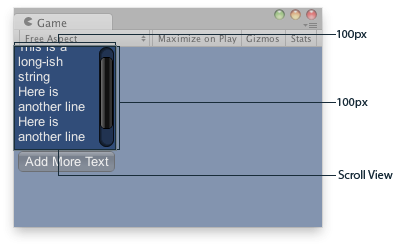
Прокрутка Вид в Game Вид..
using UnityEngine;
using UnityEditor;
public class ExampleClass : MonoBehaviour
{
    // The variable to control where the scrollview 'looks' into its child elements.
    public Vector2 scrollPosition;

    // The string to display inside the scrollview. 2 buttons below add & clear this string.
    public string longString = "This is a long-ish string";

    void OnGUI()
    {
        // Begin a scroll view. All rects are calculated automatically -
        // it will use up any available screen space and make sure contents flow correctly.
        // This is kept small with the last two parameters to force scrollbars to appear.
        using (var scrollViewScope = new ScrollViewScope(scrollPosition, GUILayout.Width(100), GUILayout.Height(100)))
        {
            scrollPosition = scrollViewScope.scrollPosition;

            // We just add a single label to go inside the scroll view. Note how the
            // scrollbars will work correctly with wordwrap.
            GUILayout.Label(longString);

            // Add a button to clear the string. This is inside the scroll area, so it
            // will be scrolled as well. Note how the button becomes narrower to make room
            // for the vertical scrollbar
            if (GUILayout.Button("Clear"))
                longString = "";
        }

        // Now we add a button outside the scrollview - this will be shown below
        // the scrolling area.
        if (GUILayout.Button("Add More Text"))
            longString += "\nHere is another line";
    }
}
Свойства
| Свойство | Описание |
|---|---|
| handleScrollWheel | Должен ли этот ScrollView обрабатывать события колеса прокрутки. (по умолчанию: true). |
| scrollPosition | Измененный scrollPosition. Введите его обратно в переменную, которую вы передали, как показано в примере. |
Конструкторы
| Конструктор | Описание |
|---|---|
| GUILayout.ScrollViewScope | Создайте новый ScrollViewScope и начните соответствующий ScrollView. |