Создание панели деталей модуля Profiler
Панель сведений о модуле отображается в нижней части окна Profiler при выборе модуля. Вы можете настроить этот раздел для отображения дополнительных сведений, относящихся к модулю, или для отображения пользовательской визуализации данных о производительности.
Чтобы создать панель деталей модуля для модуля Profiler:
- Создание панели деталей модуля Сценарий контроллера для создания панели деталей модуля.
- Создайте скрипт модуля Profiler для подключения контроллера к вашему модулю профилирования.
Создание скрипта для управления панелью сведений модуля
Используйте ProfilerModuleViewController базовый класс, чтобы настроить панель подробностей модуля в окне Profiler. Для этого создайте скрипт, который определяет, что отображается в этой панели при выборе конкретного модуля.
Скрипт должен выполнять следующие действия:
- Объявите открытый конструктор контроллера представления, который вызывает базовый конструктор
base(profilerWindow). - Переопределение
CreateViewдля создания панели деталей пользовательского модуля.
Например:
 public class CustomDetailsViewController : ProfilerModuleViewController
 {
    public CustomDetailsViewController(ProfilerWindow profilerWindow) : base(profilerWindow) { }

    protected override VisualElement CreateView()
    {
        // Create your UI.
    }
}
Пример скрипта контроллера панели деталей модуля
Следующий пример скрипта создает контроллер панели сведений о модуле, который рисует одну метку в панели сведений о модуле, отображающую текст:
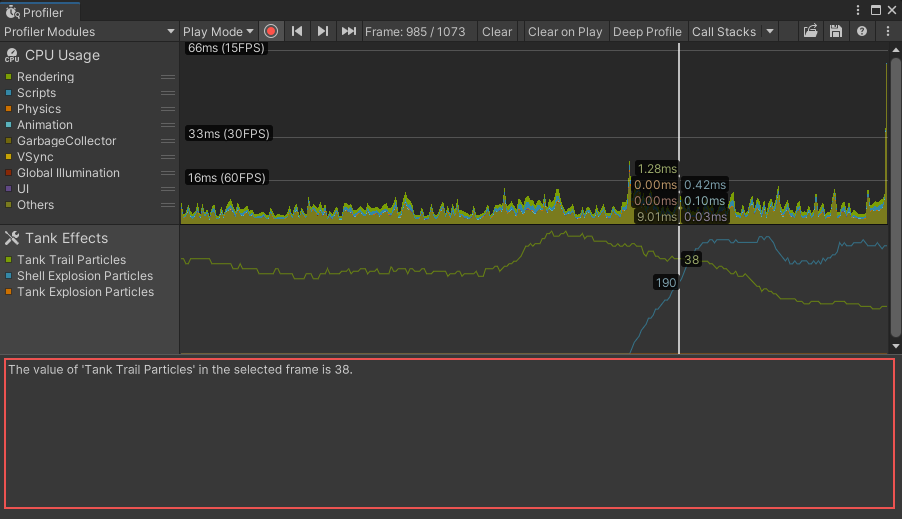
Пример скрипта выполняет следующие действия:
- Определяет и создает метку для отображения значения, которое требуется захватить, и добавляет эту метку в панель сведений модуля.
- Определяет конструктор для управления панелью деталей модуля и использует
CreateViewдля построения панели деталей пользовательского модуля. - Заполняет метку данными из текущего кадра и обновляет метку после каждого кадра.
- Получает значение счетчика в виде строки, которую можно отобразить в панели сведений о модуле.
- Указывает текст, который будет отображаться в панели деталей модуля, и указывает Profiler автоматически обновлять его каждый кадр.
 using UnityEditor;
 using UnityEditorInternal;
 using Unity.Profiling.Editor;
 using UnityEngine.UIElements;

 public class TankEffectsDetailsViewController : ProfilerModuleViewController
 {
    // Define a label, which will display the total particle count for tank trails in the selected frame.
    Label m_TankTrailParticleCountLabel;

    // Define a constructor for the view controller, which calls the base constructor with the Profiler Window passed from the module.
    public TankEffectsDetailsViewController(ProfilerWindow profilerWindow) : base(profilerWindow)
    {
        // Be notified when the selected frame index in the Profiler Window changes, so we can update the label.
        ProfilerWindow.SelectedFrameIndexChanged += OnSelectedFrameIndexChanged;
    }

    protected override void ViewLoaded()
    {
        base.ViewLoaded();

        // Populate the view with the current data for the selected frame.
        ReloadData();
    }

    protected override VisualElement CreateView()
    {
        var view = new VisualElement();

        // Create the label and add it to the view.
        m_TankTrailParticleCountLabel = new Label() { style = { paddingTop = 8, paddingLeft = 8 } };
        view.Add(m_TankTrailParticleCountLabel);

        return view;
    }


    // Override Dispose to do any cleanup of the view when it is destroyed. This is a standard C# Dispose pattern.
    protected override void Dispose(bool disposing)
    {
        if (!disposing)
            return;

        // Unsubscribe from the Profiler window event that we previously subscribed to.
        ProfilerWindow.SelectedFrameIndexChanged -= OnSelectedFrameIndexChanged;

        base.Dispose(disposing);
    }

    protected virtual void ReloadData()
    {
        // Retrieve the TankTrailParticleCount counter value from the Profiler as a formatted string.
        var selectedFrameIndexInt32 = System.Convert.ToInt32(ProfilerWindow.selectedFrameIndex);
        var value = ProfilerDriver.GetFormattedCounterValue(selectedFrameIndexInt32, GameStatistics.TanksCategory.Name, GameStatistics.TankTrailParticleCountName);

        // Update the label's text with the value.
        m_TankTrailParticleCountLabel.text = $"The value of '{GameStatistics.TankTrailParticleCountName}' in the selected frame is {value}.";
    }

    void OnSelectedFrameIndexChanged(long selectedFrameIndex)
    {
        // Update the label with the current data for the newly selected frame.
        ReloadData();
    }
}
Совет: с помощью UI Toolkit в Unity можно создать пользовательский UI для панели сведений о модуле. Дополнительные сведения см. в разделе UI Toolkit.
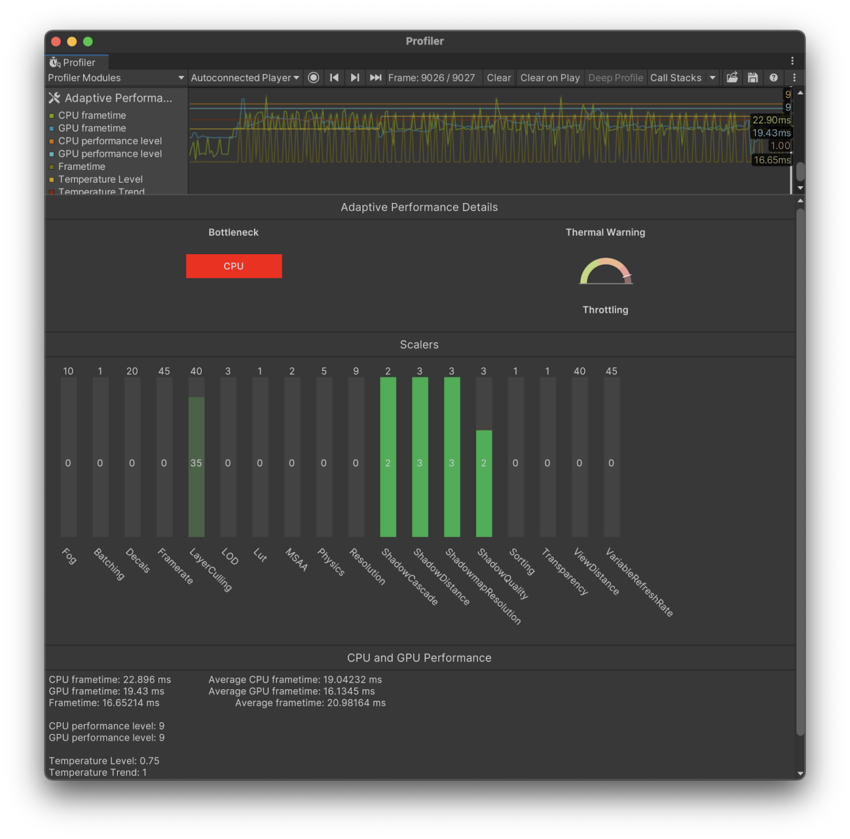
На следующем примере показана панель сведений настраиваемого модуля, принадлежащая настраиваемому модулю Адаптивная производительность:
Подключение панели деталей пользовательского модуля к модулю Profiler
Чтобы показать собственную панель подробностей модуля, нужно создать её контроллер при выборе вашего модуля профайлера. Для этого переопределите CreateDetailsViewController создать и нарисовать новый контроллер панели деталей модуля. Unity затем вызывает этот метод, когда он отображает панель деталей вашего модуля.
В следующем примере кода создается экземпляр панели настраиваемых сведений о модуле для модуля с названием TankEffectsProfilerModule:
 using Unity.Profiling.Editor;

 [System.Serializable]
 [ProfilerModuleMetadata("Tank Effects")]
 public class TankEffectsProfilerModule : ProfilerModule
 {
    static readonly ProfilerCounterDescriptor[] k_Counters = new ProfilerCounterDescriptor[]
    {
        new ProfilerCounterDescriptor(GameStatistics.TankTrailParticleCountName, GameStatistics.TanksCategory),
        new ProfilerCounterDescriptor(GameStatistics.ShellExplosionParticleCountName, GameStatistics.TanksCategory),
        new ProfilerCounterDescriptor(GameStatistics.TankExplosionParticleCountName, GameStatistics.TanksCategory),
    };

    public TankEffectsProfilerModule() : base(k_Counters) { }

    public override ProfilerModuleViewController CreateDetailsViewController()
    {
        return new TankEffectsDetailsViewController(ProfilerWindow);
    }
}
Отображение дополнительных счетчиков в панели сведений модуля
Вы можете отобразить дополнительные счетчики профилеров Это полезно, когда вы хотите отобразить дополнительные данные для выбранного кадра.
Profiler автоматически захватывает категории всех счетчиков, которые принадлежат к представлению диаграммы модуля, когда этот модуль активен. Чтобы захватить дополнительные счетчики, напишите скрипт, который скажет Profiler захватывать определенные категории, когда ваш модуль активен.
Например, следующий скрипт использует аргумент конструктора autoEnabledCategoryNames для указания категорий Scripts и Memory. Скрипт включает эти категории, когда модуль активен:
using Unity.Profiling;
using Unity.Profiling.Editor;

[System.Serializable]
[ProfilerModuleMetadata("Tank Effects & Memory")]
public class TankEffectsAndMemoryProfilerModule : ProfilerModule
{
   static readonly ProfilerCounterDescriptor[] k_Counters = new ProfilerCounterDescriptor[]
   {
       new ProfilerCounterDescriptor(GameStatistics.TankTrailParticleCountName, ProfilerCategory.Scripts),
       new ProfilerCounterDescriptor(GameStatistics.ShellExplosionParticleCountName, ProfilerCategory.Scripts),
       new ProfilerCounterDescriptor(GameStatistics.TankExplosionParticleCountName, ProfilerCategory.Scripts),
   };

   // Enable the ProfilerCategory.Scripts and ProfilerCategory.Memory categories when the module is active.
   static readonly string[] k_AutoEnabledCategoryNames = new string[]
   {
       ProfilerCategory.Scripts.Name,
       ProfilerCategory.Memory.Name
   };

   public override ProfilerModuleViewController CreateDetailsViewController()
   {
       return new TankEffectsAndMemoryDetailsViewController(ProfilerWindow);
   }

   // Pass the auto-enabled category names to the base constructor.
   public TankEffectsProfilerModule() : base(k_Counters, autoEnabledCategoryNames: k_AutoEnabledCategoryNames) { }
}
В следующем примере код отображает встроенный счетчик профилирования памяти Счётчик профилировщика Mesh Memory вместе с TankTrailParticleCount:
 using UnityEditor;
 using UnityEditorInternal;
 using Unity.Profiling.Editor;
 using UnityEngine.UIElements;

 public class TankEffectsAndMemoryDetailsViewController : TankEffectsDetailsViewController
 {
    // Define a label, which will display the total mesh memory in the selected frame
    Label m_MeshMemoryLabel;

    protected override VisualElement CreateView()
    {
        var view = base.CreateView();

        // Create the label and add it to the view.
        m_MeshMemoryLabel = new Label() { style = { paddingTop = 8, paddingLeft = 8 } };
        view.Add(m_MeshMemoryLabel);

        return view;
    }

    protected override void ReloadData()
    {
        base.ReloadData();

        // Retrieve the Mesh Memory counter value from the Profiler as a formatted string.
        var selectedFrameIndexInt32 = System.Convert.ToInt32(ProfilerWindow.selectedFrameIndex);
        var value = ProfilerDriver.GetFormattedCounterValue(selectedFrameIndexInt32, ProfilerArea.Memory, "Mesh Memory");

        // Update the label's text with the value.
        m_MeshMemoryLabel.text = $"The value of 'Mesh Memory' in the selected frame is {value}.";
    }
}