ProfilerModuleViewController
класс в Unity.Profiling.Editor
Описание
Предоставляет единое представление содержимого для ProfilerModule, отображаемого в окне Profiler.
С помощью этого класса выполняют собственную отрисовку в ProfilerModule, например, рисование пользовательского представления деталей.
Чтобы построить иерархию представлений модуля, определите ProfilerModuleViewController производный тип и переопределите его ProfilerModuleViewController.CreateView метод. Чтобы выполнить необходимую очистку контроллера представления, переопределите ProfilerModuleViewController.Dispose метод. Вам не нужно явно удалять вид контроллера вида из иерархии в рамках процесса Dispose; Unity делает это автоматически, когда он удаляет контроллер вида.
Чтобы использовать ProfilerModuleViewController производного типа, инстанцируйте новый экземпляр этого типа по запросу, как в ProfilerModule.CreateDetailsViewController.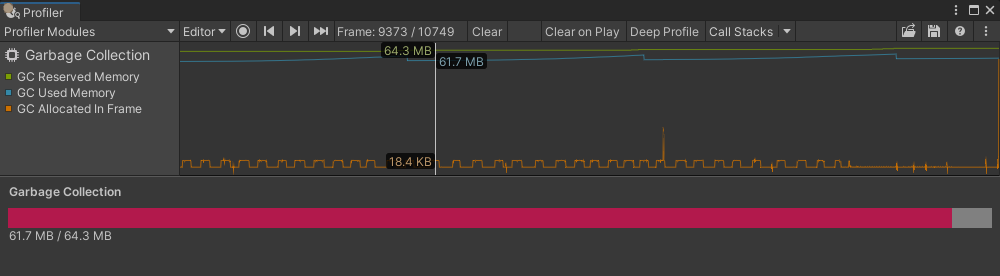 .
.
using System;
using Unity.Profiling;
using Unity.Profiling.Editor;
using UnityEditor;
using UnityEngine.UIElements;

//--Module--

[Serializable]
[ProfilerModuleMetadata("Garbage Collection")]
public class GarbageCollectionProfilerModule : ProfilerModule
{
    static readonly ProfilerCounterDescriptor[] k_ChartCounters = new ProfilerCounterDescriptor[]
    {
        new ProfilerCounterDescriptor("GC Reserved Memory", ProfilerCategory.Memory),
        new ProfilerCounterDescriptor("GC Used Memory", ProfilerCategory.Memory),
        new ProfilerCounterDescriptor("GC Allocated In Frame", ProfilerCategory.Memory),
    };

    // Specify a list of Profiler category names, which should be auto-enabled when the module is active.
    static readonly string[] k_AutoEnabledCategoryNames = new string[]
    {
        ProfilerCategory.Memory.Name,
    };

    public GarbageCollectionProfilerModule() : base(k_ChartCounters, autoEnabledCategoryNames: k_AutoEnabledCategoryNames) { }

    public override ProfilerModuleViewController CreateDetailsViewController()
    {
        return new GarbageCollectionDetailsViewController(ProfilerWindow);
    }
}

//--Module Custom Drawing--

public class GarbageCollectionDetailsViewController : ProfilerModuleViewController
{
    const string k_UxmlResourceName = "Assets/Editor/GarbageCollectionDetailsView.uxml";
    const string k_UxmlElementId_GarbageCollectionDetailsViewBarFill = "garbage-collection-details-viewbar-fill";
    const string k_UxmlElementId_GarbageCollectionDetailsViewBarLabel = "garbage-collection-details-viewbar-label";

    static readonly ProfilerCounterDescriptor k_GcReservedMemoryCounterDescriptor = new ProfilerCounterDescriptor("GC Reserved Memory", ProfilerCategory.Memory);
    static readonly ProfilerCounterDescriptor k_GcUsedMemoryCounterDescriptor = new ProfilerCounterDescriptor("GC Used Memory", ProfilerCategory.Memory);

    VisualElement m_BarFill;
    Label m_BarLabel;

    public GarbageCollectionDetailsViewController(ProfilerWindow profilerWindow) : base(profilerWindow) { }

    protected override VisualElement CreateView()
    {
        var template = AssetDatabase.LoadAssetAtPath<VisualTreeAsset>(k_UxmlResourceName);
        var view = template.Instantiate();

        m_BarFill = view.Q<VisualElement>(name: k_UxmlElementId_GarbageCollectionDetailsView__BarFill);
        m_BarLabel = view.Q<Label>(name: k_UxmlElementId_GarbageCollectionDetailsView__BarLabel);

        ReloadData(ProfilerWindow.selectedFrameIndex);
        ProfilerWindow.SelectedFrameIndexChanged += OnSelectedFrameIndexChanged;

        return view;
    }

    protected override void Dispose(bool disposing)
    {
        if (!disposing)
            return;

        ProfilerWindow.SelectedFrameIndexChanged -= OnSelectedFrameIndexChanged;
        base.Dispose(disposing);
    }

    void OnSelectedFrameIndexChanged(long selectedFrameIndex)
    {
        ReloadData(selectedFrameIndex);
    }

    void ReloadData(long selectedFrameIndex)
    {
        long gcReservedBytes = 0;
        long gcUsedBytes = 0;

        var selectedFrameIndexInt32 = Convert.ToInt32(selectedFrameIndex);
        using (var frameData = UnityEditorInternal.ProfilerDriver.GetRawFrameDataView(selectedFrameIndexInt32, 0))
        {
            if (frameData == null || !frameData.valid)
                return;

            var gcReservedBytesMarkerId = frameData.GetMarkerId(k_GcReservedMemoryCounterDescriptor.Name);
            gcReservedBytes = frameData.GetCounterValueAsLong(gcReservedBytesMarkerId);

            var gcUsedBytesMarkerId = frameData.GetMarkerId(k_GcUsedMemoryCounterDescriptor.Name);
            gcUsedBytes = frameData.GetCounterValueAsLong(gcUsedBytesMarkerId);
        }

        float gcUsedBytesScalar = (float)gcUsedBytes / gcReservedBytes;
        m_BarFill.style.width = new Length(gcUsedBytesScalar * 100, LengthUnit.Percent);
        m_BarLabel.text = $"{EditorUtility.FormatBytes(gcUsedBytes)} / {EditorUtility.FormatBytes(gcReservedBytes)}";
    }
}

//--Assets/Editor/GarbageCollectionDetailsView.uxml--

<?xml version="1.0" encoding="utf-8"?>
<engine:UXML
    xmlns:xsi="http://www.w3.org/2001/XMLSchema-instance"
    xmlns:engine="UnityEngine.UIElements"
    xmlns:editor="UnityEditor.UIElements"
    xsi:noNamespaceSchemaLocation="../../UIElementsSchema/UIElements.xsd">
  <engine:Style src="GarbageCollectionDetailsView.uss"/>
  <engine:VisualElement name="garbage-collection-details-view">
    <engine:Label name="garbage-collection-details-viewtitle-label" text="Garbage Collection"/>
    <engine:VisualElement name="garbage-collection-details-viewbar">
      <engine:VisualElement name="garbage-collection-details-viewbar-fill"/>
    </engine:VisualElement>
    <engine:Label name="garbage-collection-details-viewbar-label"/>
  </engine:VisualElement>
</engine:UXML>

//--Assets/Editor/GarbageCollectionDetailsView.uss--

#garbage-collection-details-view
{
    flex-grow: 1;
    margin: 8px;
}

#garbage-collection-details-view__title-label
{
    -unity-font-style: bold;
    margin-bottom: 8px;
}

#garbage-collection-details-view__bar
{
    background-color: gray;
    flex-direction: row;
    height: 20px;
}

#garbage-collection-details-view__bar-fill
{
    background-color: #B2194C;
    position: absolute;
    height: 100%;
}
Дополнительные ресурсы: ,ProfilerModule,, ,ProfilerWindow.SelectedFrameIndexChanged,.
Свойства
| Свойство | Описание |
|---|---|
| ProfilerWindow | Окно Profiler, к которому принадлежит контроллер представления. |
Открытые методы
| Метод | Описание |
|---|---|
| Dispose | Убирает контроллер представления. Unity вызывает этот метод автоматически, когда контроллер представления больше не требуется, и его представление будет удалено из иерархии окон. |
Защищенные методы
| Метод | Описание |
|---|---|
| CreateView | Создает вид контроллера вида. Unity вызывает этот метод автоматически, когда он собирается отобразить вид контроллера вида в первый раз. |