PropertyDrawer
класс в UnityEditor
Наследуется от:GUIDrawer
Описание
Базовый класс, от которого наследуются пользовательские отрисовщики свойств. Используйте его для создания собственных отрисовщиков ваших Serializable классов или для скриптов переменных с настраиваемыми PropertyAttributes.
PropertyDrawers имеет два применения:
- Настройка GUI для каждого экземпляра Serializable class.
- Настройка GUI членов скрипта с помощью пользовательских PropertyAttributes.
Если у вас есть обычай Serializable класс, вы можете с помощью PropertyDrawer управлять его видом в Inspector. Рассмотрим сериализуемый класс Ingredient в скрипте ниже:
using System;
using UnityEngine;

public enum IngredientUnit { Spoon, Cup, Bowl, Piece }

// Custom serializable class
[Serializable]
public class Ingredient
{
    public string name;
    public int amount = 1;
    public IngredientUnit unit;
}

public class Recipe : MonoBehaviour
{
    public Ingredient potionResult;
    public Ingredient[] potionIngredients;
}
С помощью пользовательского PropertyDrawer можно изменить внешний вид класса Ingredient во всех местах, где он появляется в Inspector.
Прикрепить PropertyDrawer к сериализуемому классу можно с помощью CustomPropertyDrawer атрибут и передайте тип сериализуемого класса, для которого он является отрисовщиком.
Собственный PropertyDrawer можно построить средствами UI Toolkit или IMGUI. Чтобы создать его на UI Toolkit, необходимо переопределить PropertyDrawer.CreatePropertyGUI у класса PropertyDrawer. Чтобы создать пользовательский PropertyDrawer на IMGUI, необходимо переопределить PropertyDrawer.OnGUI у класса PropertyDrawer.
Примечание: Вы не можете запустить UI Toolkit внутри IMGUI. Это означает, что если ваш пользовательский PropertyDrawer имеет только реализацию UI Toolkit, он не будет работать внутри IMGUI пользовательского Inspector или родительского IMGUI пользовательского PropertyDrawer. Начиная с Unity 2022.2, Inspector по умолчанию использует UI Toolkit исключительно в пользовательском PropertyDrawers. Однако, вам все равно может понадобиться реализовать IMGUI, если выдвижные ящики свойств вызываются из пользовательского редактора. До 2022.2 рекомендуется либо реализовать обе версии IMGUI и UI Toolkit каждого PropertyDrawer, либо убедиться, что они используются исключительно внутри пользовательских инспекторов UI Toolkit.
Вот пример пользовательского PropertyDrawer, написанного с помощью UI Toolkit:
using UnityEditor;
using UnityEditor.UIElements;
using UnityEngine.UIElements;

// IngredientDrawerUIE
[CustomPropertyDrawer(typeof(Ingredient))]
public class IngredientDrawerUIE : PropertyDrawer
{
    public override VisualElement CreatePropertyGUI(SerializedProperty property)
    {
        // Create property container element.
        var container = new VisualElement();

        // Create property fields.
        var amountField = new PropertyField(property.FindPropertyRelative("amount"));
        var unitField = new PropertyField(property.FindPropertyRelative("unit"));
        var nameField = new PropertyField(property.FindPropertyRelative("name"), "Fancy Name");

        // Add fields to the container.
        container.Add(amountField);
        container.Add(unitField);
        container.Add(nameField);

        return container;
    }
}
Вот пример пользовательского PropertyDrawer, написанного с использованием IMGUI. Сравните внешний вид свойств Ingredient в Inspector без и с пользовательским PropertyDrawer: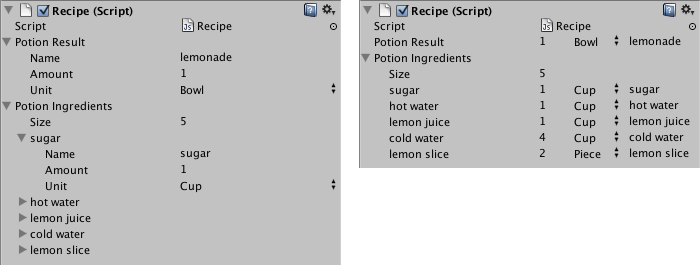
Класс в Inspector без (слева) и с (справа) пользовательским PropertyDrawer.
using UnityEditor;
using UnityEngine;

// IngredientDrawer
[CustomPropertyDrawer(typeof(Ingredient))]
public class IngredientDrawer : PropertyDrawer
{
    // Draw the property inside the given rect
    public override void OnGUI(Rect position, SerializedProperty property, GUIContent label)
    {
        // Using BeginProperty / EndProperty on the parent property means that
        // prefab override logic works on the entire property.
        EditorGUI.BeginProperty(position, label, property);

        // Draw label
        position = EditorGUI.PrefixLabel(position, GUIUtility.GetControlID(FocusType.Passive), label);

        // Don't make child fields be indented
        var indent = EditorGUI.indentLevel;
        EditorGUI.indentLevel = 0;

        // Calculate rects
        var amountRect = new Rect(position.x, position.y, 30, position.height);
        var unitRect = new Rect(position.x + 35, position.y, 50, position.height);
        var nameRect = new Rect(position.x + 90, position.y, position.width - 90, position.height);

        // Draw fields - pass GUIContent.none to each so they are drawn without labels
        EditorGUI.PropertyField(amountRect, property.FindPropertyRelative("amount"), GUIContent.none);
        EditorGUI.PropertyField(unitRect, property.FindPropertyRelative("unit"), GUIContent.none);
        EditorGUI.PropertyField(nameRect, property.FindPropertyRelative("name"), GUIContent.none);

        // Set indent back to what it was
        EditorGUI.indentLevel = indent;

        EditorGUI.EndProperty();
    }
}
Другое применение PropertyDrawer — это изменение внешнего вида членов в скрипте, которые имеют пользовательские PropertyAttributes. Допустим, вы хотите ограничить плавающие или целые числа в вашем скрипте определенным диапазоном и показать их как слайдеры в Inspector. Используя встроенные PropertyAttribute, называемые RangeAttribute, вы можете сделать именно это:
using UnityEngine;
using System.Collections;

public class ExampleClass : MonoBehaviour
{
    // Show this float in the Inspector as a slider between 0 and 10
    [Range(0.0F, 10.0F)]
    public float myFloat = 0.0F;
}
Вы можете сделать свой собственный PropertyAttribute Мы будем использовать код для RangeAttribute в качестве примера. Атрибут должен расширять класс PropertyAttribute. При желании ваш атрибут может принимать параметры и хранить их в открытых переменных-членах.
// This is not an editor script. The property attribute class should be placed in a regular script file.
using UnityEngine;

public class RangeAttribute : PropertyAttribute
{
    public float min;
    public float max;

    public RangeAttribute(float min, float max)
    {
        this.min = min;
        this.max = max;
    }
}
Теперь, когда атрибут готов, нужно сделать PropertyDrawer, который будет отрисовывать свойства с этим атрибутом. Отрисовщик должен расширять класс PropertyDrawer и иметь CustomPropertyDrawer атрибут, чтобы сказать ему, для какого атрибута он является ящиком. Вот пример использования IMGUI:
// The property drawer class should be placed in an editor script, inside a folder called Editor.

// Tell the RangeDrawer that it is a drawer for properties with the RangeAttribute.
using UnityEngine;
using UnityEditor;

[CustomPropertyDrawer(typeof(RangeAttribute))]
public class RangeDrawer : PropertyDrawer
{
    // Draw the property inside the given rect
    public override void OnGUI(Rect position, SerializedProperty property, GUIContent label)
    {
        // First get the attribute since it contains the range for the slider
        RangeAttribute range = attribute as RangeAttribute;

        // Now draw the property as a Slider or an IntSlider based on whether it's a float or integer.
        if (property.propertyType == SerializedPropertyType.Float)
            EditorGUI.Slider(position, property, range.min, range.max, label);
        else if (property.propertyType == SerializedPropertyType.Integer)
            EditorGUI.IntSlider(position, property, Convert.ToInt32(range.min), Convert.ToInt32(range.max), label);
        else
            EditorGUI.LabelField(position, label.text, "Use Range with float or int.");
    }
}
Обратите внимание, что по причинам производительности функции EditorGUILayout не могут использоваться с PropertyDrawers.
Примечание: Списки и массивы обрабатываются по-разному с настраиваемыми выдвижными ящиками. SerializedProperty передается в CreatePropertyGUI метода, он представляет каждый элемент в списке. Однако, когда пользовательский рисунок необходим для самого списка, вы должны соответствующим образом перевернуть свойство.
Если вам нужно, чтобы ящик свойств выполнял задачи очистки, такие как отделение себя от событий редактора, вы можете реализовать IDisposable интерфейс. Он позволяет определить метод, который вызывается при уничтожении редактора, что даёт возможность выполнить необходимую очистку.
Дополнительные ресурсы: PropertyAttribute class, CustomPropertyDrawer class.
Свойства
| Свойство | Описание |
|---|---|
| attribute | PropertyAttribute для этого свойства. Не применимо к отрисовщикам пользовательских классов. (Только для чтения) |
| fieldInfo | Отражение FieldInfo для члена, представленного этим свойством. (Только чтение) |
| preferredLabel | Метка для этого свойства. (только для чтения) |
Открытые методы
| Метод | Описание |
|---|---|
| CreatePropertyGUI | Создает пользовательский GUI с UI Toolkit для свойства. |
| GetPropertyHeight | Переопределите этот метод, чтобы указать высоту GUI для этого поля в пикселях. |
| OnGUI | Переопределите этот метод, чтобы создать свой собственный IMGUI, основанный на GUI для свойства. |