EditorGUI.indentLevel
Declaration
public static int indentLevel;Описание
Уровень отступов меток полей.
EditorGUILayout.LabelField покажет строку, указанную в качестве аргумента. Эта строка может быть показана в горизонтальном положении, и положение может быть изменено indentLevel. При увеличении indentLevel метки будут перемещаться вправо. Уменьшение indentLevel перемещает метки налево.
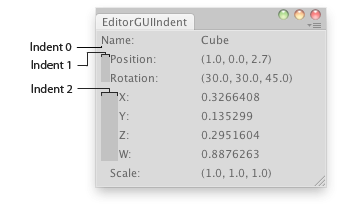
Показывает информацию о выбранном объекте.
using System.Collections;
using System.Collections.Generic;
using UnityEngine;
using UnityEditor;

public class EditorGUIIndent : EditorWindow
{
    [MenuItem("Examples/indentLevel demo")]
    static void Init()
    {
        EditorWindow window = GetWindow(typeof(EditorGUIIndent));
        window.position = new Rect(100, 100, 300, 150);
        window.Show();
    }

    void OnGUI()
    {
        Transform obj = Selection.activeTransform;
        EditorGUILayout.LabelField("Name:", obj ? obj.name : "Select an Object");

        if (obj)
        {
            // Indent further the area of position and rotation
            EditorGUI.indentLevel++;
            EditorGUILayout.LabelField("Position:", obj.position.ToString());
            EditorGUILayout.LabelField("Rotation:", obj.rotation.eulerAngles.ToString());

            // Indent further again the area of rotation values
            EditorGUI.indentLevel++;
            EditorGUILayout.LabelField("X:", obj.rotation.x.ToString());
            EditorGUILayout.LabelField("Y:", obj.rotation.y.ToString());
            EditorGUILayout.LabelField("Z:", obj.rotation.z.ToString());
            EditorGUILayout.LabelField("W:", obj.rotation.w.ToString());

            // End of inner area
            EditorGUI.indentLevel--;
            EditorGUILayout.LabelField("Scale:", obj.localScale.ToString());

            // End of area
            EditorGUI.indentLevel--;
        }
    }
}
Для максимальной совместимости в будущем, не делайте предположений о том, что означает конкретный уровень отступов, а просто увеличивайте или уменьшайте на один вокруг блоков контроля, которые должны быть больше отступов, как в примере выше.