Аудио
Audio Unity’s audio system has sophisticated features for playing sounds in 3D space. Unity can also record audio with any available microphone for use during gameplay or for storage and transmission. Audio components mimic their real-life counterparts. Attach AudioSources to your GameObjects so they can play back an audio file called an AudioClip. An AudioListener somewhere else in the scene (usually attached to your main Camera) then hears this clip. In this way, the audio system can replicate the Doppler effect if the source and listener move relative to one another. Simulate other effects, like echoes, using Audio Filters. An AudioMixer blends various audio sources, applies effects to them, and performs mastering.
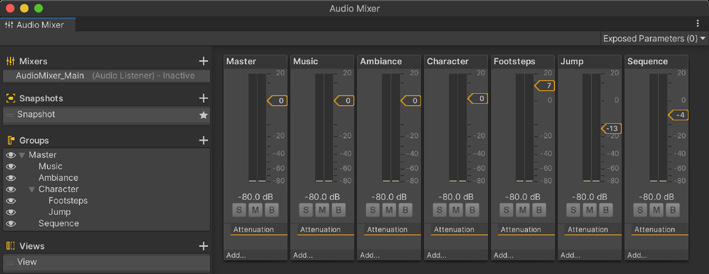
Caption: The AudioMixer
These are the most common audio component classes.
Class
Description
AudioClip
Any Audio file imported into Unity is available from scripts as an AudioClip. This provides a way for the audio system to access the encoded audio data at runtime. Meta-information from the AudioClip may load even before the actual audio data does.
AudioSource
An AudioSource attached to a GameObject plays back sounds in a 3D environment.
AudioListener
An AudioListener represents a microphone-like device that hears all sounds around it. You have one listener per scene.
AudioMixer
An Audio Mixer group is essentially a signal chain which allows you to apply volume attenuation and pitch correction; it allows you process the audio signal with effects and perform mastering.