Эффекты частиц
Эффекты частиц Для создания эффектов дыма, жидкостей и пламени Unity предлагает два решения для моделирования частиц: - Particle System может моделировать на CPU тысячи частиц. Модули компонента Particle System задают готовые варианты поведения. Для создания одного эффекта часто объединяют несколько объектов GameObject с компонентами Particle System.
Класс ParticleSystem поддерживает Built-in Render Pipeline и URP. Через ParticleSystem можно определять саму систему и отдельные частицы из скрипта. Particle System может взаимодействовать с физической системой Unity и компонентами Collider в сцене, но не имеет доступа к буферам кадров. Чтобы ознакомиться с примерами встроенной Particle System, загрузите пакет Particle Pack из Asset Store.
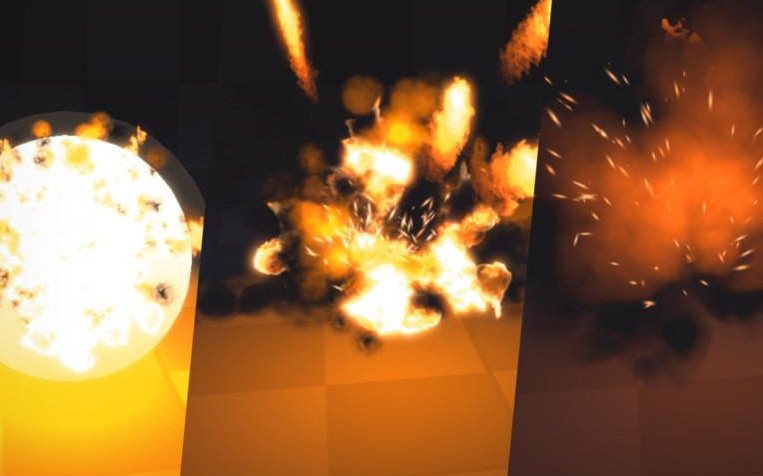
Простая симуляция эффекта с помощью Particle System
- Visual Effect Graph переносит вычисления на GPU с помощью вычислительных шейдеров. Это позволяет моделировать миллионы частиц, способных взаимодействовать с буферами цвета и глубины. Рабочий процесс построен вокруг гибко настраиваемого графового редактора. Visual Effect Graph не имеет доступа к физической системе, но может взаимодействовать со сложными ресурсами: Point Cache, Vector Field и Signed Distance Field. Visual Effect Graph работает только на платформах, поддерживающих вычислительные шейдеры и HDRP; поддержка URP пока имеет статус Preview. Через интерфейс событий можно отправлять пользовательские события и передавать связанные данные для обработки графом. Компонент Visual Effect также предоставляет API управления воспроизведением. Unity поддерживает два проекта на GitHub с примерами применения Visual Effect Graph в реальных проектах: Visual Effect Graph Samples и Spaceship Demo. Они показывают, как создавать множество высококачественных эффектов.
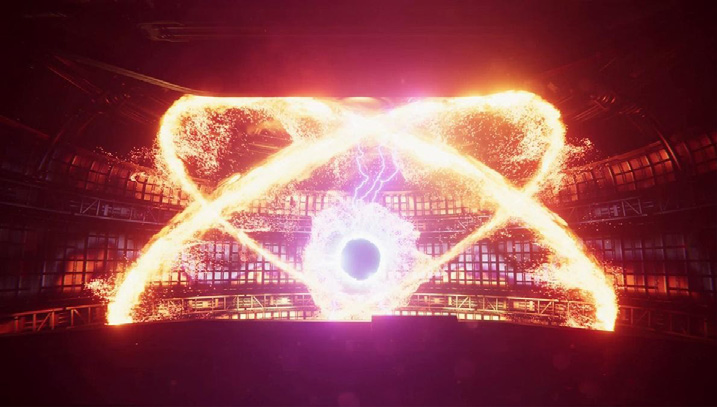
Миллионы частиц на экране, созданные с помощью Visual Effect Graph
При выборе одной из двух систем учитывайте совместимость устройств. Большинство ПК и консолей поддерживают вычислительные шейдеры, но многие мобильные устройства - нет. Для мобильных платформ сейчас рекомендуется встроенный Particle System. Если целевая платформа поддерживает вычислительные шейдеры, в проекте Unity можно использовать оба типа моделирования частиц.
Particle effects Unity includes two particle simulation solutions for your effects needs (smoke, liquids, flames): —
The Particle System can simulate thousands of particles on the CPU. Use the modules of the Particle System component to represent predefined behaviors. To create each effect, you will often layer several GameObjects with ParticleSystems together. ParticleSystem supports the Built-in Render Pipeline and URP. You can access the ParticleSystem class to define a system and its individual particles via script. Particle Systems can interact with Unity’s underlying physics system and any Colliders in your scene, but cannot access frame buffers. For examples of the built-in ParticleSystem, download the Particle Pack from the Asset Store.
A simple effects simulation using the Particle System
The Visual Effect Graph moves calculations on the GPU using compute shaders. This can simulate millions of particles that can also interact with the color and depth buffer. The workflow includes a highly customizable graph view. While it does not have access to the underlying physics system, a Visual Effect Graph can interact with complex assets such as Point Caches, Vector Fields, and Signed Distance Fields. Visual Effect Graph only works on platforms that support compute shaders and HDRP (support for URP is currently in Preview). You can use the event interface to send custom events and pass in attached data that the graph can process. The Visual Effect component also provides a playback control API. Unity maintains two GitHub projects that demonstrate production examples of the Visual Effect Graph, the Visual Effect Graph Samples project and the Spaceship Demo. These both illustrate how the Visual Effect Graph can create a myriad of high-quality effects.
Millions of particles onscreen created with the Visual Effect Graph
When selecting one of the two systems, keep device compatibility in mind. Most PCs and consoles support compute shaders, but many mobile devices do not. We currently recommend the built-in ParticleSystem if your intended platform is mobile. If your target platform does support compute shaders, Unity allows you to use both types of particle simulation in your project.