Package Manager
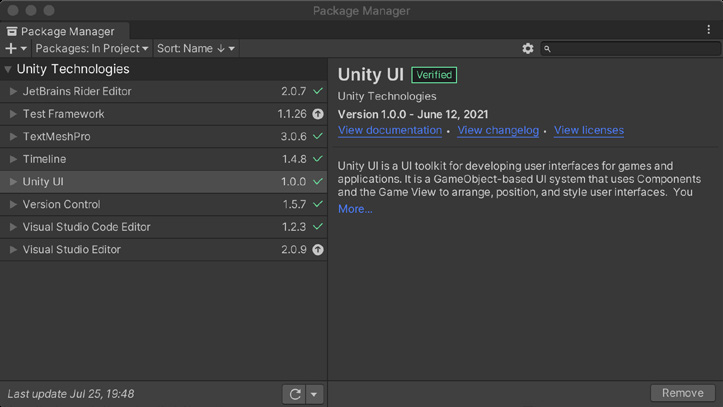
Package Manager Для большей гибкости разработки Unity предоставляет некоторые возможности в виде дополнительных пакетов. Они поставляются отдельно от основной части Unity Editor, поэтому могут обновляться чаще. Система управления пакетами позволяет устанавливать только инструменты, необходимые конкретному проекту, и тем самым сохранять сборку компактной. Пакеты различаются по назначению: они могут содержать любые сочетания ресурсов, шейдеров, текстур, плагинов, значков и скриптов, расширяющих разные части проекта.
Управляйте доступными пакетами в окне Package Manager (Window >
Package Manager). Помимо встроенных пакетов Unity и пакетов из Unity Registry можно устанавливать пользовательские пакеты с диска, по URL GitHub или из Asset Store: - Нажмите кнопку, чтобы установить пакет непосредственно по URL Git или по локальному пути.
- В раскрывающемся меню Packages выбирается содержимое списка (Unity Registry, In Project, My Assets или Built-in), а меню Sort упорядочивает пакеты по имени или дате. - Для пакетов Asset Store в разделе My Assets доступны дополнительные параметры фильтрации.
- Поле Search позволяет найти пакет по имени. Для управления пакетами проекта используйте кнопки Download, Import и Update.
Package Manager
Опытные разработчики могут также использовать PackageManager API для создания собственных общих библиотек. Краткое введение представлено в видео Creating Custom Packages in Unity.
Package Manager To make development more flexible, Unity offers some features as optional add-on packages. These exist outside of the core Editor so that they can follow a more rapid release cycle. The package management system keeps your build small, as it allows you to only install the tools that you need for your specific project requirements. Packages themselves can vary in functionality. They can contain any combination of assets, shaders, textures, plug-ins, icons, and scripts to enhance various parts of your project. Manage available packages using the Package Manager window (Window > Package Manager). In addition to Unity-provided packages that are built-in or part of the Unity registry, you can also install custom packages from disk, GitHub URL, or the Asset Store: —
Click the
button to install a package directly from git URL or a local path.
The Packages drop-down menu changes what appears in the list (Unity Registry/In project/My Assets/Built-in). Meanwhile, the Sort menu organizes packages by name or date.
Asset Store packages from My Assets feature additional filtering options.
The Search field allows you to locate a package by name. Use the Download, Import, and/or Update buttons to manage the packages in use by your project.
The Package Manager
Experienced developers can also leverage the PackageManager API to build their own shared libraries. Watch Creating Custom Packages in Unity for a quick introduction.