Паттерн: объекты-делегаты
Pattern: Delegate objects
ScriptableObjects in Unity aren’t just for storing data; you can also put methods in them, meaning they can hold both what to do (logic) and what to use (data).
Delegates versus events Delegates and events are closely related concepts in C#, but they serve different purposes. A delegate is a type that defines a method signature. This allows you to pass methods as arguments to other methods. Think of it like a variable that holds a reference to a method, instead of a value. An event, on the other hand, is essentially a special type of delegate that allows classes to communicate with each other in a loosely coupled way. Events are explored in more detail in the Pattern: Observer chapter. For general information about the differences between delegates and events, see Distinguishing Delegates and Events in C#.
The idea is that if you need to perform specific tasks, you encapsulate the algorithms for doing those tasks into their own objects. The original Gang of Four refers to this general design as the strategy pattern. Suppose you want a pathfinding object that calculates a route through a maze. The object itself wouldn’t actually contain any pathfinding logic. Instead, it just keeps a reference to another object that does.
If you want to solve the maze with a specific path search technique (e.g., A*, Dijkstra, etc.), implement the correct solution within this separate “strategy” object. At runtime, you can then swap to a different algorithm by exchanging objects.
ScriptableObjects methods In Unity, one way to implement this pattern is to have a MonoBehaviour reference a ScriptableObject containing the necessary logic. When the MonoBehaviour performs a task, it calls the external methods on the ScriptableObject rather than its own. However, there a few limitations to this: —
Methods on a ScriptableObject won’t be called automatically from the MonoBehaviour’s player loop (like Start(), Update(), and OnCollisionEnter()). You need to call them yourself.
Like prefabs, ScriptableObjects can’t reference scene objects directly. If they need to perform work on a scene object, you’ll need to pass that object in as a parameter. When calling the ScriptableObject’s methods, a MonoBehaviour can often pass in itself as the argument or pass in any other dependencies. This gives you the flexibility to execute logic, run coroutines, etc. even though the ScriptableObject exists at the project level.
ScriptableObjects can contain pluggable implementations of behavior or logic.
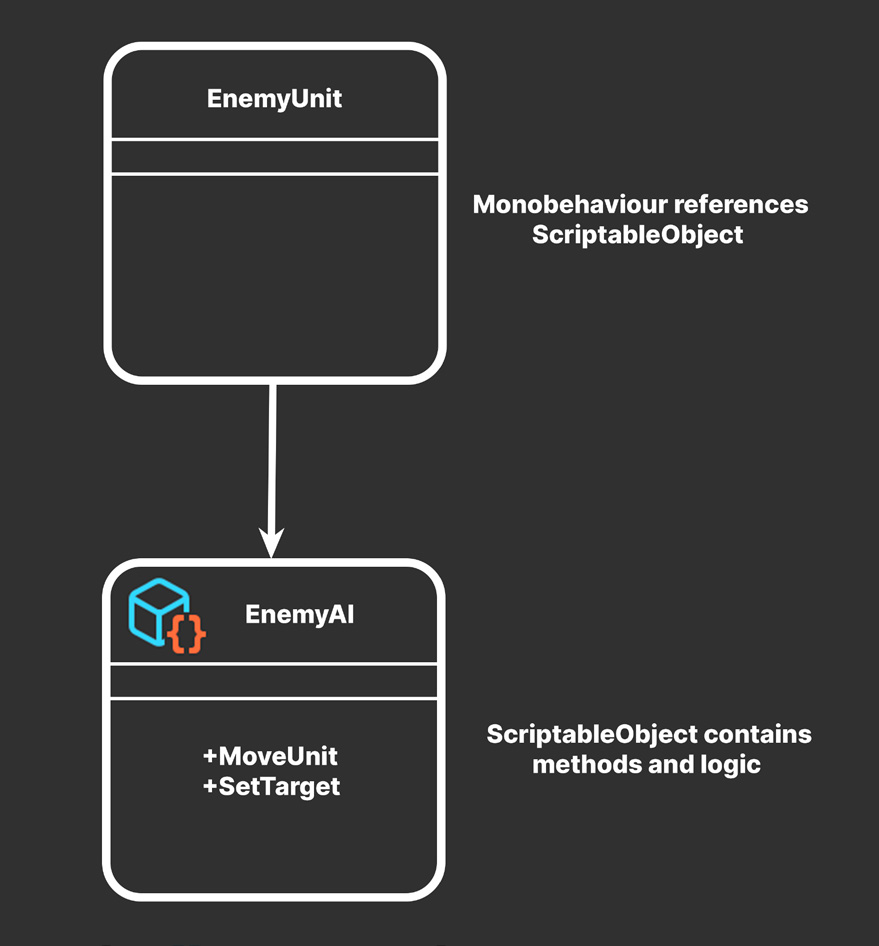
For example, you can define several enemy units in a game with different movement behavior. Let’s suppose some of them need to patrol, stand idle, or flee from the player. A single EnemyUnit MonoBehaviour can reference a EnemyAI ScriptableObject that contains a method called MoveUnit. The EnemyUnit script itself doesn’t contain any movement or behavior logic. It only executes the ScriptableObject’s MoveUnit at the appropriate time. If the method needs data from the scene, the EnemyUnit object can pass in a reference to itself as a parameter. Any other necessary dependencies in the scene can be passed in as well.
Modifying ScriptableObject data At runtime, you actually can change ScriptableObject data, but be careful whenever doing so. Multiple Monobehaviour sharing the same ScriptableObject can cause problems if they modify the same data. Remember that you can create an instance of a ScriptableObject at runtime to avoid this issue. The initial ScriptableObject then acts like a template with all the logic and data. Each MonoBehaviour can then make its own instance of that ScriptableObject which can be modified freely.
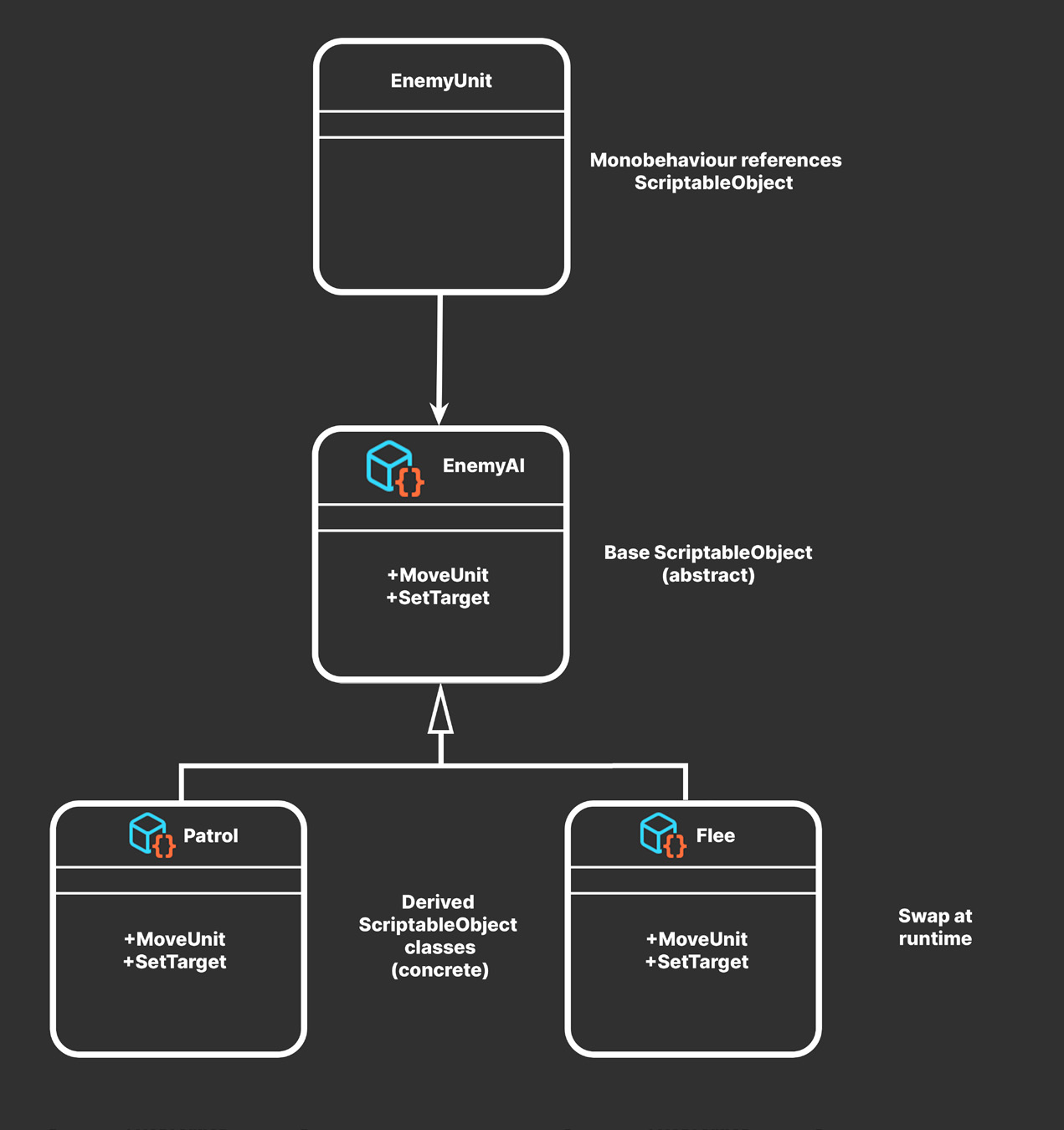
Pluggable behavior You can make this pattern more useful by defining the EnemyAI ScriptableObject as an abstract class. This allows it to act as a template for a variety of ScriptableObjects that are compatible with the EnemyUnit MonoBehaviour, so the abstract ScriptableObject can stand in for more than one algorithm.
Pluggable behaviors can change at runtime or in the Editor.
Thus, you could have concrete ScriptableObject classes for behaviors like Patrol, Idle, or Flee that derive from the base EnemyAI. Even though they all implement the same MoveUnit method, each can produce very different results. In the Editor, each asset is interchangeable. You can just drag and drop the ScriptableObject of choice into the EnemyAI field. Any compatible ScriptableObject is “pluggable” in this fashion.
The EnemyUnit or another component can behave as the “brain” that monitors when to switch ScriptableObjects and also swap behavior at runtime. This is one way the EnemyUnit can react to gameplay events like transitioning from a patrolling to a fleeing state. Simply switch EnemyAI ScriptableObjects on each state change. In production, a second developer or designer can implement the actual movement or AI logic within the ScriptableObject. As additional movements or behaviors get added to the game (e.g., DuckAndCover, Chase, etc.), the original EnemyUnit script remains unchanged. This pattern can help keep your codebase more extensible, in keeping with the open-closed principle from SOLID programming. Because everything is already split into smaller objects, the resulting project is more scalable as you add team members or as game design changes.
Gameplay AI with ScriptableObjects For a more detailed example of using ScriptableObjects to drive behavior, see the Pluggable AI With Scriptable Objects video series. These recorded live sessions demonstrate a finite state machine-based AI system that can be configured using ScriptableObjects for states, actions, and transitions between those states.
Example: Audio delegates The behavior contained in the ScriptableObject does not necessarily need to be complex. It can be something as basic as playing back a customized sound. Here’s an example of a “sound delegate” ScriptableObject that can help add variations to your AudioClips. The AudioDelegateSO defines an abstract class with a Play method that takes an AudioSource as a parameter.
using UnityEngine;
using Random = UnityEngine.Random;
using System;
[Serializable] public struct RangedFloat {
    public float MinValue;
    public float MaxValue;
}
public abstract class AudioDelegateSO: ScriptableObject {
    public abstract void Play(AudioSource source);
}
This concrete SimpleAudioDelegate ScriptableObject can then select a random clip from the available choices and vary its volume and pitch during playback. This reduces the monotony of repeating the same sound.
[CreateAssetMenu(fileName ="AudioDelegate")] public class SimpleAudioDelegateSO : AudioDelegateSO {
    public AudioClip[] Clips;
    public RangedFloat Volume;
    public RangedFloat Pitch;
    public void Play(AudioSource source) {
if (clips.Length == 0 || source == null)
return;source.clip = clips[Random.Range(0, Clips.Length)];
source.volume = Random.Range(Volume.minValue, Volume.maxValue);
source.pitch = Random.Range(Pitch.minValue, Pitch.maxValue);
source.Play();
}
}
Any MonoBehaviour can then use a ScriptableObject instance derived from the AudioDelegateSO class. You can also make variations of the AudioDelegate for different audio effects. Having methods on a ScriptableObject opens up several possibilities. In addition to performing actions, its methods can send messages to any object in the scene. Next, let’s look at a ScriptableObject-based event system with the observer pattern.
The glorious ScriptableObject revolution Richard Fine’s Overthrowing the MonoBehaviour tyranny in a glorious ScriptableObject revolution presentation at Unite 2016 lay the foundation for much of this e-book. Part of the demo (called AudioEvent in the original project) has been modified for this example. See the sample project for implementation details and an example using ScriptableObjects.