Контейнеры данных
Data containers
The most common use for ScriptableObjects is as data containers for shared static data, particularly for game configuration data that doesn’t change at runtime. Typical use cases of ScriptableObjects may include: —
Inventories like item type, icon, rarity, effects
Enemy, player, or item statistics like health, damage, speed, AI parameters
Audio collections like audio clip groups for footsteps, UI sounds, or ambient loops
Config Files like difficulty settings, progression curves, spawn tables
Dialogue data
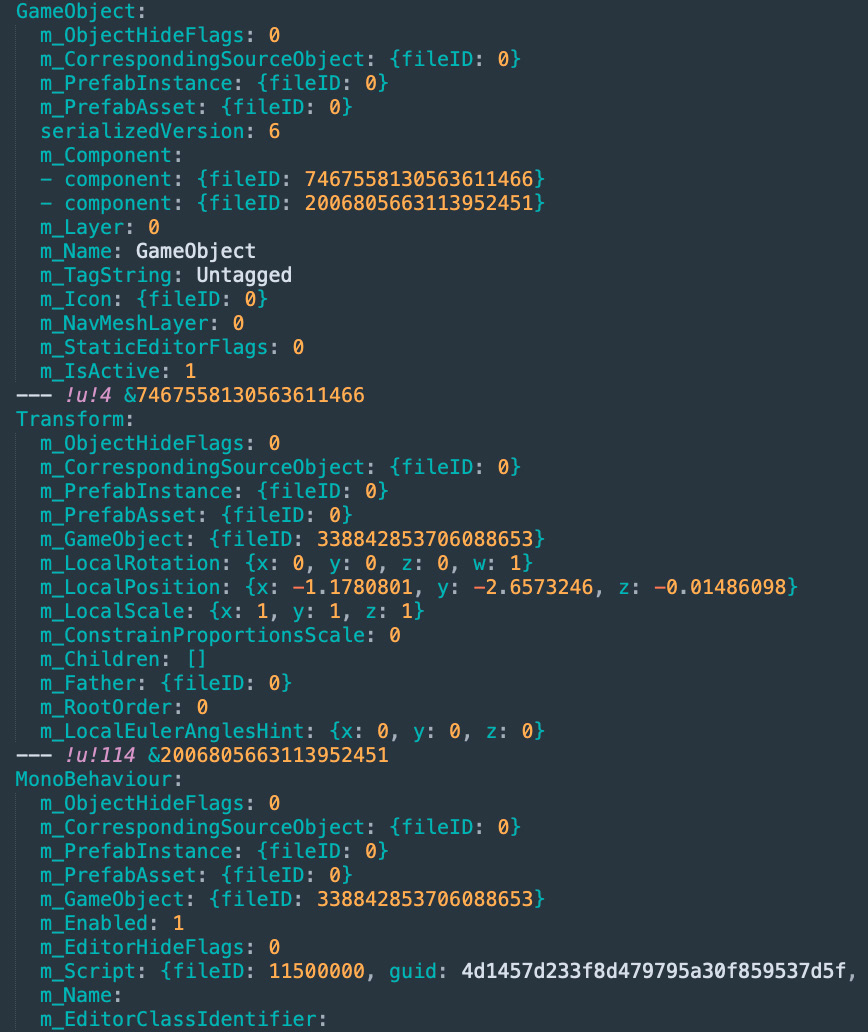
At runtime, you could store this data on MonoBehaviours, but doing so can be inefficient. As you saw in the previous comparison, MonoBehaviours carry extra overhead since they require a GameObject – and by default a Transform – to act as a host. That means that you need to create a lot of unused data before storing a single value.
To see for yourself, generate a new GameObject with an otherwise empty MonoBehaviour. Then, open the serialized object in a text editor and it will look something like this:
A new GameObject with a barebones MonoBehaviour
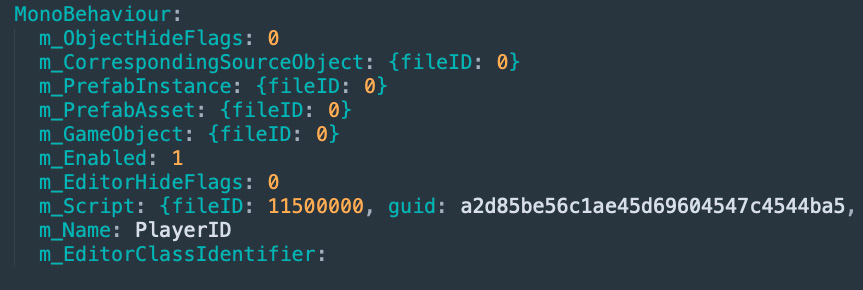
Compare that with an empty ScriptableObject and you see its notably leaner:
A ScriptableObject reduces overhead for storing data.
The ScriptableObject slims down this memory footprint and drops the GameObject and Transform which can have a significance at large scale commercial projects. It also stores the data at the project level. That can be helpful, especially if you need to access the same data from multiple scenes.
The extra data from a MonoBehaviour might not impact your application’s performance at first, but as your game grows to commercial scale, with many more objects, it will become noticeable.
ScriptableObject data versus persistent data When ScriptableObjects are referred to as data containers, this usually refers to static or shared configuration data that does not need to change at runtime in a permanent way. While changes to ScriptableObject data do persist within the Editor (much like modifying a material or a prefab), these changes won’t save at runtime in an application build. Any changes made to a ScriptableObject instance during gameplay exist only in memory and are lost when the session ends. Persistent data that needs to be saved from one session and then loaded into another is typically stored in a different file format (e.g., JSON, XML, MessagePack, Protocol Buffers, and so on). See Dual Serialization below for more details. It’s possible to change ScriptableObject data at runtime (e.g., ScriptableObject variables and Runtime Sets) in the game build, but these changes are temporary. Starting a new game session will revert the ScriptableObject data back to its original state at build time. Think of ScriptableObject data as “read-only” for persistent data purposes. Persistent data should be “read-write” and stored externally.
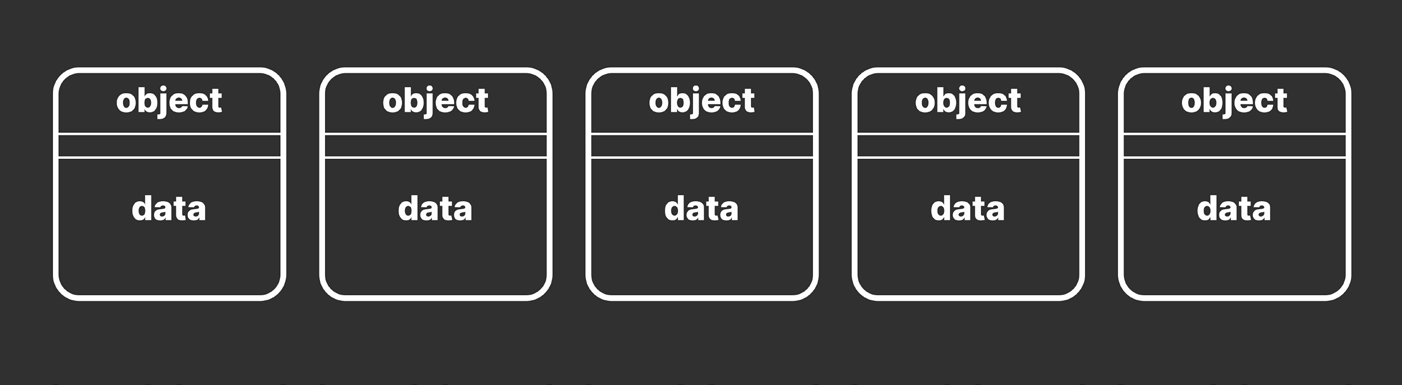
Reducing duplicate data Imagine you have a thousand GameObjects with custom MonoBehaviours, each with several fields. If each component holds its own copy of these values, you’re duplicating a lot of data in memory. This is inefficient, especially when the data is identical across instances and doesn’t change at runtime.
Many objects with duplicate, local data leads to performance inefficiencies.
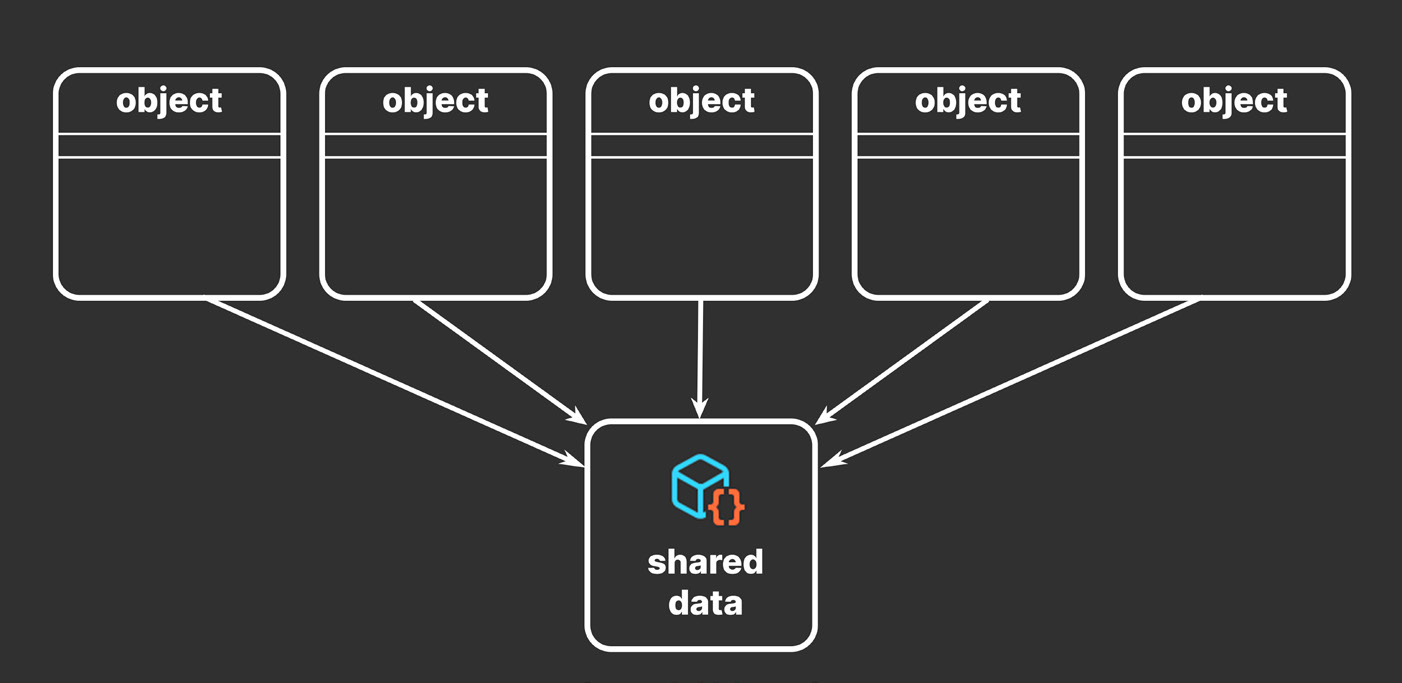
Instead of duplicating this static data, you can funnel it into a ScriptableObject. Then, each of the thousand objects can point to this shared data asset. Each object stores a reference to the data rather than copying the data itself.
Many objects sharing data via a ScriptableObject
In software design, this is an optimization known as the flyweight pattern. Restructuring your code in this way avoids copying a lot of values and reduces your memory footprint.
Design patterns Design patterns can help developers create more maintainable and flexible code, which can be useful in the often-changing world of game development. Download the free e-book Level up your code with design patterns and SOLID for more about SOLID principles and design patterns.
A reference to the ScriptableObject (instead of a full copy of the data) is comparatively small. As you scale up, the memory savings from not duplicating data can become significant.
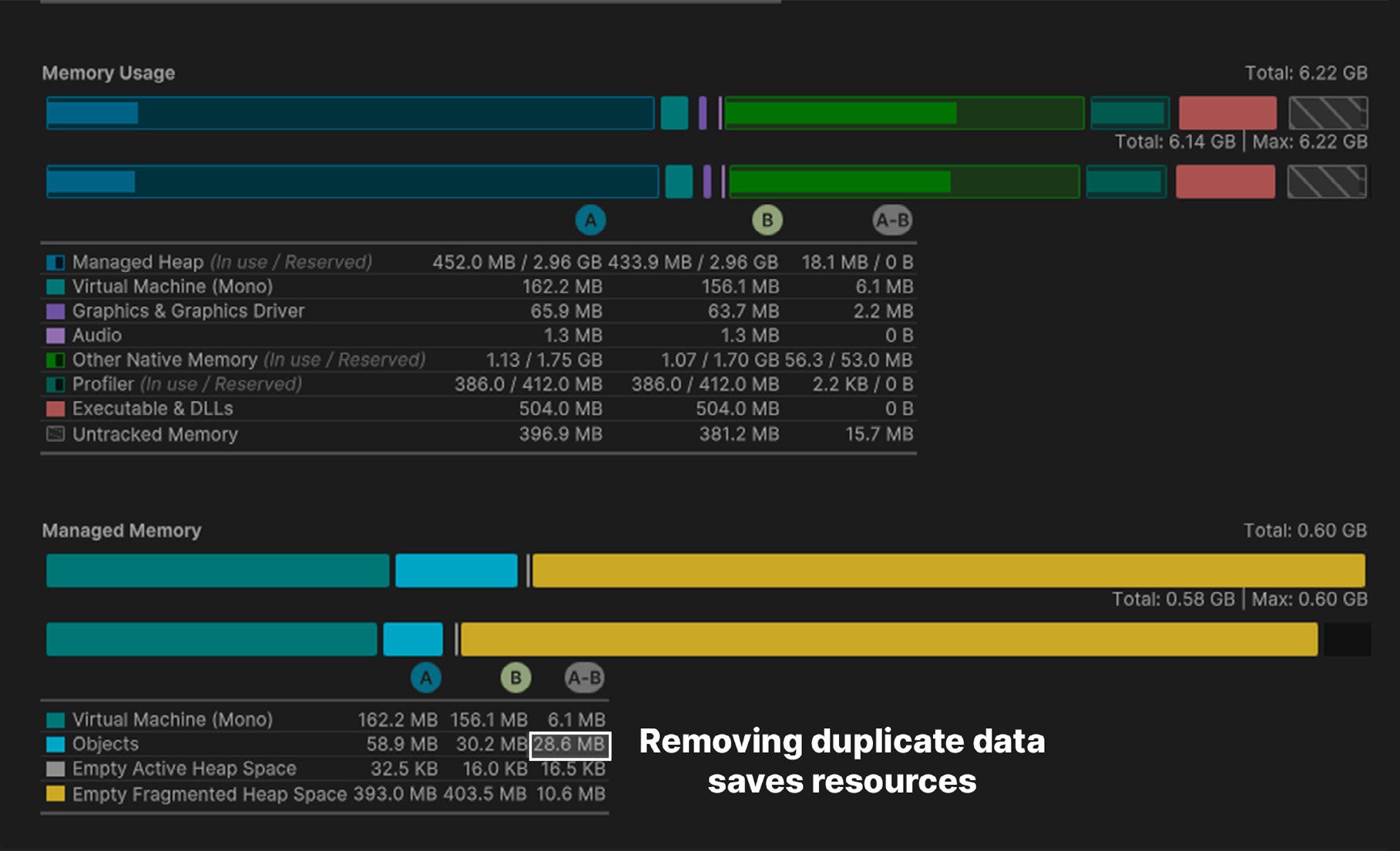
The Memory Profiler compares memory usage of duplicate (A) versus shared data (B).
You can store large quantities of shared data in this manner. Consider ScriptableObjects for: —
Saving and storing data during an Editor session
Saving data as an Asset for use at runtime
Unlike MonoBehaviours, ScriptableObjects can’t be attached to a GameObject. Instead, you save them as assets in your project. This is especially useful if you have a prefab that uses unchanging data in its MonoBehaviours.
Refactoring example Consider a MonoBehaviour that controls an NPC’s health. You might define its class like this:
public class NPCHealthUnrefactored : MonoBehaviour {
    [Range(10, 100)] public int MaxHealth;
    [Range(10, 100)] public int HealthThreshold;
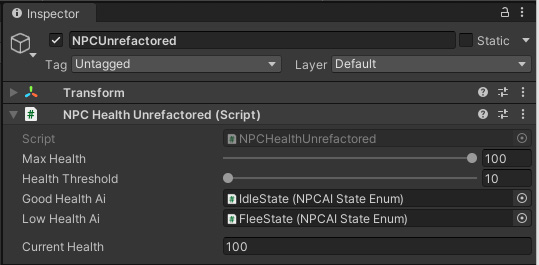
public int CurrentHealth; } This works, but you have data that you won’t expect to change at runtime. If you have many objects with NPCHealthUnrefactored attached, this can lead to a lot of unnecessarily duplicated data.
An NPCHealth MonoBehaviour before refactoring
Any data that does not need to change can move it into a ScriptableObject:
[CreateAssetMenu(fileName="NPCConfig")] public class NPCConfigSO : ScriptableObject {
    [Range(10, 100)] public int maxHealth;
    [Range(10, 100)] public int healthThreshold;
} Use the CreateAssetMenu attribute to configure the menu action. You can optionally specify the default fileName or menu item order.
Code conventions in this guide Many of the code samples in this guide are simplified for illustrative purposes and easier readability (e.g., public fields). In production, use private fields and public properties for additional encapsulation and flexibility. Apply the SerializeField attribute to private fields to make them appear in the Editor’s Inspector. A naming convention can also help differentiate scripts for ScriptableObjects from MonoBehaviours. One way to achieve this is to add a “Data” or “SO” suffix at the end of the class name. While this isn’t necessary, it can help keep your project organized and reduce ambiguity. It’s recommended that you maintain and follow a code style guide as your codebase grows. See Create a C# style guide (Unity 6 edition) for more information.
Then the refactored NPCHealth component simplifies to this:
public class NPCHealth: MonoBehaviour {
    // Reference to our ScriptableObject

    public NPCConfigSO Config;
    public int CurrentHealth;
}
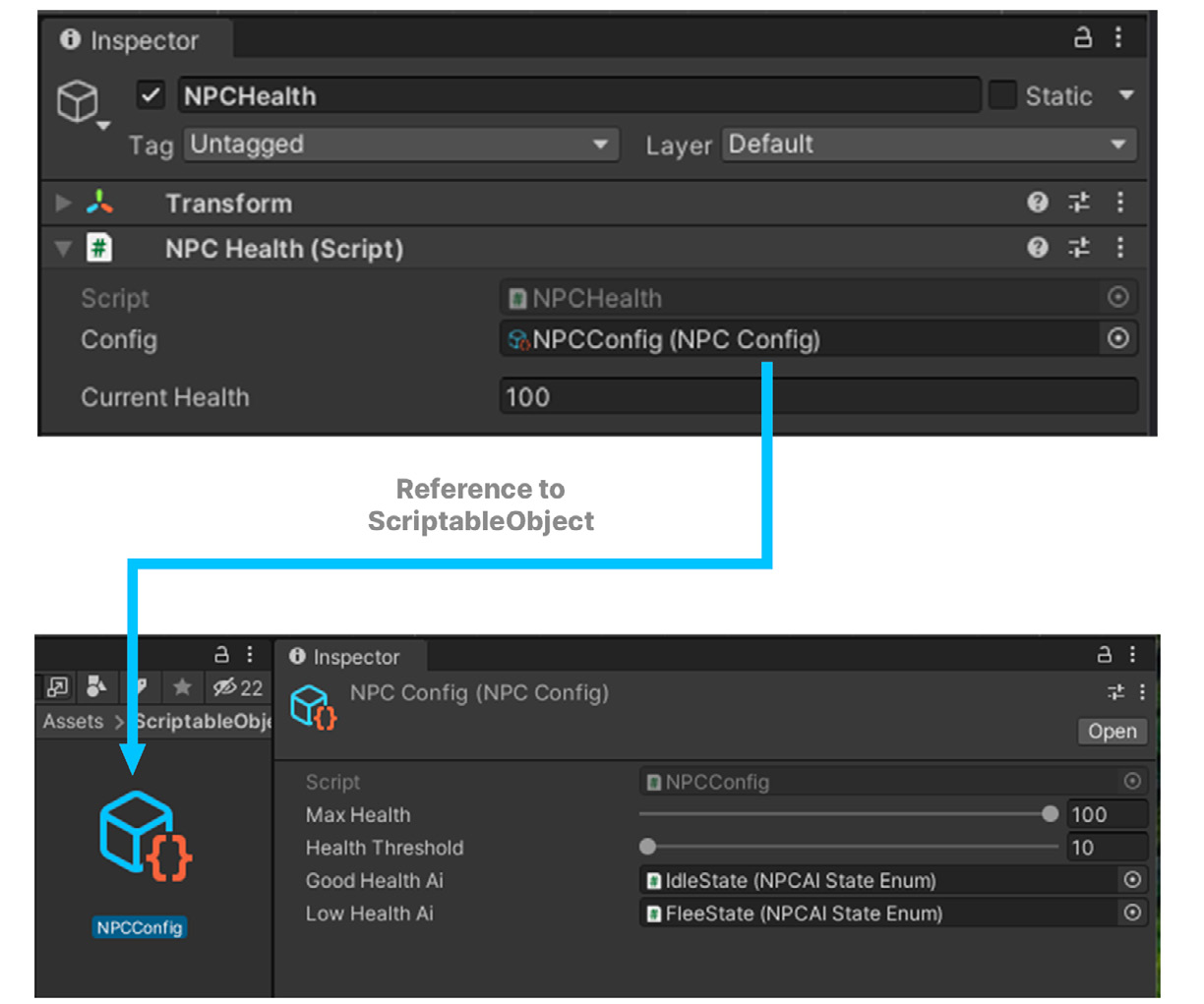
The MonoBehaviour now contains a reference to this new ScriptableObject. In the Inspector, everything after refactoring looks similar, except the data is split.
Refactoring splits data between a MonoBehaviour and ScriptableObject
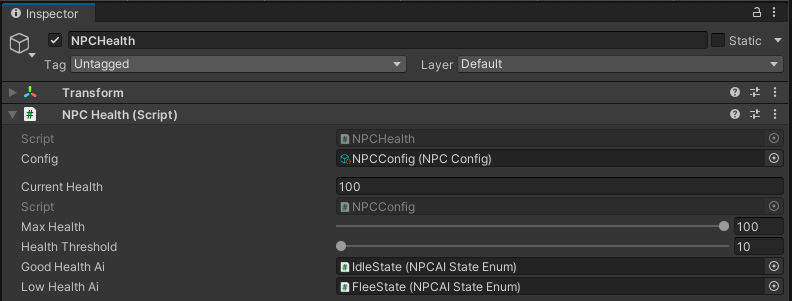
Custom Inspectors When separating data into a ScriptableObject, you have data contained in two places, the ScriptableObject asset and the MonoBehaviour referencing it. To make your MonoBehaviours easier to navigate, consider creating a custom editor. Below is an example for the NPCHealth.
A custom Inspector shows the ScriptableObject’s variables in the MonoBehaviour.
This allows you to inspect the NPCConfig’s variables alongside the other properties in the MonoBehaviour. If you select the original NPCHealth prefab, you can easily edit values in both objects. A custom editor requires only a few lines of code: —
Derive a new class from Editor, and store this in a folder named “Editor.” Apply the CustomEditor attribute with the NPCHealth type.
Reserve a temporary editor for the NPCConfig ScriptableObject.
In OnInspectorGUI, create the editor for the NPCHealth component.
Draw the inspectors from the base class and new custom Inspector.
using UnityEditor;
[CustomEditor(typeof(NPCHealth))] public class NPCHealthEditor : Editor {
    private Editor editorInstance;
    private void OnEnable() {
        // Reset the editor instance editorInstance = null;

    }
    public override void OnInspectorGUI() {
        // The inspected target component NPCHealth npcHealth = (NPCHealth)target;

        if (editorInstance == null) editorInstance = Editor.CreateEditor(npcHealth.config);
// Show the variables from the MonoBehaviour base.OnInspectorGUI();// Draw the ScriptableObjects inspector editorInstance.DrawDefaultInspector();
}
}
You can expand on this example with custom property drawers and editor attributes. This can even make for a better user experience when working with ScriptableObjects.Architectural benefits With ScriptableObjects, you can cleanly separate shared and unshared data. Anything unique and dynamic to the GameObject instance remains inside the MonoBehaviour, while the shared data is stored in the ScriptableObject. Architecture with ScriptableObjects, however, goes beyond just saving memory.
There are a few benefits to restructuring the code architecture: —
Designers can work more independently from software developers: Storing data and logic on a single MonoBehaviour creates the potential for developers and game designers to step over each other’s work. If two people change different parts of the same prefab or scene, this results in a time-wasting merge conflict. Breaking off shared data into smaller files and assets reduces these problems. Architecting with ScriptableObjects also enables designers to build gameplay without always relying on a programmer.
Just be prepared to define a clear workflow between your teams when sharing data. Good communication and establishing some boundaries can help prevent issues here. Some extra error checking or data validation may be necessary as well (e.g., use a Range attribute or OnValidate to prevent bad values). —
Editing shared data is faster and less error-prone: Changes to the shared data now happen all at once. If you need to modify a setting for your NPCs, for example, you could adjust it in just one location, and have it propagate the changes for every affected component in every scene. This reduces any potential errors from mass editing a large number of individual GameObjects by hand. Offloading data into ScriptableObjects can also help with version control and prevent merge conflicts when teammates work on the same scene or prefab.
Save gameplay tweaks in Play mode: Play mode in the Editor is an opportunity for designers to experiment with gameplay and settings. However, any modifications made to MonoBehaviours are lost when exiting Play mode because Unity discards the temporary copy of the scene. Because the ScriptableObjects are assets, changes to their values are saved regardless of whether Unity is in Play mode. This can be useful if you want to make adjustments at runtime. This can, however, also be a liability if you want to revert those changes. Just remember to rely on Unity Version Control or another version control system, so you can always restore your work if necessary. See the guide Version control and project organization best practices (Unity 6 edition) for more information.
Improve scene loading times: When saving a scene or prefab, Unity serializes everything inside of them. That includes every GameObject, every component attached to those GameObjects, and every public field. Unity does this without checking for duplicate data. Moving data to ScriptableObjects can reduce your scene and prefab sizes which can noticeably impact loading and saving.
ScriptableObject variables You can make your shared data containers even more granular with a ScriptableObject representing just one value. For instance, you could create a ScriptableObject class called IntVariable that holds one public field called value:
using UnityEngine;
[CreateAssetMenu(menuName = "Variables/Int", order = 1)] public class IntVariableSO : ScriptableObject { public int value; }
Then, you could use the IntVariable in a MonoBehaviour. Structuring a PlayerHealth class would then look like this: public class PlayerHealth : MonoBehaviour { public IntVariableSO health; }
Though we normally think of ScriptableObjects as holding unchanging values, you can give them methods that update this data at runtime (and reset to an initial value when exiting Play mode). In this way, you can make ScriptableObjects that essentially function as variables – containing integers, floats, booleans, and so on. Your designers can then reserve data for game logic without needing a software developer each time they want to do it. However, this requires planning to be successful. Decide with your designers how to divide authoring gameplay data. The key is to set some boundaries on how to collaborate. For example, the programming team might do the initial setup of ScriptableObjects for use with an inventory system. Then, the design team could use those to fill in each item’s in-game stats or behaviors. With some extra Editor scripting, this can become a near-seamless experience. Another possibility is making the fields in the Inspector toggle between using a shared value from a ScriptableObject and a constant. This can allow the game design team greater freedom to override the ScriptableObject data per instance.
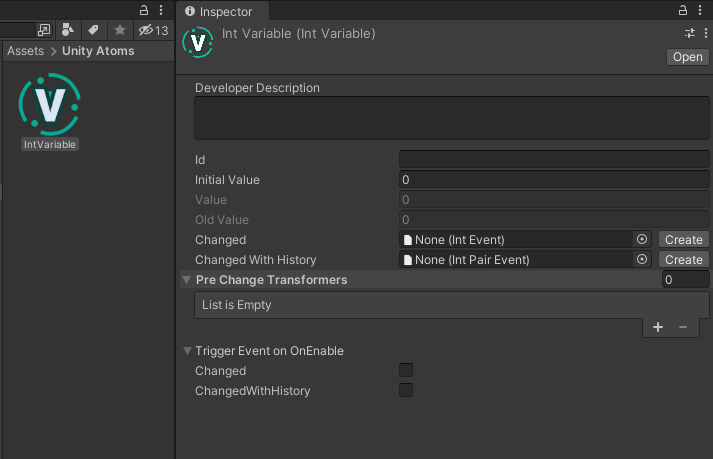
Example of a ScriptableObject-based IntVariable from the open source Unity Atoms project
See the Game architecture with ScriptableObjects presentation from Unite Austin for how to implement this behavior in your own projects. You can also download the open source Unity Atoms project to see a working implementation of ScriptableObject variables.
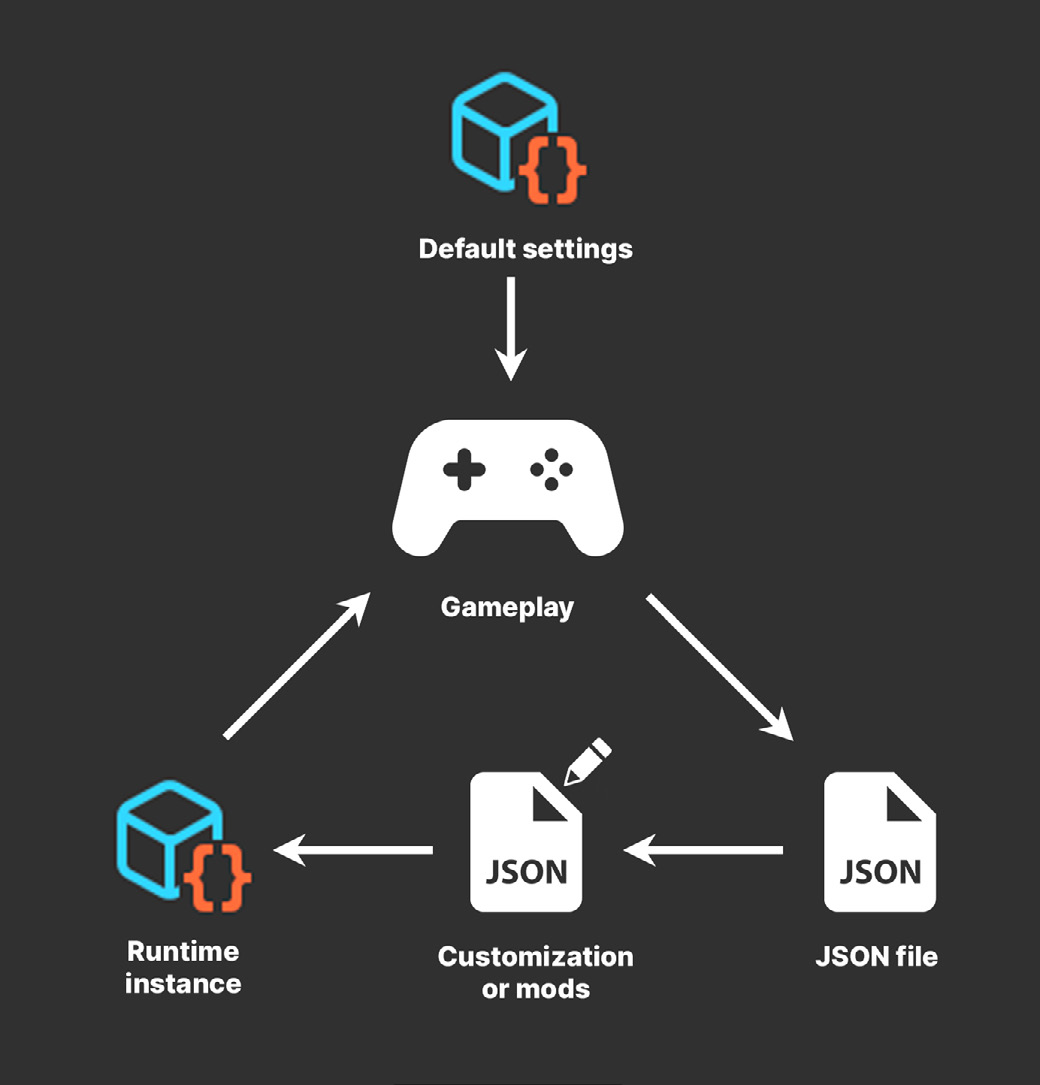
Dual serialization You can mix how to serialize data within Unity. This allows you to work with ScriptableObjects in the Editor, but then store their data in another location, such as a JSON or XML file. This allows you to take advantage of each format’s strengths. File formats like JSON and XML are suitable for storing persistent data, such as save game data or settings, but can be difficult to work with in the Editor; however, they’re easy to modify outside of Unity with any text editor. In contrast, ScriptableObjects work well in the Editor and can be swapped with a quick dragand-drop operation. However, they aren’t easy to modify outside of Unity or share within your community of players. Mixing serialized formats could open up new possibilities for your game, such as level editing or modding. At build time, a script can convert the other files into ScriptableObjects, which is faster to load than plain text. While you’ll want to keep some sensitive data safely tucked away on your servers (e.g., virtual currency, account information), exposing part of your game data to the community may enhance gameplay by allowing sandbox levels for user experimentation.
Imagine a ScriptableObject that defines your game level layout. It may simply contain a number of Transforms that define placement of prefabs, starting configurations, and so on. Your game scripts will use this data to assemble each level. Imagine the walls and starting positions of a game, stored within a ScriptableObject:
[CreateAssetMenu(fileName ="LevelLayout")] public class LevelLayout : ScriptableObject {
    public Vector3[] wallPositions = new Vector3[2];
    public Vector3[] playerPositions = new Vector3[2];
    public Vector3[] goalPositions = new Vector3[2];
    public Vector3 ballPosition;
}
This defines how you set up the level. Your level management scripts can read the data from the LevelLayout object, then instantiate your prefabs in their correct positions. A custom script can use JsonUtility to export this same data to disk. This results in a text file outside of the Editor that your users can modify with external tools. To load a custom modded level, ScriptableObject.CreateInstance can generate a ScriptableObject at runtime. Then, read the text from the JSON file to populate the ScriptableObject. This LoadLevelFromJson example method shows that in action: using System.IO;
public class LevelManager : MonoBehaviour {
    public ScriptableObject levelLayout;
    public void LoadLevelFromJson(string jsonFile) {
        if (levelLayout == null) {
            levelLayout = ScriptableObject. CreateInstance<LevelLayout>();
        }
        var importedFile = File.ReadAllText(jsonFile);
        JsonUtility.FromJsonOverwrite(importedFile, levelLayout);
    }
}
Your custom data replaces the contents of the ScriptableObject and allows you to use this externally modded level like any other in your game. The application is none the wiser. Be sure to see this work for yourself in the sample project. If we load a modified JSON file, this customized level overrides the default level data on the ScriptableObject.
Mix serialized formats for more flexibility
Note: When deserializing JSON into ScriptableObjects with JsonUtility, you must use the FromJsonOverwrite method. Instead of creating a new object and loading the JSON data into it, JsonUtility loads the JSON data into an existing object. This updates the values stored in classes or objects without any allocations.
Protect your data The simple mod example described above demonstrates one possible application of ScriptableObjects. However, when exposing game data for modification, you should exercise caution to avoid players tampering with the rest of your application. Here are common ways to protect anything that you don’t want modded: —
Encryption: Use encryption to protect data files from being easily read or modified. This can make it more difficult for users to alter critical data.
Digital signatures: You can use a fingerprint algorithm to verify that your data files have not been tampered with.
Server-side validation: If your game relies on data that is stored on a server, check the data on the server before it is used in the game, and reject any data that appears to have been manipulated.
No single approach is foolproof, and it’s generally a good idea to use a combination of these techniques so your players don’t introduce any bugs or vulnerabilities into your game.