Паттерн: объекты-делегаты
Паттерн: объекты-делегаты
В Unity объекты ScriptableObject предназначены не только для хранения данных. Они могут содержать методы, а значит, объединять сведения о том, что нужно сделать (логику), и о том, с чем работать (данные).
Делегаты и события Делегаты и события в C# тесно связаны, но решают разные задачи. Делегат представляет собой тип, определяющий сигнатуру метода. Благодаря этому методы можно передавать другим методам в качестве аргументов. Делегат можно представить как переменную, которая вместо значения хранит ссылку на метод.
Событие, в свою очередь, представляет собой особый вид делегата, который позволяет классам взаимодействовать при слабой связанности. Подробнее события рассматриваются в главе о паттерне «Наблюдатель». Общие сведения см. в материале «Различия между делегатами и событиями в C#».
Суть подхода в том, чтобы инкапсулировать алгоритмы выполнения отдельных задач в самостоятельных объектах. Авторы книги «Банда четырех» называют такое общее решение паттерном «Стратегия». Предположим, объект поиска пути должен построить маршрут через лабиринт. Сам объект не содержит алгоритма поиска, а лишь хранит ссылку на другой объект, который выполняет вычисления.
Чтобы решить лабиринт конкретным алгоритмом поиска пути, например A* или алгоритмом Дейкстры, реализуйте это решение в отдельном объекте-стратегии. Во время выполнения алгоритм можно заменить, просто назначив другой объект.
Методы ScriptableObject В Unity этот паттерн можно реализовать с помощью MonoBehaviour, который ссылается на ScriptableObject с необходимой логикой. Выполняя задачу, MonoBehaviour вызывает внешние методы ScriptableObject вместо собственных. Однако у такого подхода есть несколько ограничений: - Методы ScriptableObject не вызываются автоматически из цикла PlayerLoop компонента MonoBehaviour, как Start(), Update() и OnCollisionEnter(). Их необходимо вызывать самостоятельно. - Как и префабы, объекты ScriptableObject не могут напрямую ссылаться на объекты сцены. Если ScriptableObject должен работать с объектом сцены, этот объект необходимо передать в качестве параметра. При вызове метода ScriptableObject компонент MonoBehaviour часто может передать в качестве аргумента самого себя или другие зависимости. Это позволяет выполнять логику, запускать корутины и решать другие задачи, хотя ScriptableObject существует на уровне проекта.
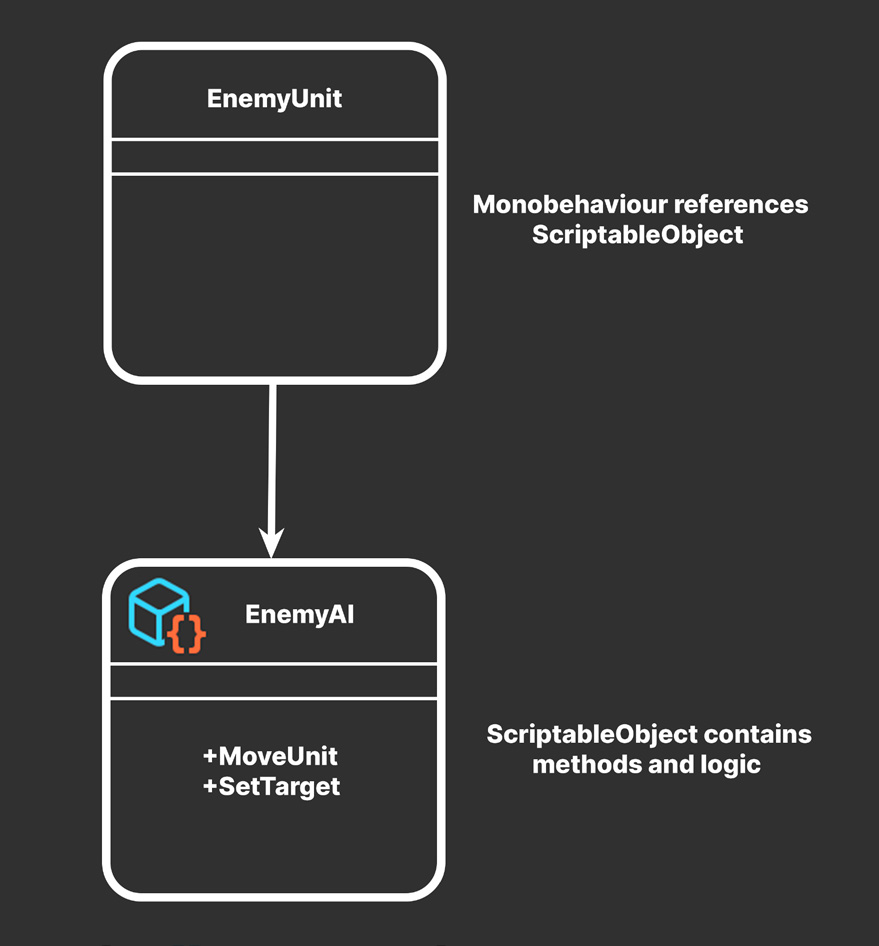
MonoBehaviour ссылается на ScriptableObject
ScriptableObject содержит методы и логику
ScriptableObject может содержать взаимозаменяемые реализации поведения или логики.
Например, в игре можно создать несколько типов противников с разным поведением при перемещении. Одни будут патрулировать территорию, другие стоять на месте, а третьи убегать от игрока. Один MonoBehaviour EnemyUnit может ссылаться на ScriptableObject EnemyAI с методом MoveUnit. Сам скрипт EnemyUnit не содержит логики перемещения или поведения, а лишь вызывает MoveUnit объекта ScriptableObject в подходящий момент. Если методу нужны данные сцены, EnemyUnit может передать ссылку на самого себя в качестве параметра. Таким же образом передаются и другие необходимые зависимости из сцены.
Изменение данных ScriptableObject Данные ScriptableObject можно изменять во время выполнения, но делать это следует осторожно. Если несколько компонентов MonoBehaviour совместно используют один ScriptableObject и изменяют одни и те же данные, могут возникнуть проблемы. Чтобы избежать этой ситуации, во время выполнения можно создать отдельный экземпляр ScriptableObject. Исходный ScriptableObject послужит шаблоном со всей логикой и данными, а каждый MonoBehaviour создаст собственный экземпляр, который можно свободно изменять.
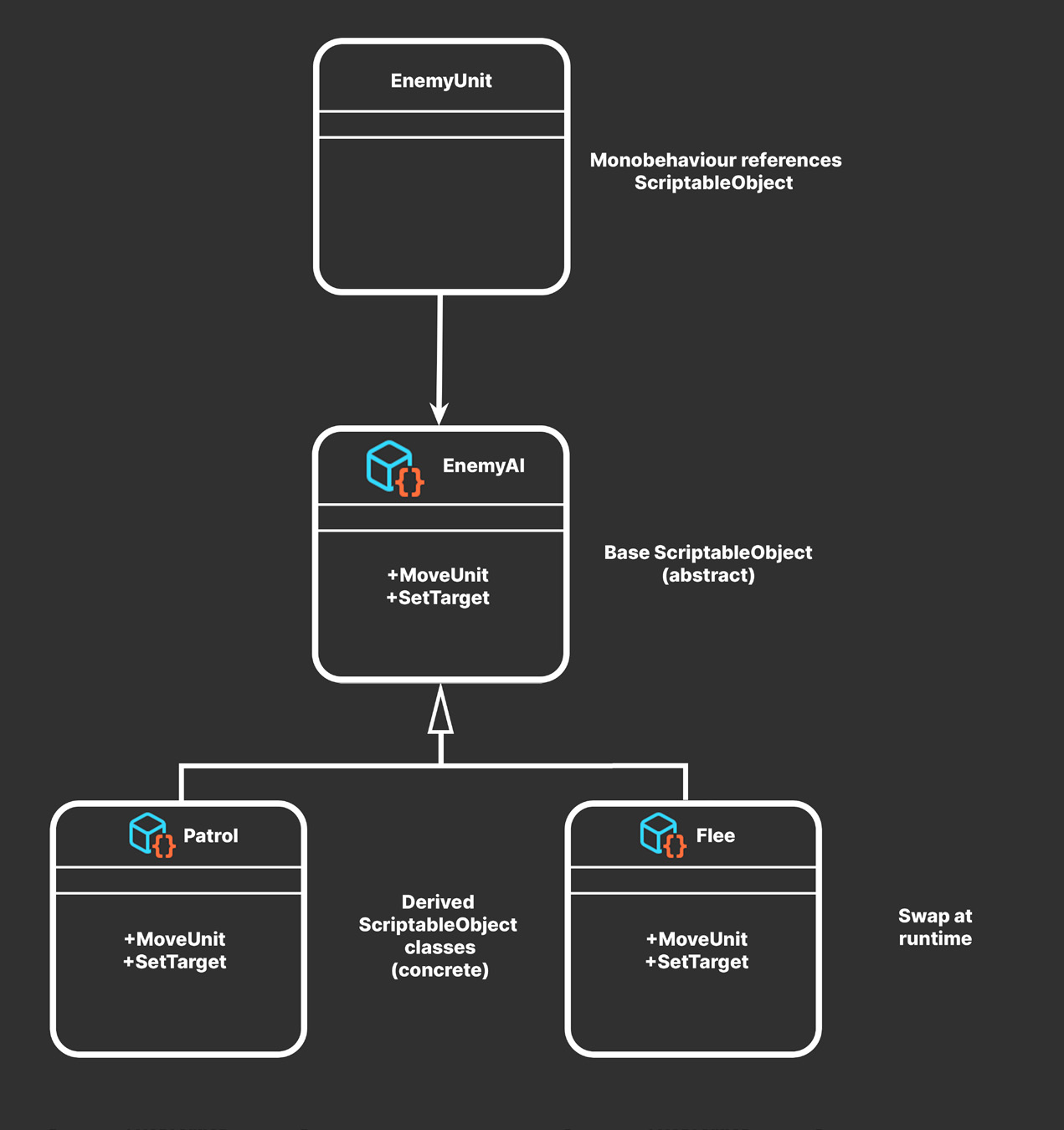
Подключаемое поведение Этот паттерн станет полезнее, если определить ScriptableObject EnemyAI как абстрактный класс. Тогда он послужит шаблоном для разных объектов ScriptableObject, совместимых с MonoBehaviour EnemyUnit, а один абстрактный ScriptableObject сможет представлять несколько алгоритмов.
MonoBehaviour ссылается на ScriptableObject
Базовый ScriptableObject (абстрактный)
Производные классы ScriptableObject (конкретные)
Замена во время выполнения
Подключаемое поведение можно менять во время выполнения или в редакторе Unity.
Например, от базового EnemyAI можно унаследовать конкретные классы ScriptableObject с поведением Patrol, Idle и Flee. Все они реализуют один метод MoveUnit, но результаты его работы могут существенно различаться. В редакторе Unity каждый такой ассет можно заменить другим. Достаточно перетащить нужный ScriptableObject в поле EnemyAI. Любой совместимый ScriptableObject подключается таким способом.
EnemyUnit или другой компонент может играть роль «мозга»: отслеживать момент смены ScriptableObject и заменять поведение во время выполнения. Так EnemyUnit способен реагировать на игровые события, например переходить от патрулирования к бегству. При каждой смене состояния достаточно назначить другой ScriptableObject EnemyAI.
В рабочем проекте второй разработчик или дизайнер может реализовать перемещение или логику ИИ непосредственно в ScriptableObject. При добавлении новых вариантов перемещения и поведения, например DuckAndCover или Chase, исходный скрипт EnemyUnit останется без изменений. Такой паттерн повышает расширяемость кодовой базы и соответствует принципу открытости/закрытости из SOLID. Поскольку система уже разделена на небольшие объекты, проект легче масштабировать при расширении команды или изменении дизайна игры.
Игровой ИИ на основе ScriptableObject Более подробный пример управления поведением с помощью ScriptableObject представлен в серии видео «Подключаемый ИИ с ScriptableObject». В этих записях прямых эфиров показана система ИИ на основе конечного автомата, где состояния, действия и переходы между состояниями настраиваются с помощью объектов ScriptableObject.
Пример: аудиоделегаты Поведение в ScriptableObject не обязательно должно быть сложным. Это может быть даже обычное воспроизведение настроенного звука. Например, ScriptableObject в роли «звукового делегата» позволяет разнообразить звучание объектов AudioClip. AudioDelegateSO определяет абстрактный класс с методом Play, который принимает AudioSource в качестве параметра.
using UnityEngine;
using Random = UnityEngine.Random;
using System;
[Serializable] public struct RangedFloat {
    public float MinValue;
    public float MaxValue;
}
public abstract class AudioDelegateSO: ScriptableObject {
    public abstract void Play(AudioSource source);
}
Конкретный ScriptableObject SimpleAudioDelegate может выбирать случайный клип из доступных вариантов и изменять при воспроизведении его громкость и высоту тона. Это делает повторяющиеся звуки менее однообразными.
[CreateAssetMenu(fileName ="AudioDelegate")] public class SimpleAudioDelegateSO : AudioDelegateSO {
    public AudioClip[] Clips;
    public RangedFloat Volume;
    public RangedFloat Pitch;
    public void Play(AudioSource source) {
if (clips.Length == 0 || source == null)
return;source.clip = clips[Random.Range(0, Clips.Length)];
source.volume = Random.Range(Volume.minValue, Volume.maxValue);
source.pitch = Random.Range(Pitch.minValue, Pitch.maxValue);
source.Play();
}
}
После этого любой MonoBehaviour сможет использовать экземпляр ScriptableObject, унаследованный от AudioDelegateSO. Для разных звуковых эффектов можно создавать и другие варианты AudioDelegate. Методы ScriptableObject открывают множество возможностей. Они могут не только выполнять действия, но и отправлять сообщения любому объекту сцены. Теперь рассмотрим систему событий на основе ScriptableObject и паттерна «Наблюдатель».
Славная революция ScriptableObject Доклад Ричарда Файна «Свержение тирании MonoBehaviour в славной революции ScriptableObject» на Unite 2016 заложил основу значительной части этой электронной книги. Фрагмент демонстрационного проекта, который в оригинале назывался AudioEvent, был изменен для данного примера. Подробности реализации и пример применения ScriptableObject см. в примере проекта.
Pattern: Delegate objects
ScriptableObjects in Unity aren’t just for storing data; you can also put methods in them, meaning they can hold both what to do (logic) and what to use (data).
Delegates versus events Delegates and events are closely related concepts in C#, but they serve different purposes. A delegate is a type that defines a method signature. This allows you to pass methods as arguments to other methods. Think of it like a variable that holds a reference to a method, instead of a value. An event, on the other hand, is essentially a special type of delegate that allows classes to communicate with each other in a loosely coupled way. Events are explored in more detail in the Pattern: Observer chapter. For general information about the differences between delegates and events, see Distinguishing Delegates and Events in C#.
The idea is that if you need to perform specific tasks, you encapsulate the algorithms for doing those tasks into their own objects. The original Gang of Four refers to this general design as the strategy pattern. Suppose you want a pathfinding object that calculates a route through a maze. The object itself wouldn’t actually contain any pathfinding logic. Instead, it just keeps a reference to another object that does.
If you want to solve the maze with a specific path search technique (e.g., A*, Dijkstra, etc.), implement the correct solution within this separate “strategy” object. At runtime, you can then swap to a different algorithm by exchanging objects.
ScriptableObjects methods In Unity, one way to implement this pattern is to have a MonoBehaviour reference a ScriptableObject containing the necessary logic. When the MonoBehaviour performs a task, it calls the external methods on the ScriptableObject rather than its own. However, there a few limitations to this: —
Methods on a ScriptableObject won’t be called automatically from the MonoBehaviour’s player loop (like Start(), Update(), and OnCollisionEnter()). You need to call them yourself.
Like prefabs, ScriptableObjects can’t reference scene objects directly. If they need to perform work on a scene object, you’ll need to pass that object in as a parameter. When calling the ScriptableObject’s methods, a MonoBehaviour can often pass in itself as the argument or pass in any other dependencies. This gives you the flexibility to execute logic, run coroutines, etc. even though the ScriptableObject exists at the project level.
ScriptableObjects can contain pluggable implementations of behavior or logic.
For example, you can define several enemy units in a game with different movement behavior. Let’s suppose some of them need to patrol, stand idle, or flee from the player. A single EnemyUnit MonoBehaviour can reference a EnemyAI ScriptableObject that contains a method called MoveUnit. The EnemyUnit script itself doesn’t contain any movement or behavior logic. It only executes the ScriptableObject’s MoveUnit at the appropriate time. If the method needs data from the scene, the EnemyUnit object can pass in a reference to itself as a parameter. Any other necessary dependencies in the scene can be passed in as well.
Modifying ScriptableObject data At runtime, you actually can change ScriptableObject data, but be careful whenever doing so. Multiple Monobehaviour sharing the same ScriptableObject can cause problems if they modify the same data. Remember that you can create an instance of a ScriptableObject at runtime to avoid this issue. The initial ScriptableObject then acts like a template with all the logic and data. Each MonoBehaviour can then make its own instance of that ScriptableObject which can be modified freely.
Pluggable behavior You can make this pattern more useful by defining the EnemyAI ScriptableObject as an abstract class. This allows it to act as a template for a variety of ScriptableObjects that are compatible with the EnemyUnit MonoBehaviour, so the abstract ScriptableObject can stand in for more than one algorithm.
Pluggable behaviors can change at runtime or in the Editor.
Thus, you could have concrete ScriptableObject classes for behaviors like Patrol, Idle, or Flee that derive from the base EnemyAI. Even though they all implement the same MoveUnit method, each can produce very different results. In the Editor, each asset is interchangeable. You can just drag and drop the ScriptableObject of choice into the EnemyAI field. Any compatible ScriptableObject is “pluggable” in this fashion.
The EnemyUnit or another component can behave as the “brain” that monitors when to switch ScriptableObjects and also swap behavior at runtime. This is one way the EnemyUnit can react to gameplay events like transitioning from a patrolling to a fleeing state. Simply switch EnemyAI ScriptableObjects on each state change. In production, a second developer or designer can implement the actual movement or AI logic within the ScriptableObject. As additional movements or behaviors get added to the game (e.g., DuckAndCover, Chase, etc.), the original EnemyUnit script remains unchanged. This pattern can help keep your codebase more extensible, in keeping with the open-closed principle from SOLID programming. Because everything is already split into smaller objects, the resulting project is more scalable as you add team members or as game design changes.
Gameplay AI with ScriptableObjects For a more detailed example of using ScriptableObjects to drive behavior, see the Pluggable AI With Scriptable Objects video series. These recorded live sessions demonstrate a finite state machine-based AI system that can be configured using ScriptableObjects for states, actions, and transitions between those states.
Example: Audio delegates The behavior contained in the ScriptableObject does not necessarily need to be complex. It can be something as basic as playing back a customized sound. Here’s an example of a “sound delegate” ScriptableObject that can help add variations to your AudioClips. The AudioDelegateSO defines an abstract class with a Play method that takes an AudioSource as a parameter.
using UnityEngine;
using Random = UnityEngine.Random;
using System;
[Serializable] public struct RangedFloat {
    public float MinValue;
    public float MaxValue;
}
public abstract class AudioDelegateSO: ScriptableObject {
    public abstract void Play(AudioSource source);
}
This concrete SimpleAudioDelegate ScriptableObject can then select a random clip from the available choices and vary its volume and pitch during playback. This reduces the monotony of repeating the same sound.
[CreateAssetMenu(fileName ="AudioDelegate")] public class SimpleAudioDelegateSO : AudioDelegateSO {
    public AudioClip[] Clips;
    public RangedFloat Volume;
    public RangedFloat Pitch;
    public void Play(AudioSource source) {
if (clips.Length == 0 || source == null)
return;source.clip = clips[Random.Range(0, Clips.Length)];
source.volume = Random.Range(Volume.minValue, Volume.maxValue);
source.pitch = Random.Range(Pitch.minValue, Pitch.maxValue);
source.Play();
}
}
Any MonoBehaviour can then use a ScriptableObject instance derived from the AudioDelegateSO class. You can also make variations of the AudioDelegate for different audio effects. Having methods on a ScriptableObject opens up several possibilities. In addition to performing actions, its methods can send messages to any object in the scene. Next, let’s look at a ScriptableObject-based event system with the observer pattern.
The glorious ScriptableObject revolution Richard Fine’s Overthrowing the MonoBehaviour tyranny in a glorious ScriptableObject revolution presentation at Unite 2016 lay the foundation for much of this e-book. Part of the demo (called AudioEvent in the original project) has been modified for this example. See the sample project for implementation details and an example using ScriptableObjects.