Задержка и производительность сети
Network latency and performance
If you’ve ever played an online game, you likely have firsthand experience with how latency can detract from the experience. Poor bandwidth and unstable networking connections lead to jerky player movement, inconsistent frame rates, and noticeable input lag. Now that you understand how clients and servers communicate, you can appreciate why this happens. With the internet filling the gap between your devices, a lot can go wrong. Even with the extra reliability of Unity Transport, UDP packets can get lost, arrive out of order, or get damaged on the way to their destination. These are potential sources of latency, also perceived as lag.
Simulating latency To understand and mitigate the effects of latency during development, you can simulate various network conditions in the Unity Editor using either the Debug Simulator in the UnityTransport or Network Simulator.
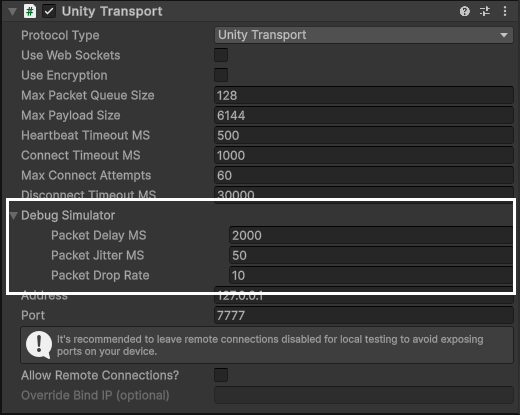
Unity Transport Debug Simulator Adjust the Debug Simulator in the UnityTransport component to introduce artificial latency, jitter, and packet loss. You can find these settings in the Inspector when selecting the NetworkTransport object in your scene. Set a few values to recreate network congestion: Latency: Add a delay in milliseconds to simulate slower network connections. For example, set latency to 100ms to mimic moderate network delay.
Jitter: Introduce variability in latency to simulate fluctuating network conditions. For instance, set jitter to 50ms to see how unstable connections affect gameplay. Packet Loss: Specify a percentage of packets to drop, mimicking poor connection quality. Try setting packet loss to 5% to understand its impact on gameplay. Play the game application again to observe how these simulated conditions affect gameplay.
Adjust the Debug Simulator of the Unity Transport.
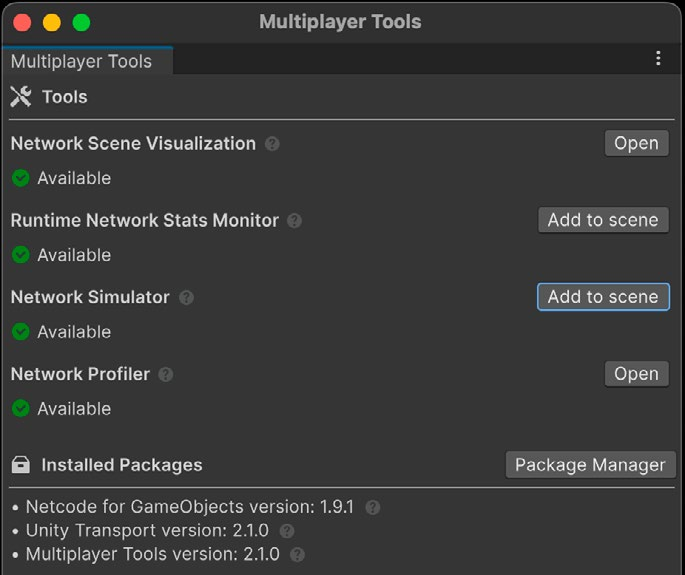
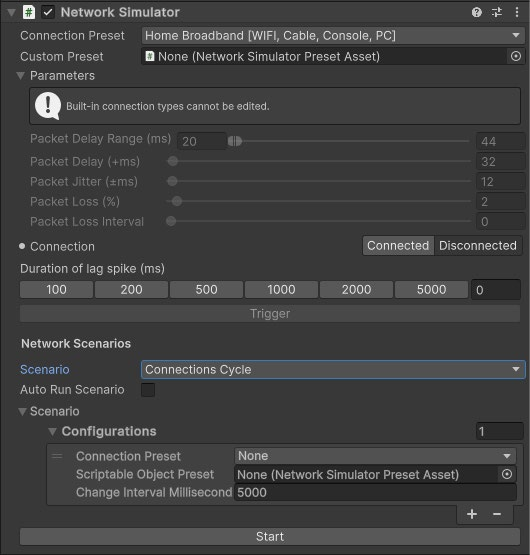
Network Simulator The Network Simulator from the Multiplayer Tools package lets you test less-than-ideal network conditions. This can help you discover and fix issues before they surface in production. It facilitates simulating network events, such as network disconnects, lag spikes, and packet loss.
Install the Network Simulator from the Multiplayer Tools package.
Test latency in the Network Simulator.
Other network conditioners The Debug Simulator or the Network Simulator only work in the Editor, however. For runtime builds, alternative network conditioners can be used to simulate latency. Tools such as clumsy for Windows and Network Link Conditioner for macOS/iOS can recreate various network conditions for thorough testing. For more information see the Testing and Debugging section further on in this guide. Dealing with the impact of latency on application performance is one of the biggest challenges in multiplayer development. Fortunately there are some strategies to help mitigate the effects of latency. Let’s explore a few of them here.
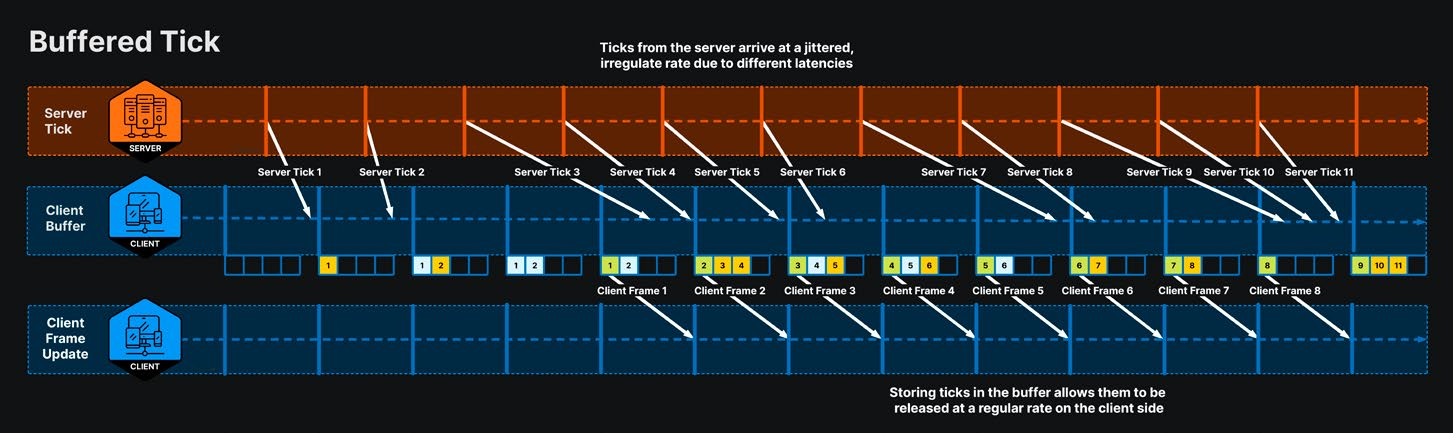
Client-side interpolation One way to reduce the effects of latency is client-side interpolation. In this method, each client intentionally delays rendering by a short interpolation period, rather than rendering it right away. In client-server topology, clients generally render a state that is about half the round-trip time (RTT) behind the server. Client-side interpolation adds an extra intentional delay on top of that. By running slightly behind, clients can buffer incoming state updates from the server. When it’s time to render the next update, the client calculates an interpolated state from the two most recent server ticks. The buffer allows the client to render regular client updates, even if ticks from the server arrive at a jittered, irregular rate. The interpolated states conceal minor latency or jitter.
The client renders interpolated states from a buffer.
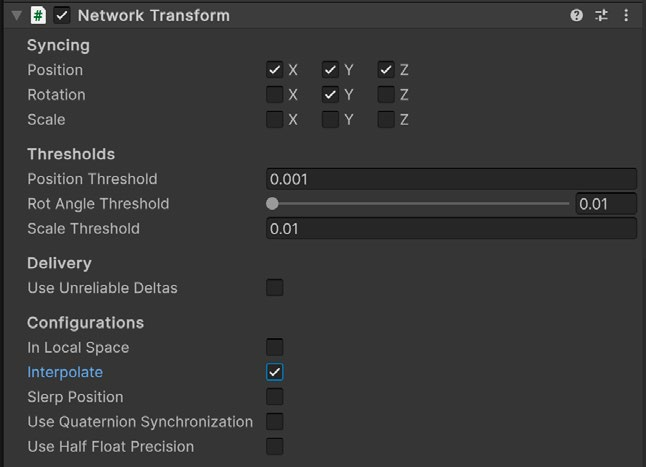
Client-side interpolation is available in Netcode for GameObjects as a flag on the NetworkTransform component. Enabling Interpolation interpolates position, rotation, and scale for the associated GameObject.
Client-side interpolation enabled on the NetworkTransform.
Just bear in mind that client-side interpolation introduces a slight delay in rendering, which is necessary for the interpolation.
Client-side prediction and anticipation In our earlier example, the ClientNetworkTransform gives the client direct control over player movement, making the game feel more responsive and instant. However, it’s important to note that client authority is not possible in many games due to a number of factors, such as game design, fairness, and security.
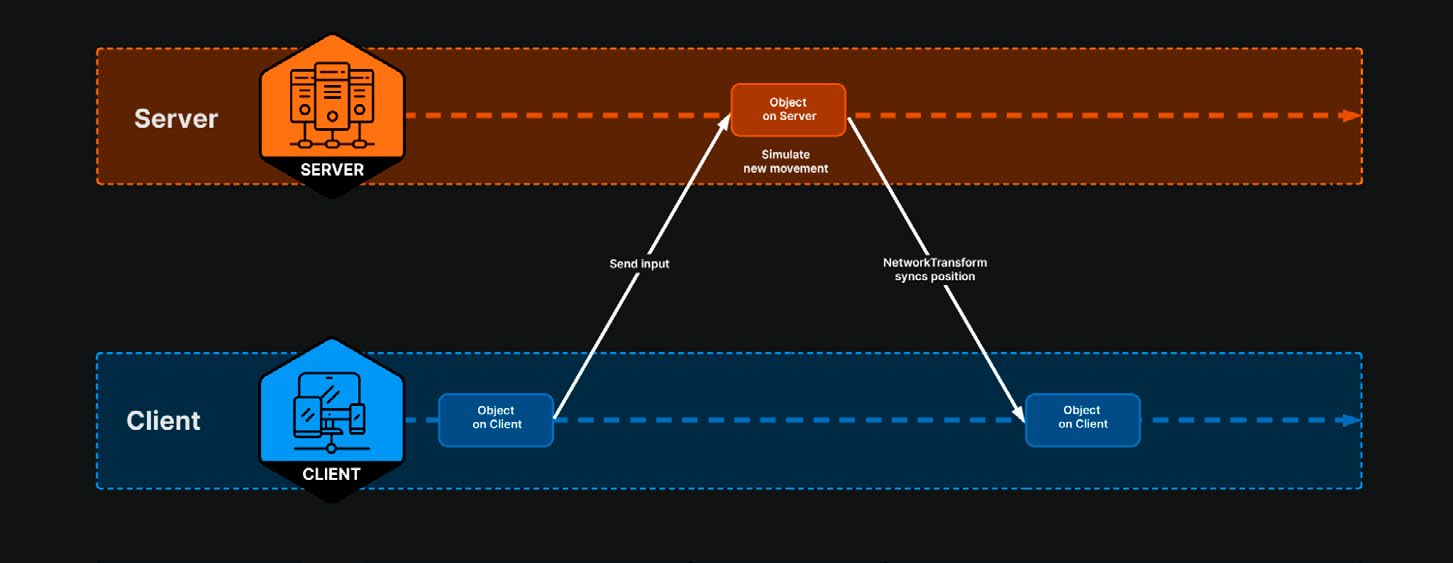
Why server authority In competitive games where fair competition is crucial, client authority can give players the ability to cheat or exploit the game by manipulating the client-side code or data. Games with complex player interaction and shared game worlds often require server authority to ensure data integrity, prevent tampering, and maintain a consistent experience for all players. Here, server authority is required to ensure a level playing field and maintain the integrity of the game. This means using the standard NetworkTransform component instead of the ownerauthoritative ClientNetworkTransform. This ensures that client input does not control the player; instead, only the server will have control.
Moving a NetworkTransform using server authority.
Server authority, however, can exacerbate latency. Instead of manipulating an onscreen player directly, each client must send its inputs to the server. The server then processes those inputs to simulate the game and calculates the game state. Only when the client receives the results of that simulation can it display the next frame. When using an authoritative server, players perceive latency because of the time it takes for data to travel from the client to the server and back again. In this scenario, clients tend to lag behind the server, especially as your UDP packets need to traverse the internet.
For many elements in a game, this lag might be acceptable, but for others, like the player’s character, such lag can ruin the feel of the game and make it difficult to play.
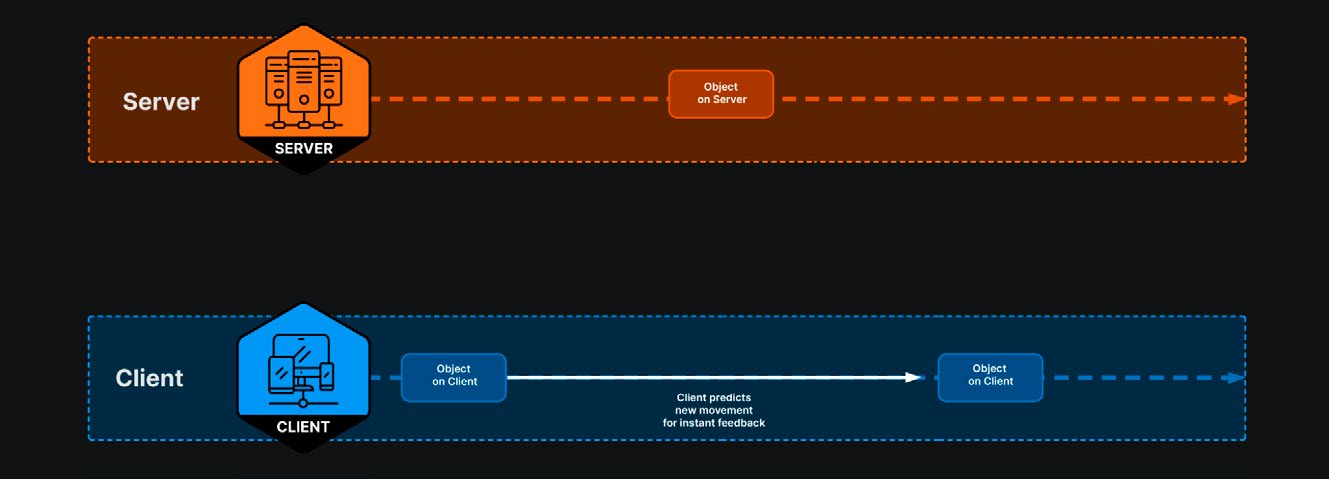
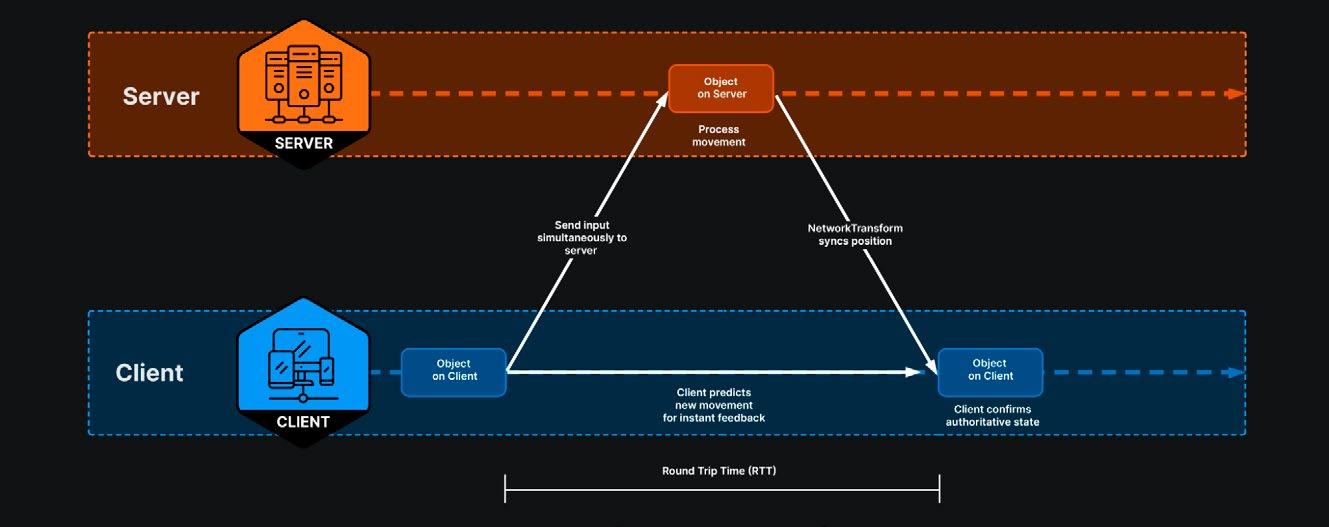
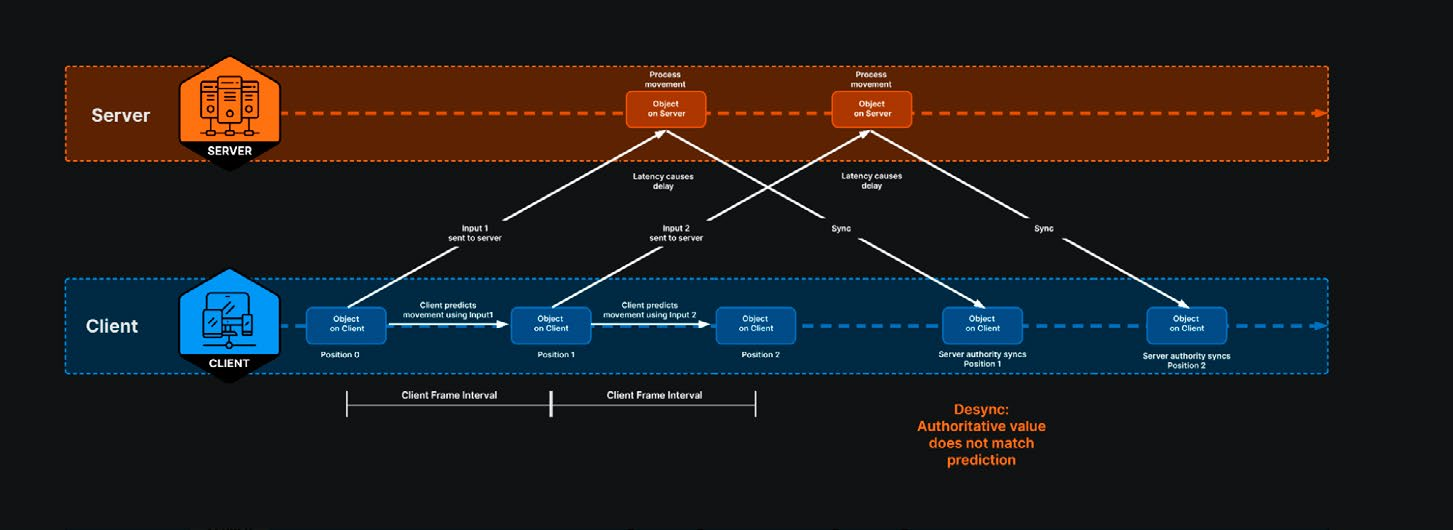
How client-side prediction works Client-side prediction offers one solution to the lag introduced by server authority. Instead of waiting for the server’s response, the client predicts the game state a fraction of a second into the future and updates the game visually. This is called “prediction” because the client predicts the game state without knowing the true state from the server. By doing this, the client can provide instant visual feedback to the player’s actions, making the game feel responsive.
Client predicts the game state.
Simultaneously, the client sends the player’s actions to the server in a packet. The server receives the client’s input packet and simulates the game state using those inputs. The server processes these inputs to simulate the game state, establishing the authoritative game state as the ground truth. The server sends that authoritative state back to the client.
The server sends back the authoritative state.
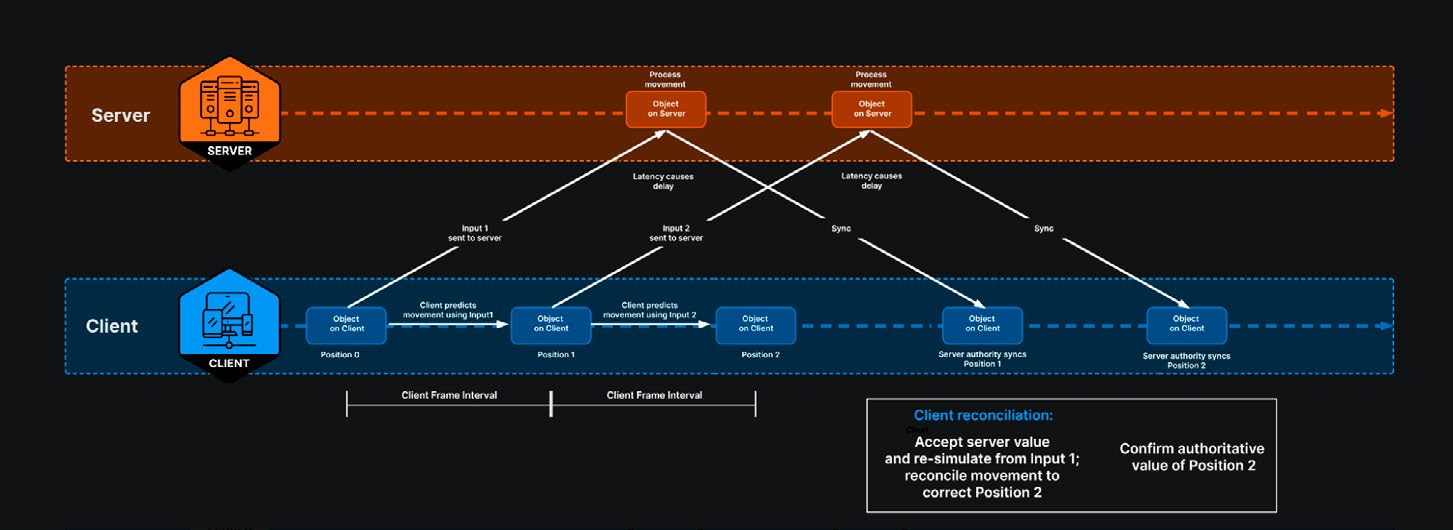
Reconciliation and rollback The client then compares the authoritative state with the anticipated state and looks for any differences. If the two states are close enough, then nothing happens and the client continues playing. If there is a significant mismatch – also called a “desync” – then, the client must decide how to correct its state to match the server’s authoritative state. This process is called reconciliation.
The client receives a mismatched state, or “desync.”
To handle latency and compensate for it, the client stores a history of its inputs and predicted state for a certain number of frames. When a desync occurs, the client can roll back its state to the last known correct state from the server. Then, it re-simulates the game from that point using the correct inputs. This brings the client state back in sync with the server.
The client reconciles the desync.
On any given frame, the client may need to re-simulate several frames, which is why a networked application can be more computationally expensive. This reconciliation and rollback, however, is what helps maintain a smooth and consistent experience for the player even with the presence of network latency.
Client-side anticipation in Netcode for GameObjects Netcode for GameObjects supports client anticipation, a simplified model for handling latency without full client-side prediction and reconciliation. It uses these components: —
AnticipatedNetworkVariable<T> is a generic component used for scalar or simple data types like integers, floats, and colors. It’s suitable for non-transform properties such as health, score, or item states.
AnticipatedNetworkTransform works similarly to AnticipatedNetworkVariable but is designed for Transform data, including position, rotation, and scale.
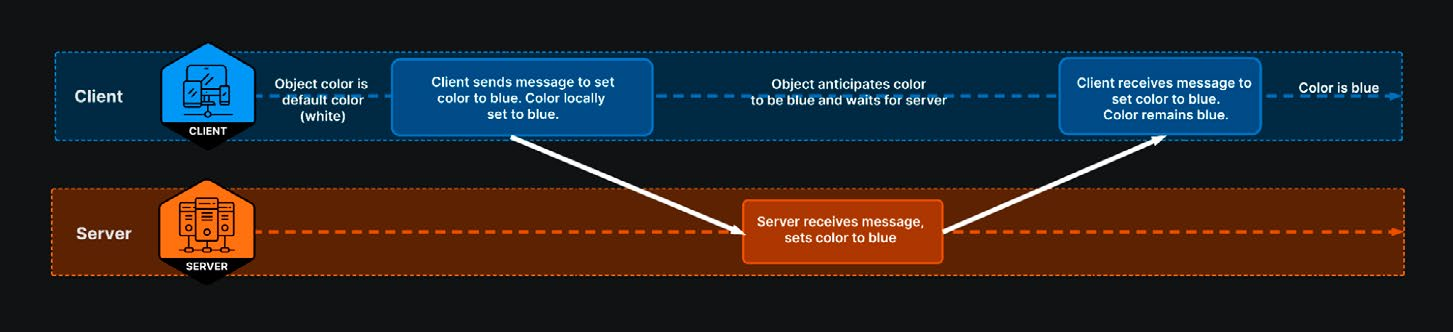
Client anticipation allows the client to provide immediate visual feedback to the user while waiting for the server’s authoritative update. This helps make the game feel more responsive. In our simple ColorTrigger example, when a player changes the color of an object from white to blue, the client can visually update the color immediately while waiting for the server to confirm the change. Between the client and server, anticipation would look something like this:
The client anticipates the game state.
AnticipatedNetworkVariable<T> and AnticipatedNetworkTransform both work by separating values into anticipated (visual) and authoritative states. Anticipation refers to the client’s predicted state, which provides immediate visual feedback to the player locally. The authoritative state is determined by the server. When the server’s update arrives, the client compares its anticipated state with the authoritative state. If they differ significantly, the client adjusts its state to match the server’s, ensuring consistency across all clients.
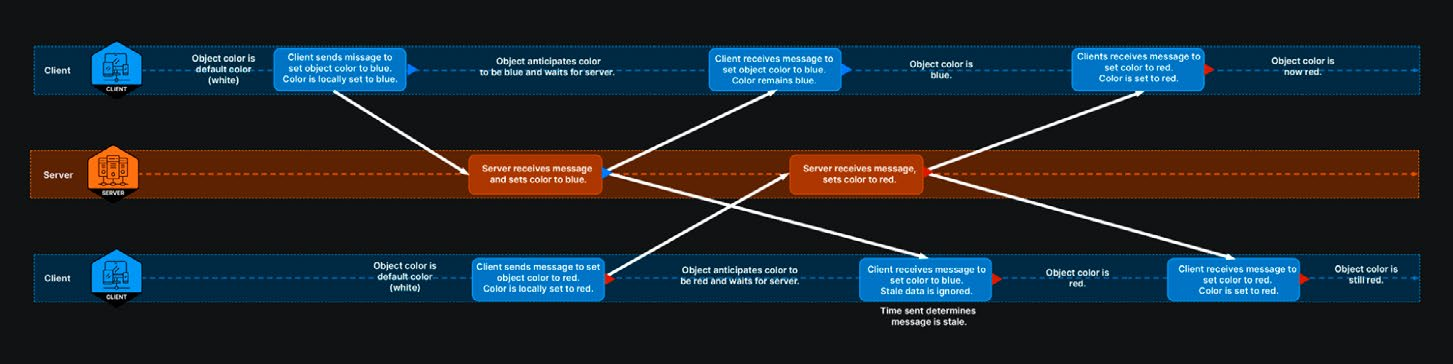
Client anticipation can ignore stale data.
Client anticipation also needs to account for “stale data” – updates from the server that reflect actions occurring before the client’s last request. Netcode for GameObjects provides two ways to handle this through the StaleDataHandling property: —
StaleDataHandling.Ignore ignores stale data and keeps the anticipated value. This can be useful if the state is changing rapidly and causing visual flickering.
StaleDataHandling.Reanticipate treats stale data like any other server update, triggering rollback and re-anticipation, which replays player inputs to maintain consistency.
To prevent choppy visual updates when server values differ from anticipated values, use the Smooth method available to both components. Smooth requires a starting value, a final value, and a duration for the smoothing process. This helps maintain a smooth and responsive visual experience despite network latency. While client anticipation improves gameplay responsiveness, this simplified approach may not cover all cases of latency and network issues. Note that true rollback and reconciliation require a deterministic physics system, which ensures that the same inputs will always produce the same results (below). This is essential for accurately rolling back and resimulating game states. Without determinism, discrepancies can arise between the server and client simulations. Netcode for GameObjects does not support deterministic physics, which is necessary for true client prediction and lag compensation. Instead, Netcode for GameObjects provides a simpler solution that focuses on client anticipation and smoothing. This can improve responsiveness without a full rollback system.
Deterministic physics A deterministic physics system ensures that given the same initial conditions and inputs, the physics simulation will always produce the same results. Note that Netcode for GameObjects uses Unity’s built-in physics engine, which is not deterministic. When re-running the simulation with the same inputs, the physics system does not guarantee identical results. Netcode for Entities, however, supports Unity Physics and Havok Physics, both of which offer deterministic simulation capabilities. This allows Netcode for Entities to support true client-side prediction.
Client-side prediction in Netcode for Entities Netcode for Entities offers advanced tools for handling client-side prediction and lag compensation. The same simulation code runs on both the client and the server for each entity. This allows the client to predict the state of the game based on player inputs, giving immediate feedback without waiting for the server’s response. When the client receives the latest snapshot from the server, it updates all the predicted entities with this data. After applying this snapshot, the client runs a simulation called the PredictedSimulationSystemGroup. This simulation processes from the oldest saved tick to the current target time, rolling back and re-simulating the game state to ensure that the client accurately simulates the game state. This rollback and re-simulation process helps the client correct any discrepancies and maintain synchronization with the server’s authoritative state. On the server side, the prediction loop runs once per frame. The server updates the authoritative game state and sends this updated state back to the client. The client stores a history of inputs and predicted states. When a desync occurs, the client rolls back to the last correct state from the server and re-simulates the game using the correct inputs. This keeps the client in sync with the server’s “ground truth.” Netcode for Entities also supports advanced physics features like: —
Multiple physics worlds: This allows for local-only physics simulations that don’t need to be replicated across the network.
Custom physics proxies: These enable interactions when you would like to make the ghosts interact with physics objects that are present only on the client (ex: debris).
Deterministic physics simulation: This ensures that the client and server simulations produce the same results given the same inputs, maintaining consistency between the client and server states.
The GhostPredictionSmoothingSystem helps smooth out prediction errors by transitioning between predicted and authoritative states, with options for custom smoothing.
This combination of prediction, rollback, lag compensation, and smoothing techniques minimizes the impact of latency and helps maintain game integrity and responsiveness. Compare how Netcode for GameObjects and Netcode for Entities handle client prediction:
Feature
Netcode for GameObjects
Netcode for Entities
Prediction Method
Client anticipation: The client anticipates server responses.
Full client prediction: The client runs the same simulation code as the server.
Latency Mitigation
Anticipates server results and smooths transitions
Uses rollback and re-simulation to correct desyncs
Snapshots
Not explicitly used
Uses snapshots to represent game state at specific moments in time
Lag Compensation
Simplified model with StaleDataHandling options
Comprehensive lag compensation with a reference to collision worlds
Physics Interaction
Limited to client-side prediction with anticipated transforms
Supports interaction between predicted and client-only physics worlds
Smoothing
Uses the Smooth method for anticipated values
GhostPredictionSmoothingSystem for smoothing transitions between predicted and authoritative states
Use Case
Suitable for simpler games requiring immediate visual feedback
Suitable for complex games requiring accurate state synchronization
Both Netcode for GameObjects and Netcode for Entities provide mechanisms to handle client prediction and mitigate latency issues encountered during multiplayer networking. While Netcode for GameObjects offers a simplified model using client anticipation, Netcode for Entities provides a more advanced system with full prediction, rollback, and lag compensation.
Netcode for Entities terms Netcode for Entities uses the Entity Component System (ECS) and Data-Oriented Technology Stack (DOTS), which differ from the MonoBehaviour workflow used in Netcode for GameObjects. Here are some terms that may be new: Entity: In ECS, an entity is a basic unit of data representing individual GameObjects or components within the game. Entities are lightweight and contain no behavior, only data. Game world: The game world refers to the entire environment in which the game takes place. It includes all the entities, their states, and the rules governing their interactions. Collision world: The collision world is the state of all physical objects in the game world, including their positions, velocities, and interactions. It is used for collision detection and physics simulations. Snapshot: A snapshot (also called “ghost snapshot”) is a set of data representing the game state at a specific moment in time. Clients and servers periodically stay in sync by updating the game state via snapshots. Ghost: A ghost is a networked entity that is replicated across clients and the server. Every frame, the server sends a snapshot of the current state of all ghosts to the client. Ghosts are used to synchronize the state of entities between the server and clients, ensuring that all players have a consistent view of the game world. Predicted ghost: A predicted ghost is a client-side entity simulated locally to provide instant visual feedback for player actions, reducing perceived latency. Use these for entities that are directly controlled by the player or other interactive entities that need immediate feedback. Interpolated ghost: An interpolated ghost is a representation of a server-side entity on a client. The client displays its state based on snapshots received from the server, blending them to minimize jitter caused by latency. Use these for entities not controlled directly by the player that don’t require immediate feedback, like other players’ characters, NPCs, or server-controlled entities.