Сетевая синхронизация
Network synchronization
Network synchronization is essential for maintaining a consistent – and fair – gaming experience for all players. You’ve already seen how to synchronize player movements and animations with the Player NetworkObject using a client-driven model. However, gameplay often involves more than just the player character. Depending on your game design, your player may need to shoot projectiles, open doors, or interact with other scene objects. These interactions will need to be networkable, with their own game states that need to be synced between the clients and the server. In this section, we will set up client-server communication for gameplay actions, where the player may interact with part of the game environment. This involves implementing networked game states and sending remote procedure calls (RPCs) to and from the server.
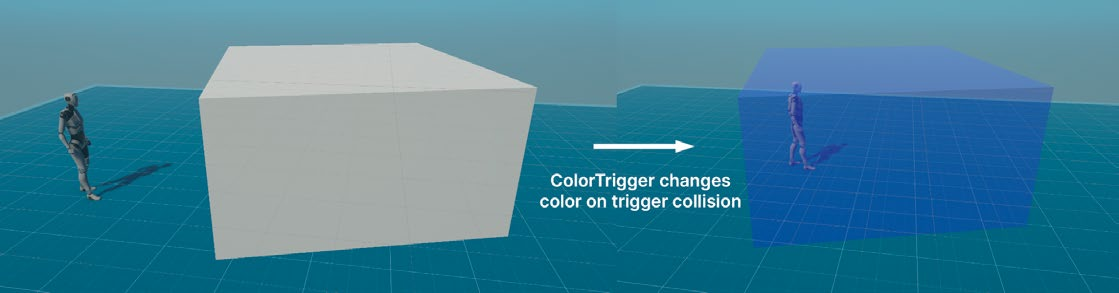
Gameplay mechanic To illustrate server-client communication, let’s recreate a simple game mechanic. Let’s start by adding Trigger Colliders to the game level that change color when making contact with a player. They can change one color when one player touches it and another color when a different player touches it. In the scene, create a new GameObject (e.g., a cube). Add a BoxCollider component and enable the IsTrigger option. Create and assign a transparent material to the MeshRenderer (this example uses the URP/Lit shader). Set its initial color to something neutral like white.
The trigger will receive a networked color value.
Next, we need to add network synchronization. Let’s use NetworkVariables and RPCs to synchronize the color change across the network.
Define a NetworkVariable A NetworkVariable is a specialized variable designed for synchronized state management across the network. Changes to a NetworkVariable on the server propagate to all clients. This is ideal for continuously synchronized data, such as positions, health points, or in this case, the color state of the trigger. We’ll create a NetworkBehaviour called ColorTrigger and attach it to the trigger object. This script will contain a NetworkVariable called m_NetworkColor that contains a Color value.
using UnityEngine;
using Unity.Netcode;
public class ColorTrigger : NetworkBehaviour {
    public NetworkVariable<Color> m_NetworkColor = new NetworkVariable<Color>(Color. white);
    private Material m_InstanceMaterial;
    public override void OnNetworkSpawn() {
        m_NetworkColor.OnValueChanged += OnColorChanged;
        MeshRenderer meshRenderer = GetComponent<MeshRenderer>();
        if (meshRenderer != null) {
            m_InstanceMaterial = new Material(meshRenderer.material);
            meshRenderer.material = m_InstanceMaterial;
            UpdateMaterialColor(m_NetworkColor.Value);
        }
}public override void OnNetworkDespawn() {
m_NetworkColor.OnValueChanged -= OnColorChanged;
}
private void OnColorChanged(Color oldColor, Color newColor) { UpdateMaterialColor(newColor); }
private void UpdateMaterialColor(Color newColor) {
if (m_InstanceMaterial != null) {
m_InstanceMaterial.SetColor(“_BaseColor”, newColor);
}
}
}When a player enters the trigger, this script will toggle the base color property of its material instance. The script uses a NetworkVariable called m_NetworkColor. Here’s a breakdown of how this works: —
This NetworkVariable keeps track of the actual color value and then syncs across all clients. Though the script runs on both the server and the clients, by default, only the server has write permissions to the NetworkVariable. Clients can only read its Color value.
The OnValueChanged event updates the trigger’s material base color whenever the NetworkVariable changes. The script subscribes to the event in OnNetworkSpawn and unsubscribes in OnNetworkDespawn.
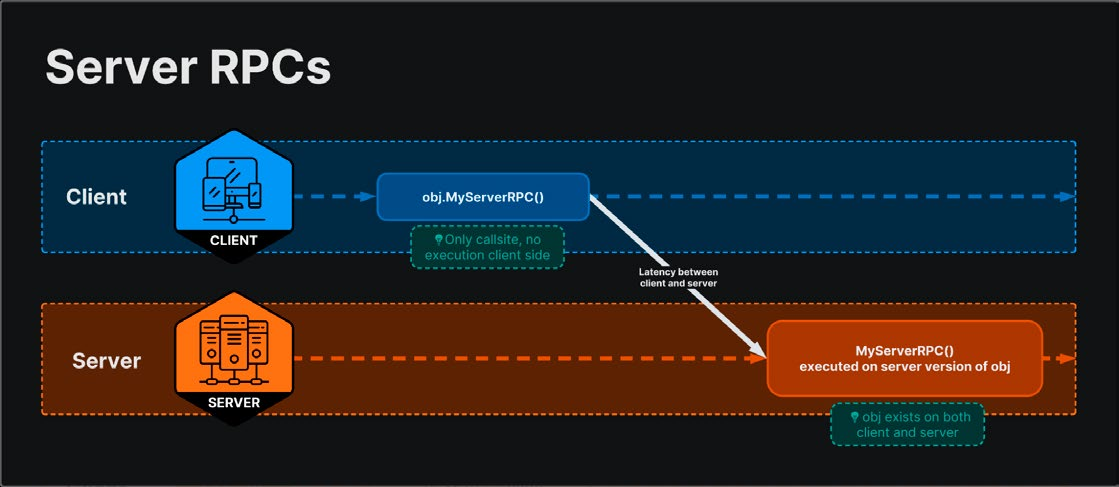
While a NetworkTransform is specific to syncing transform data (position, rotation, scale), a NetworkVariable can sync more general data types, including primitive types, custom structs, and other data necessary for game state management. When working on a client, you can’t change the NetworkVariable directly because it is serverauthoritative. Instead, the client must notify the server to make any changes. The server updates the state and propagates it back, and only then does the client see the change take effect. To handle communication for changes like this, we use an RPC. RPCs can allow one device to require another device to perform specific actions or updates. RPCs can be called from the client to the server, or vice versa.
Let’s look at how to implement an RPC for this purpose.
A server RPC runs remotely from the client to the server.
Adding an RPC RPCs allow you to invoke functions on the server or other clients remotely. Methods marked with [Rpc(SendTo.Server)] are called on the server from a client, and those marked with [Rpc(SendTo.Client)] are called on clients from the server. You can also use the legacy syntax [ServerRpc] or [ClientRpc] to indicate a server RPC or client RPC here. RPCs are much like other methods, except they must follow a few conventions: —
Rpc attribute: Annotate your method with the [Rpc] attribute and specify a possible target, e.g., [Rpc(SendTo.Server)] will call the method only on the server.
Naming convention: End the method name with the suffix “Rpc” e.g., DoSomethingRpc.
RPCs are better suited for discrete events, such as player actions or specific game state changes that do not need continuous synchronization. Append these methods to the TriggerColor script:
private void OnTriggerEnter(Collider other) {
    NetworkObject networkObject = other.GetComponent<NetworkObject>();
    if (IsClient && networkObject != null && networkObject.IsOwner) {
        ChangeColorServerRpc(networkObject.OwnerClientId);
    }
}private void ChangeColorServerRpc(ulong playerId) {
// Simple team system: blue for even, red for odd Color newColor = (playerId % 2 == 0) ? new Color(0, 0, 1, 0.5f) : new Color(1, 0, 0, 0.5f);
m_NetworkColor.Value = newColor;
}
In a single-player game, you could add the appropriate logic to OnTriggerEnter. However, in a multiplayer game, you typically handle interactions
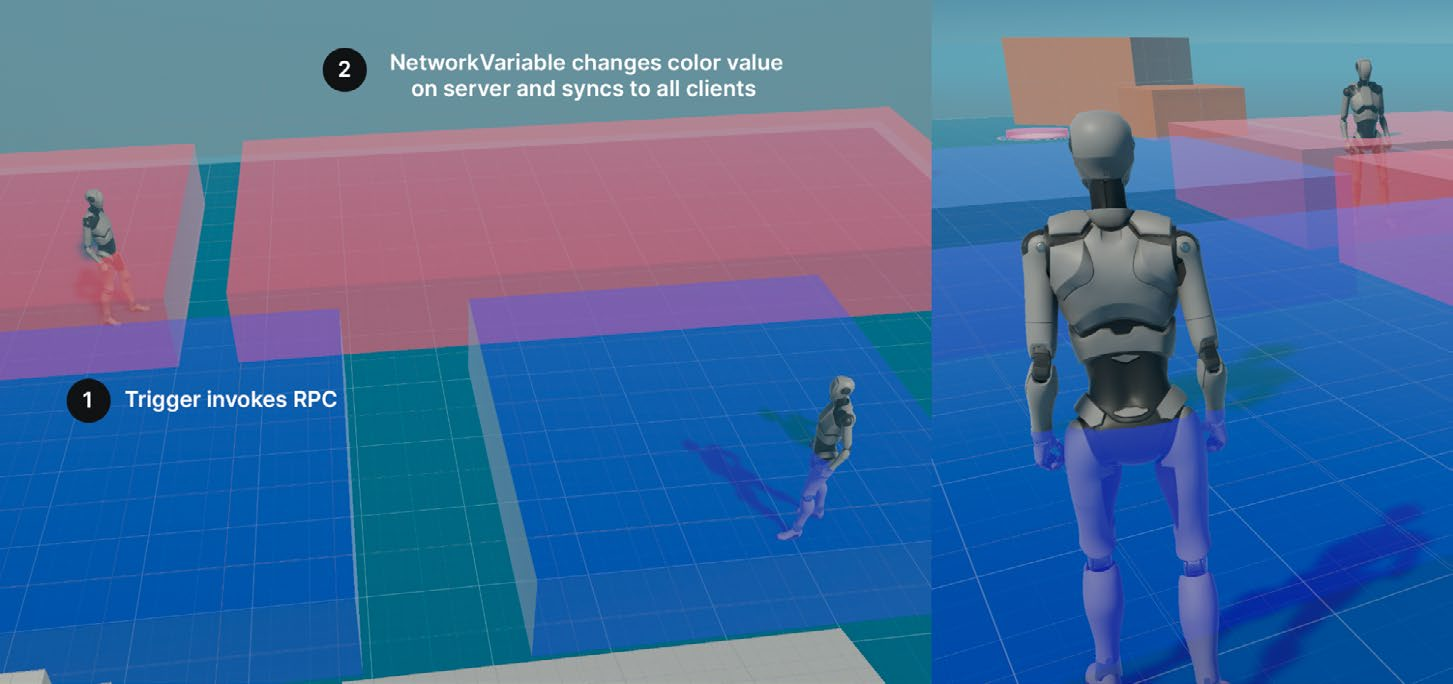
using client-server communication to ensure that all clients remain in sync. Instead of setting the m_NetworkColor value directly, OnTriggerEnter checks if the current game instance is a client. If it is, it calls ChangeColorServerRpc and passes in the OwnerClientId. This method determines the new color based on the player’s ID (in this example, even ID numbers become blue, while odd IDs become red) and updates the m_NetworkColor value. This change is propagated to all connected clients, ensuring every game instance has a consistent view of the game state. When the m_NetworkColor changes, the OnColorChanged method is triggered on all clients, updating the trigger’s material color.This simple game mechanic shows client-server interactions.
Trigger mechanic Even though this is a simple example, similar game mechanics can be found in many multiplayer games where the player’s actions can trigger visual changes to the environment. For example: —
In a cooperative puzzle game, players may need to use buttons or triggers to interact with the environment. The visual cues that happen in the game environment serves as a signal for everyone to coordinate their actions.
In a competitive shooter, players can take control points on the level. These often change color to the team that controls them. Again, this doubles as a visual cue to players to adjust their strategies accordingly.
In online RPGs, specific areas of the level can trigger buffs, debuffs, or other effects.
RPCs versus NetworkVariables When synchronizing data, choosing between NetworkVariables and RPCs depends on the use case: —
NetworkVariables and NetworkTransforms are ideal for continuously synchronized data, such as positions, health points, or in this case, the color state of the trigger. Here, the color trigger uses a NetworkVariable to store its active color. —
Use cases: Health points, positional data, game scores
Remote procedure calls (RPCs) are better suited for discrete events, such as player actions or specific game state changes that do not need continuous synchronization. In this example, the RPC notifies all clients when a player enters the trigger zone, prompting the server to change the color based on the player’s ID. —
Use cases: Player actions (e.g., shooting, using an ability), game events (e.g., spawning, game start, game won)
Both mechanisms are essential for data synchronization in networked games, where NetworkVariables manage ongoing states and RPCs handle specific events and actions.
These gameplay examples can help you determine when to use NetworkVariables or RPCs.
Task/system
RPCs
NetworkVariables
Inventory management
Notify clients when an item is picked up or used, to be added or removed from the inventory.
Maintain the current inventory for each player. The inventory can be a NetworkList that syncs the list of items.
Combat systems
Execute combat actions like attacks or special moves. An RPC can apply damage and effects.
Track the health and status of each player. Health points and active status effects can be synced using NetworkVariables.
Environmental interactions
Trigger specific actions like opening a door or activating a mechanism.
Maintain the state of interactive objects, such as whether a door is open or closed.
Objectives
Signal the completion of an objective.
Track ongoing progress toward an objective. Store the number of items collected or completed tasks in a NetworkVariable.
For a more detailed discussion, see the RPC vs NetworkVariable documentation page.
Designing for multiplayer Now that you’re familiar with the basics of netcode, it’s essential to adopt a “networked multiplayer” mindset when creating your games. What might be simple in a single-player game often becomes more complex when we need to incorporate NetworkVariables or RPCs to create the same behavior over multiple devices. Plan how you’ll synchronize the states between clients and the server. Use NetworkVariables for continuously synced data and RPCs for discrete events. Then, make sure to minimize network traffic by syncing only what’s necessary. While it’s possible to convert a single-player game into a multiplayer game, it’s usually more efficient to design with multiplayer in mind from the start. Decide early which objects and actions will be owned by the server and which can be managed by the clients. While server authority offers the most security and consistency, balance that with client authority to reduce latency for certain actions. This latency can be a sore sticking point in building your networked game, so let’s next examine how it impacts the multiplayer experience. For some inspiration, see this Unite 2024 session that explores the most common and significant mistakes in making a multiplayer game, and how to avoid them to improve your chances of success.