Основные понятия
Basic concepts
In multiplayer gaming, networking enables players to connect to a central server or directly to each other. This allows them to share data and play together in real-time. The same game application runs simultaneously on each player’s device, and each player’s actions are then synchronized across the network.
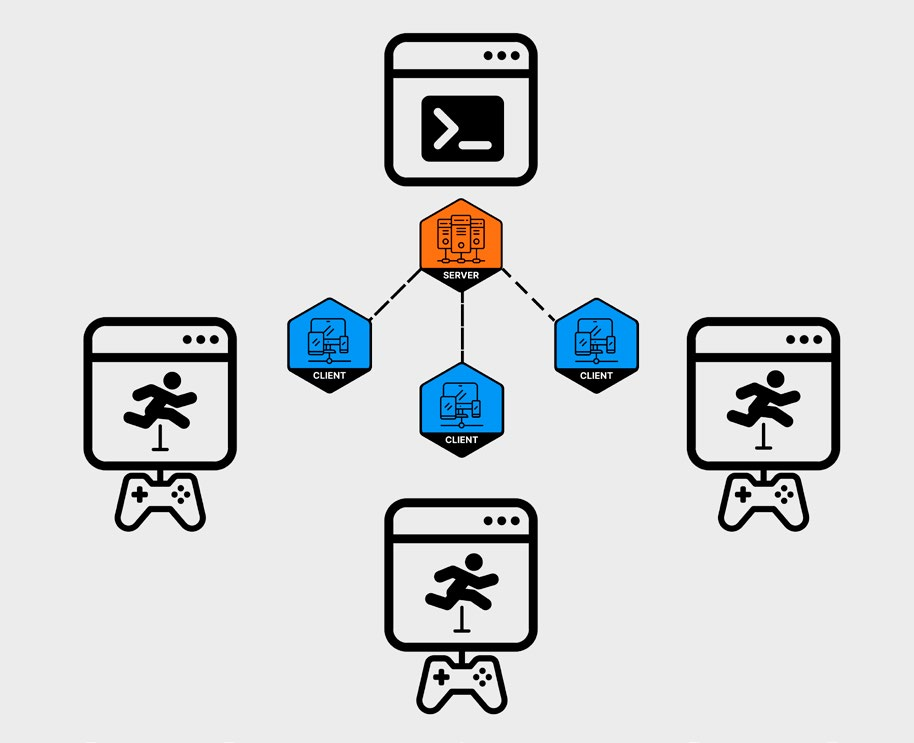
In networked multiplayer, the same game application runs across multiple devices.
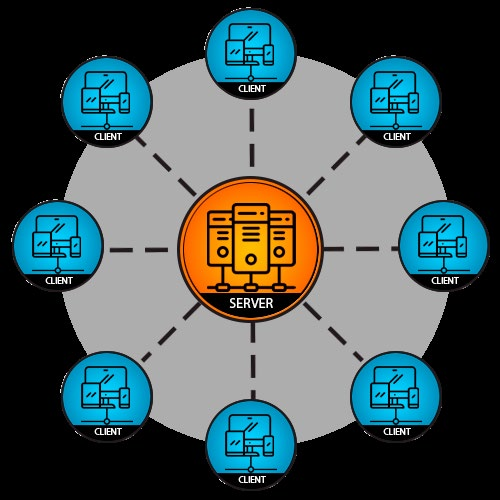
A typical networked game consists of two main components in its architecture, clients and servers. Clients are the instances of the game running on players’ devices – PCs, consoles, or mobile phones. Clients render the game graphics, play the audio, handle user input, and send updates to the server about the player’s actions. Servers, on the other hand, manage the game state, the current status of all the elements in the game. They handle communication between clients and enforce the game’s rules. Servers can be dedicated, headless machines run by the game developers or they can be playerhosted, where one of the players also acts as the server.
The server receives inputs from clients, processes game logic, and sends updates back to clients. Although the server is the final authority on the game state, clients maintain local copies for responsive gameplay. Constant synchronization then keeps the game as consistent as possible for all players in real-time.
The client-server architecture
Headless servers A headless server is a server that operates without a graphical user interface, focusing solely on backend tasks. Because they don’t render graphics, they can scale more easily and are often deployed on dedicated hardware or cloud environments. For more information, see Dedicated game server under Network Topologies.
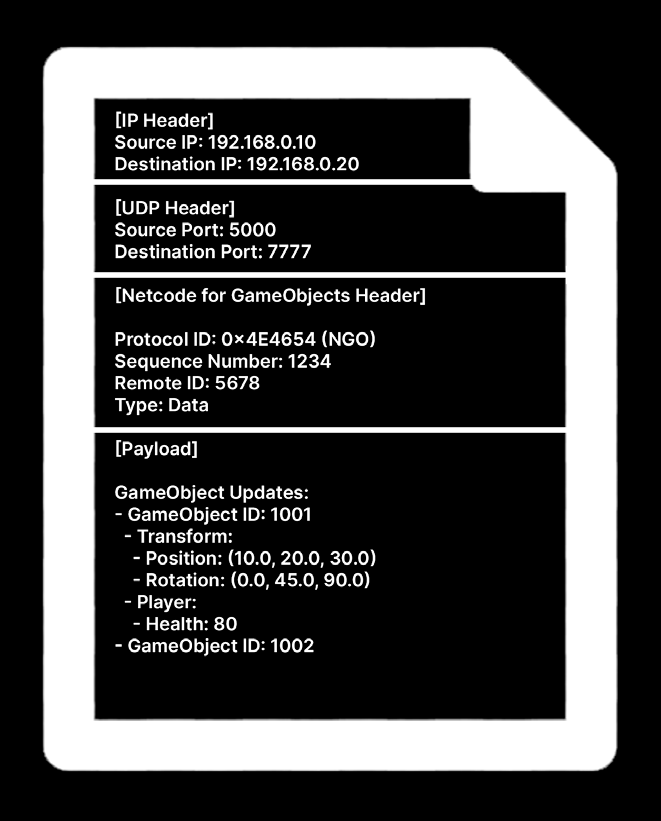
UDP packets Clients and servers communicate by exchanging data packets using standard Internet protocols like UDP (User Datagram Protocol). In real-time applications, especially fast-paced games like first-person shooters, UDP is preferred to TCP (Transmission Control Protocol) because it gives full control to the game to prioritize different aspects of the communication. Unlike TCP, UDP does not require acknowledgement from the recipient. This makes UDP a more efficient and flexible foundation but it also puts the burden on the application to handle cases when such functionality is required. Each UDP packet consists of a header and a payload. The UTP payload contains additional protocol-specific sections, each with their own headers and payloads. In networking terminology, this nesting is known as encapsulation. The IP and UDP headers are of a fixed size and contain important metadata like the address of the sender and receiver (IP address and ports). The payload varies in size, structure, and content, depending on the specific game and context. For example, a payload could carry player inputs or a snapshot of the game state at one moment in time.
Simplification of a UDP packet
UDP packets favor low latency and speed, essential for real-time applications; however, this speed comes with a lack of reliability as a tradeoff. The UDP protocol doesn’t provide any mechanisms for reliability, ordering, or congestion control. A packet traveling through the internet could experience errors, including: —
Packet Loss: Sometimes a packet may get lost and never arrive at its destination. This could be due to network congestion, faulty hardware, or other issues.
Duplication: A packet might be duplicated, resulting in the same packet arriving multiple times at the receiver. This can happen due to misconfigured network hardware or software.
Reordering: Packets may arrive at the receiver in a different order than they were sent. This can happen if packets take different routes to the destination that have varying latencies.
Corruption: Packet contents may get altered during transmission, resulting in unusable data.
UDP versus TCP A network protocol is a set of rules and conventions that govern how data is transmitted and received over a network. Protocols define how to establish connections, format messages, handle errors, and transmit data. UDP is typically preferred over Transmission Control Protocol (TCP) in game development due to its fast and lightweight nature. TCP, while reliable and suitable for web browsing, ensures ordered data delivery by retransmitting lost or out-of-order packets; this can introduce lag or stutter that don’t make it suitable for real-time gaming. In contrast, UDP accepts some data loss to prioritize real-time performance. This means that games can run smoothly at 60 fps or higher without freezing, even if dropping some non-critical data. UDP usually strikes a better balance between responsiveness and occasional data loss, making it ideal for networked multiplayer games. The following techniques can mitigate UDP’s unreliability. Unlike the built-in functionality in TCP, they can be fine-tuned for use in real-time games. Technique
What it does
Sequence numbers
Each packet has a unique, increasing sequence number. The receiver uses this to detect missing or out-of-order packets.
Acknowledgement (ACK) and ACK bitmasks
Packets include the sequence number of the last received packet, letting the sender know which packets have been delivered. An ACK bitmask tracks the status of multiple packets at once, allowing for quicker detection of lost packets.
Retransmission timeout adjustment (RTO)
This is a technique that makes use of measuring round trip time in TCP approximation. For example, you can measure the round trip time and then use it to adjust client-side interpolation or client-side prediction.
Timeouts
If an acknowledgment isn’t received within a certain period, the packet is considered lost.
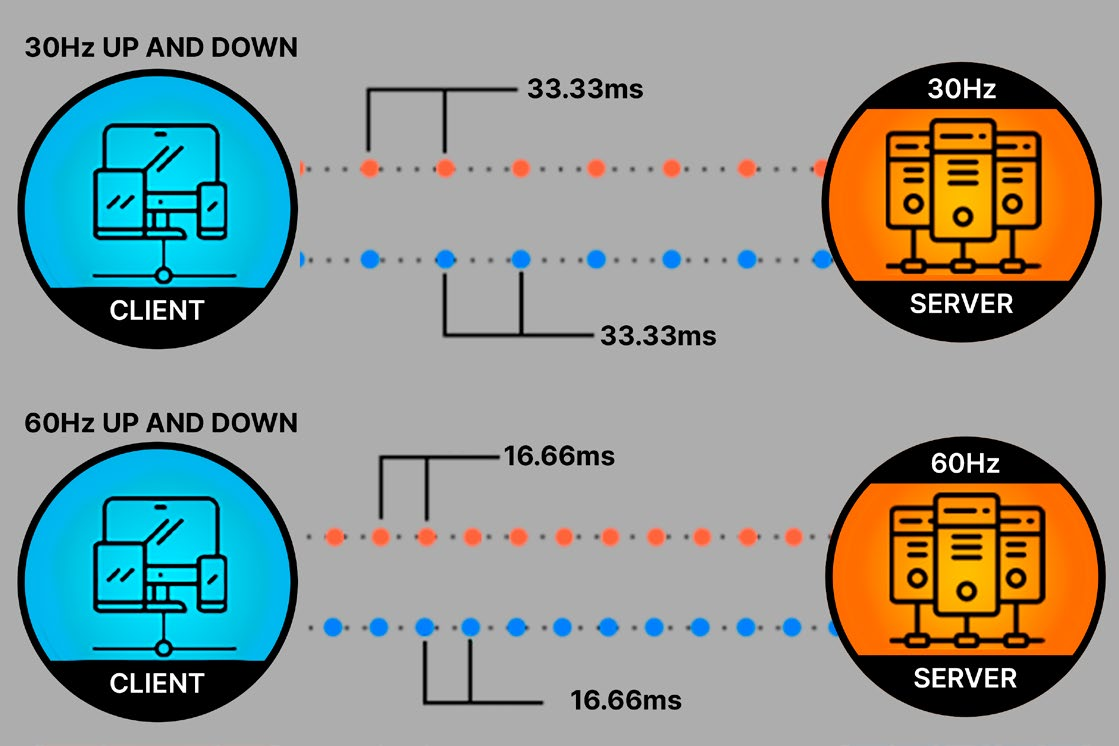
Ticks and updates In a multiplayer game, the server handles the core game logic, physics simulations, and other gameplay functions, even if it doesn’t have a display. As the server is only handling the global game state, it takes its input from the clients, much like a single-player game handles inputs from a local player. Instead of having a mouse and keyboard, the server processes those inputs to maintain the “authoritative game state” – this includes everything from current player positions and object states to physics calculations and game progress. The heart of server-side processing is the server tick. A server tick is a cycle during which the server updates the game state based on received inputs. This happens at a fixed interval known as the tick rate, measured in Hertz (Hz) or ticks per second. This tick rate determines the frequency at which the game world is updated. Conversely, the update rate refers to how frequently the client exchanges data with the server. A higher update rate can enhance the responsiveness of the game but requires more bandwidth and processing power. It’s typically constrained by the client’s network capabilities and computing resources.
Tick rate versus update rate
A higher tick rate can improve the game’s responsiveness but may strain server resources. Similarly, a higher update rate enhances interaction smoothness at the expense of greater data transmission. Creating a smooth and responsive multiplayer experience hinges on finding
the right balance between the tick rate and the update rate. The actual tick rate can vary based on gameplay needs. A fast-paced first person shooter often runs at tick rates of 60 Hz or higher to reflect fast player movements and split-second shots. A real-time strategy game, on the other hand, doesn’t rely on twitch reflexes, so a tick rate of 30 Hz may be sufficient. Meanwhile, a large-scale strategy MMO might use a fairly low tick rate of 10 Hz in order to support an extensive number of concurrent players.
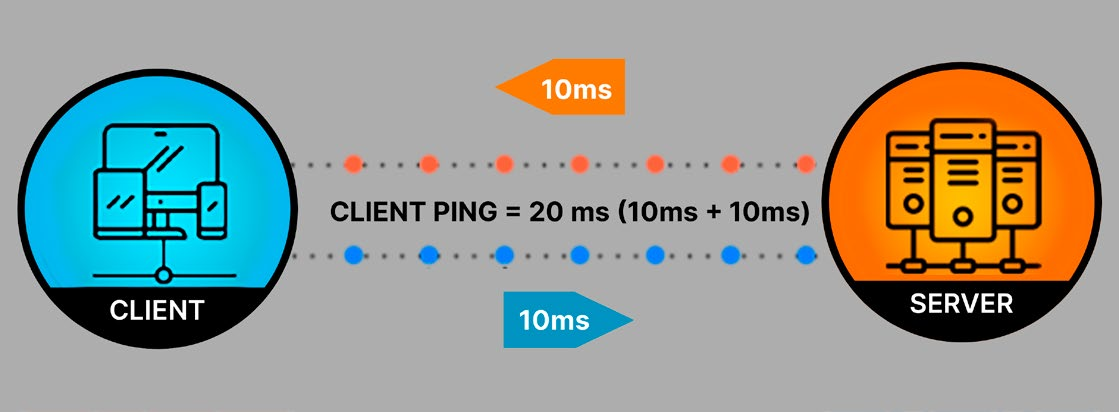
Latency Latency is the time it takes for data to travel from the source to the destination. Round-trip time (RTT) measures how long it takes for a packet to travel to its destination and return with a response, providing a gauge of network latency. While subjective, a general rule of thumb is that users notice gameplay degradation around 200ms of latency. Different types of games can tolerate more or less latency. For example, first-person shooter games perform best with less than 100ms of latency, whereas real-time strategy games might allow higher latency values of up to 500 ms.
Round-trip time is a gauge of network latency.
Lower latency produces a responsive experience for the player. Ideally, there is minimal delay between a user’s action and seeing the expected result in a multiplayer game. High latency leads to noticeable delays during gameplay. Sometimes latency results from non-network components. For example, there may be a delay in detecting user input or a hiccup in the render pipeline. Another culprit is Vsync: Though this feature can stop screen tearing, it does so at the cost of additional latency. More often, the network itself is the major source of latency. It can involve several types of delays: —
Processing delay: Routers take time to read packet headers and forward packets to their destination. Though usually minimal, this delay can accumulate across multiple hops.
Transmission delay: This is the time required to put packets onto the network, directly affected by packet size. This is more apparent on end-user networks with lower bandwidth.
Queueing delay: When packets are held in queues due to congestion or limited interface capacity, this delay can significantly increase latency.
Propagation delay: Signals take time to travel across the network. This type of delay results primarily from the physical distance between servers and users, the physical media (fiber, copper, air) and type of signal (electrical, optical, radio wave).
While some latency is unavoidable, especially in internet-based games, there are many techniques (e.g., anticipation, prediction, interpolation) to minimize its impact. We’ll examine a few of these later.
Other networking terms Here are some other terms that you may encounter when discussing latency: Ping: This involves sending and receiving back a basic message to gauge network responsiveness. Think of it as a simplified version of Round Trip Time (RTT). Jitter: This is the variation in RTT due to fluctuating network conditions, which can affect latency mitigation and cause packets to arrive out of order. Bandwidth: This is the amount of data that can be transmitted over a network in a given amount of time. Higher bandwidth can be important for games that need to transmit large amounts of state data. You can find these terms and more in this glossary page of Multiplayer Networking Terminology.
Network synchronization To stay in sync, clients and the server continuously exchange messages in order to maintain a consistent game state across all players. Typically, clients usually send user commands to the server at a high frequency – often at 60 Hz, or about every 16 milliseconds. These commands might be actions or inputs; for example, mouse or gamepad movements or button presses for jumping and shooting. Once the server receives and processes the client commands, it then sends updates about the game world back to the clients. The faster the game reacts to player input, the more responsive it feels. Just bear in mind that the server’s tick rate, the client’s update rate, and the client’s frame rate serve different purposes and don’t need to match. In fact, achieving perfect synchronization is uncommon. A server and its clients are constantly in flux, exchanging a continuous stream of dynamic data. The objective is to reduce their discrepancies, thereby creating the illusion that all clients are playing in unison.
Techniques for network synchronization State synchronization involves the periodic transmission of the state of network objects from the server to the clients. How frequently these game updates happen can vary based on the specific needs of the game genre (e.g. a competitive shooter versus a co-op strategy game). Remote procedure calls (RPCs) invoke functions on the server or other clients remotely. Use RPCs for client-to-server communication, such as sending player inputs, requesting specific actions, or triggering one-time game events. Bandwidth management can significantly impact performance. Synchronization consumes bandwidth, so implement strategies like the following to reduce data transmission over the network: —
Data culling: This reduces network traffic by excluding non-essential updates, focusing only on what is necessary for gameplay. For instance, you can sync only critical axes of movement or trigger VFX and animations locally using events instead of continuously synchronizing them. Any reduction in network traffic can enhance game performance.
Delta compression: This also goes by the term delta encoding. It allows the server to send only the changes (deltas) since the last update. Clients then apply only these deltas to their local game state to keep it in sync with the server.
Interest management: This prioritizes data synchronization based on several criteria. Spatial relevance determines the priority of objects based on their distance from the player and their visibility. Age (or staleness) prioritizes objects or data that haven’t been transmitted recently, making them higher-priority until updated. Interaction focuses on objects that have recently interacted with the player or are likely to do so soon.
These techniques can help you optimize network performance, ensuring a smoother and more efficient gameplay experience.
Network topologies Simply put, a network topology defines how devices are connected and communicate in a multiplayer environment. Each network model has its own advantages and disadvantages. Choosing one depends on the type of game, the desired level of control over the game state, and the resources available for server infrastructure. Topologies can impact the game’s architecture, performance, and the overall player experience. Netcode for GameObjects supports two primary topologies: client-server and distributed authority. Let’s unpack what that means.
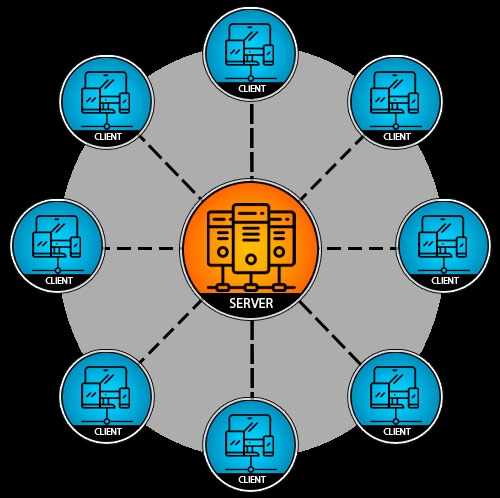
Client-server topology The client-server topology is a common network model that divides responsibilities between client devices and a central server to optimize performance and manage the game effectively. A client represents a player’s game instance, handling local inputs, rendering, and partial simulation of the game state. Clients send local inputs like character movements to the server and receive updates in return. The server maintains the definitive, accurate representation of the game world, processing player inputs and enforcing game rules. This central server resolves conflicts and validates actions, ensuring a consistent and fair experience for all players. This setup also helps prevent cheating by controlling game state centrally. Clients and servers can communicate with each other over the internet or a local area network (LAN). Offline LAN games connect multiple devices within the same physical vicinity through a local network without needing internet access. This setup bypasses the internet and ensures minimal latency, high security, and reliable connectivity due to the close proximity of the devices. This makes it suitable for LAN parties, esports tournaments, and environments where the internet is unstable. There are two types of servers within the client-server topology:
Dedicated game server A dedicated game server is a separate entity that only processes data and doesn’t participate as a player. It can offer the highest performance while handling all major simulations and player interactions in networked games. Dedicated servers are integral for games where minimizing cheating is paramount. However, this setup can introduce communication latency as all player state changes need to be processed by the server before being relayed to other clients. Dedicated servers are particularly well-suited for performance-sensitive, competitive games such as first-person shooters. They can be essential to maintaining fairness and reducing disruptive behavior.
A dedicated game server handles all major game simulations.
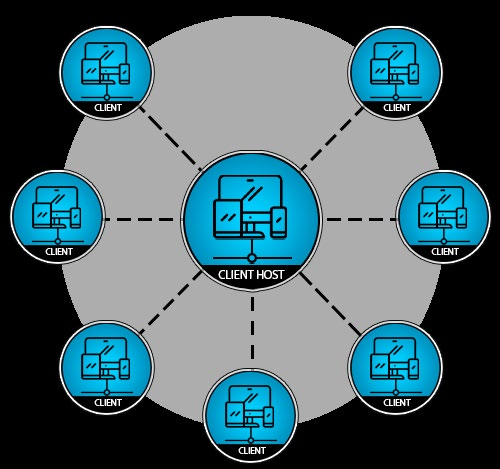
Client-hosted listen server A client-hosted listen server acts as both server and client, allowing the host to play the game. This can help reduce costs but gives the host a latency advantage (since no packets need to be sent across the network). This setup often results in degraded server performance since the same machine is tasked with running the game server and generating the visual output for the host player. Also, because the hosting client services connections via a residential internet connection, it can be slower than using a dedicated server in a remote data center. This is because residential internet service providers typically prioritize download performance over upload performance.
A client-hosted listen server acts as both a server and client.
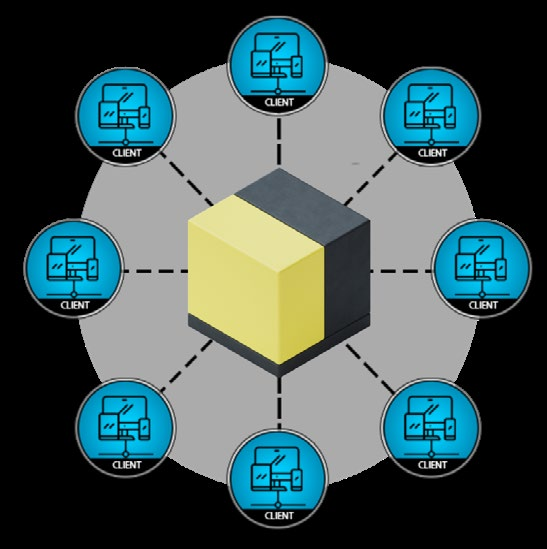
Distributed authority The distributed authority network model decentralizes control and management of game state among all participating clients. Each client is responsible for owning, tracking, and managing a portion of the state of objects within the game, with the ability to spawn and manage these objects autonomously. A central, lightweight service monitors changes in object states and manages the routing of network traffic, but it does not simulate the game itself. This topology offers several benefits, including reduced costs and lower input latency, as it eliminates the need for a central server to process all game actions and reduces network round-trips since each client is authoritative over its own objects. For example, that means it can handle actions like movement, attacks, or other game inputs locally without waiting for permission from a server. This results in more immediate feedback for the player, which in turn makes the game feel more responsive. However, it also can be subject to increased vulnerability to cheating as there’s no single authoritative server to validate all actions. Distributed authority is less suitable for games requiring precise simulations or high competitiveness but works well for games with less critical interaction needs.
You can learn more about Unity’s new Distributed Authority package (beta) for Netcode for GameObjects in this Unite 2024 session.
The distributed authority model decentralizes control and game management.
Local or couch multiplayer Local multiplayer games use a single client runtime instance that can be played by two or more people on the same screen in the same physical location. This setup is ideal for social gaming scenarios, offering direct interaction among players without any need for networking. It’s popular in party games and co-op modes, providing a straightforward way for friends and family to play together.
Peer-to-peer (P2P) Each device functions as both client and server, allowing for direct connections between players. This resembles distributed authority but disposes of the lightweight server altogether. This method helps reduce the need for centralized servers, lowering costs and complexity. However, it can introduce challenges in ensuring fairness and consistent latency, as there is no central authority to manage game state and security.
What is an authoritative server? An authoritative server refers to a server setup that is the central controller of game states and logic. As the name implies, it’s the final authority in a networked game. Rather than splitting authority of what is happening in the game across the player machines, an authoritative server runs the full game simulation itself and dictates what is happening in the game. Clients simply send their inputs to the server, which then updates the game and sends back the latest game state. The server also enforces game rules and resolves conflicts. Authoritative servers are one of the simplest ways to implement networked game logic and the one least prone to exploitation by cheaters, ensuring a uniform experience for everyone playing the game.
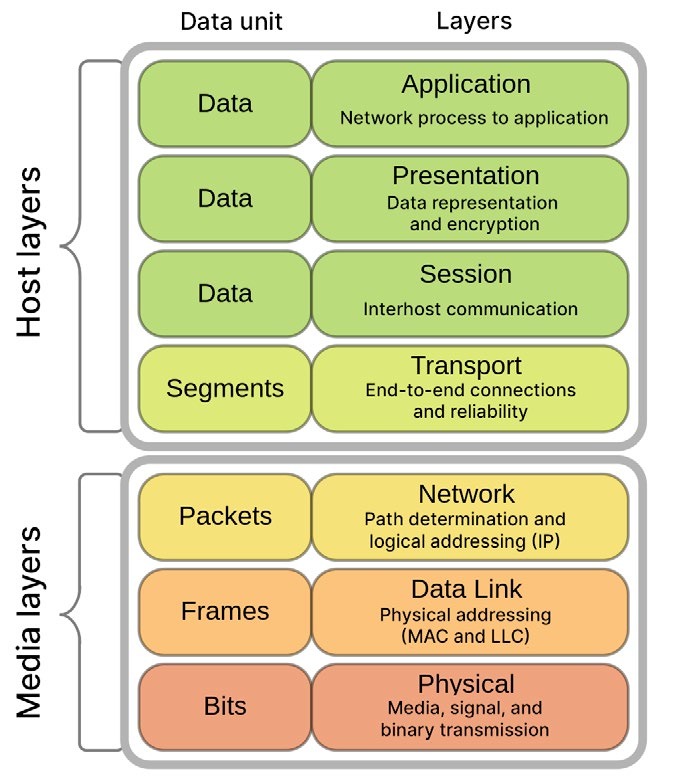
Network stack A protocol stack, or network stack, is generally speaking software that implements various communication protocols to enable data transmission across networks. It’s organized like a layered cake:
The Network stack (source: Wikipedia)
Each layer only interacts with the layers directly above and below it, providing modularity and simplifying network management. Application layer: The high-level of the stack where most Unity development takes place. Packages like Netcode for GameObjects or Netcode for Entities abstract away the complexities of lower-level networking, allowing developers to focus on implementing multiplayer functionality. Transport layer: The transport layer is responsible for providing reliable data transfer, error detection and correction, flow control, and ensuring end-to-end communication between devices in a network. It facilitates the segmentation and reassembly of data packets and provides mechanisms for error recovery and data integrity. Network layer: The network layer is responsible for routing data packets between networked devices across different networks. It relies on the network infrastructure and protocols, such as IP (Internet Protocol), to handle communication.
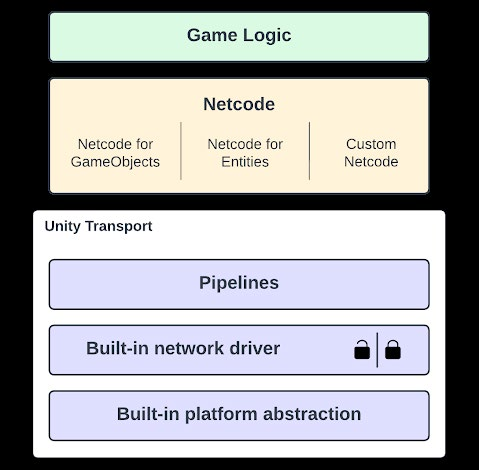
Data link and physical layers: These layers directly handle physical transmission of data packets over the network medium, such as Ethernet or Wi-Fi. The data link layer and physical layers are typically handled by the operating system and network hardware. As a Unity developer, you’ll primarily work with the high-level application layer to implement multiplayer features, such as synchronizing GameObjects, managing game state, and handling player interactions. Generally, you won’t need to worry about the lower layers unless your application has specific requirements. This simplifies the network stack to something that looks like this:
Netcode development layers