Handles.Label
Declaration
public static void Label(Vector3 position, string text);public static void Label(Vector3 position, Texture image);public static void Label(Vector3 position, GUIContent content);public static void Label(Vector3 position, string text, GUIStyle style);public static void Label(Vector3 position, GUIContent content, GUIStyle style);Параметры
| Параметр | Описание |
|---|---|
| должность | Позиция в пространстве 3D, как видно с текущей камеры ручки. |
| текст | Текст, отображаемый на метке. |
| изображение | Текстура для отображения на метке. |
| содержание | Текст, изображение и tooltip для этой метки. |
| стиль | Стиль, используемый для этой метки. Если этот параметр не указан, то используется стиль label из текущего GUISkin. |
Описание
Создает текстовую метку для манипулятора, расположенного в пространстве 3D.
Метки не имеют взаимодействия с пользователем и не могут быть нажаты. Метки всегда отображаются в обычном стиле.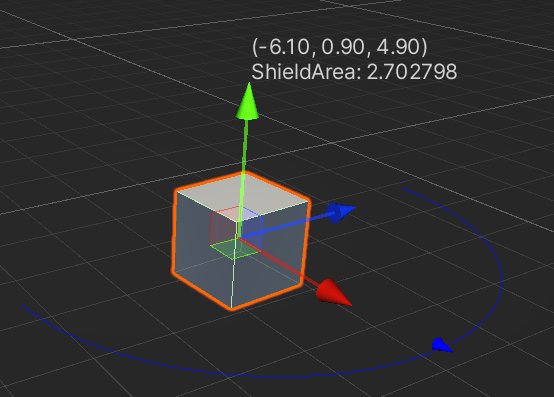
Этикетка в Scene вид.
//This script is not an Editor script
//Attach this script to a GameObject in your Scene

using System.Collections;
using System.Collections.Generic;
using UnityEngine;

[ExecuteInEditMode]
public class HandleExample : MonoBehaviour
{
    public float shieldArea = 5.0f;

    // Use this for initialization
    void Start()
    {
    }

    // Update is called once per frame
    void Update()
    {
    }
}
//Create a folder named "Editor" in your project directory, if the directroy does not already have one. Place this script in the Editor folder.

using UnityEngine;
using System.Collections;
using UnityEditor;

// Create a 180 degrees wire arc with a ScaleValueHandle attached to the disc
// lets you visualize some info of the transform

[CustomEditor(typeof(HandleExample))]
class LabelHandle : Editor
{
    void OnSceneGUI()
    {
        HandleExample handleExample = (HandleExample)target;
        if (handleExample == null)
        {
            return;
        }

        Handles.color = Color.blue;
        Handles.Label(handleExample.transform.position + Vector3.up * 2,
            handleExample.transform.position.ToString() + "\nShieldArea: " +
            handleExample.shieldArea.ToString());

        Handles.BeginGUI();
        if (GUILayout.Button("Reset Area", GUILayout.Width(100)))
        {
            handleExample.shieldArea = 5;
        }
        Handles.EndGUI();


        Handles.DrawWireArc(handleExample.transform.position,
            handleExample.transform.up,
            -handleExample.transform.right,
            180,
            handleExample.shieldArea);
        handleExample.shieldArea =
            Handles.ScaleValueHandle(handleExample.shieldArea,
                handleExample.transform.position + handleExample.transform.forward * handleExample.shieldArea,
                handleExample.transform.rotation,
                1,
                Handles.ConeHandleCap,
                1);
    }
}