EditorGUILayout.RectField
Declaration
public static Rect RectField(Rect value, params GUILayoutOption[] options);public static Rect RectField(string label, Rect value, params GUILayoutOption[] options);public static Rect RectField(GUIContent label, Rect value, params GUILayoutOption[] options);Параметры
| Параметр | Описание |
|---|---|
| метка | Метка, отображаемая над полем. |
| значение | Значение для редактирования. |
| варианты | Необязательный список параметров компоновки, задающих дополнительные свойства раскладки. Любые переданные здесь значения переопределяют настройки, заданные style.Дополнительные ресурсы: GUILayout.Width, GUILayout.Height, GUILayout.MinWidth, GUILayout.MaxWidth, GUILayout.MinHeight, GUILayout.MaxHeight, GUILayout.ExpandWidth, GUILayout.ExpandHeight. |
Возвращаемое значение
Прямая Значение, введенное пользователем.
Описание
Сделайте X, Y, W & H поле для ввода Rect.
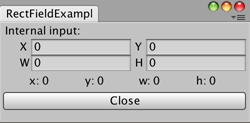
Захват размеров RectField.
using UnityEditor;
using UnityEngine;

public class RectFieldExample : EditorWindow
{
    static Rect pos;

    [MenuItem("Examples/RectField Example")]
    static void rectFieldExample()
    {
        RectFieldExample window =
            EditorWindow.GetWindowWithRect<RectFieldExample>(new Rect(0, 0, 250, 100));
        window.Show();
    }

    void OnGUI()
    {
        EditorGUILayout.BeginVertical();
        pos =  EditorGUILayout.RectField("Internal input:", pos);

        EditorGUILayout.BeginHorizontal();
        GUILayout.FlexibleSpace();
        GUILayout.Label("x: " + (pos.x).ToString());
        GUILayout.FlexibleSpace();
        GUILayout.Label("y: " + (pos.y).ToString());
        GUILayout.FlexibleSpace();
        GUILayout.Label("w: " + (pos.width).ToString());
        GUILayout.FlexibleSpace();
        GUILayout.Label("h: " + (pos.height).ToString());
        GUILayout.FlexibleSpace();
        EditorGUILayout.EndHorizontal();
        EditorGUILayout.EndVertical();

        if (GUILayout.Button("Close"))
        {
            this.Close();
        }
    }
}