GUILayout.FlexibleSpace
Declaration
public static void FlexibleSpace();Описание
Вставьте гибкий элемент пространства.
Гибкие пространства используют любое оставшееся пространство в макете.
Примечание: Это переопределит GUILayout.ExpandWidth и GUILayout.ExpandHeight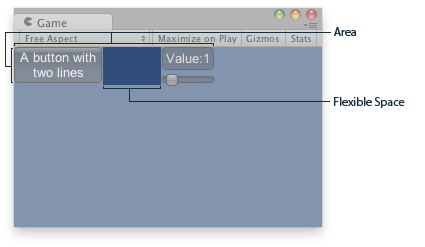
Гибкое пространство в зоне GUILayout.
using UnityEngine;

public class ExampleScript : MonoBehaviour
{
    float sliderValue = 1.0f;

    void OnGUI()
    {
        // Wrap everything in the designated GUI Area
        GUILayout.BeginArea(new Rect(0, 0, 200, 60));
        // Begin the singular Horizontal Group
        GUILayout.BeginHorizontal();
        // Place a Button normally
        GUILayout.RepeatButton("A button with\ntwo lines");
        // Place a space between the button and the vertical area
        // so it fits the whole area
        GUILayout.FlexibleSpace();
        // Arrange two more Controls vertically beside the Button
        GUILayout.BeginVertical();
        GUILayout.Box("Value:" + Mathf.Round(sliderValue));
        sliderValue = GUILayout.HorizontalSlider(sliderValue, 0.0f, 10f);

        // End the Groups and Area
        GUILayout.EndVertical();
        GUILayout.EndHorizontal();
        GUILayout.EndArea();
    }
}