Multiplayer Services
Multiplayer Services
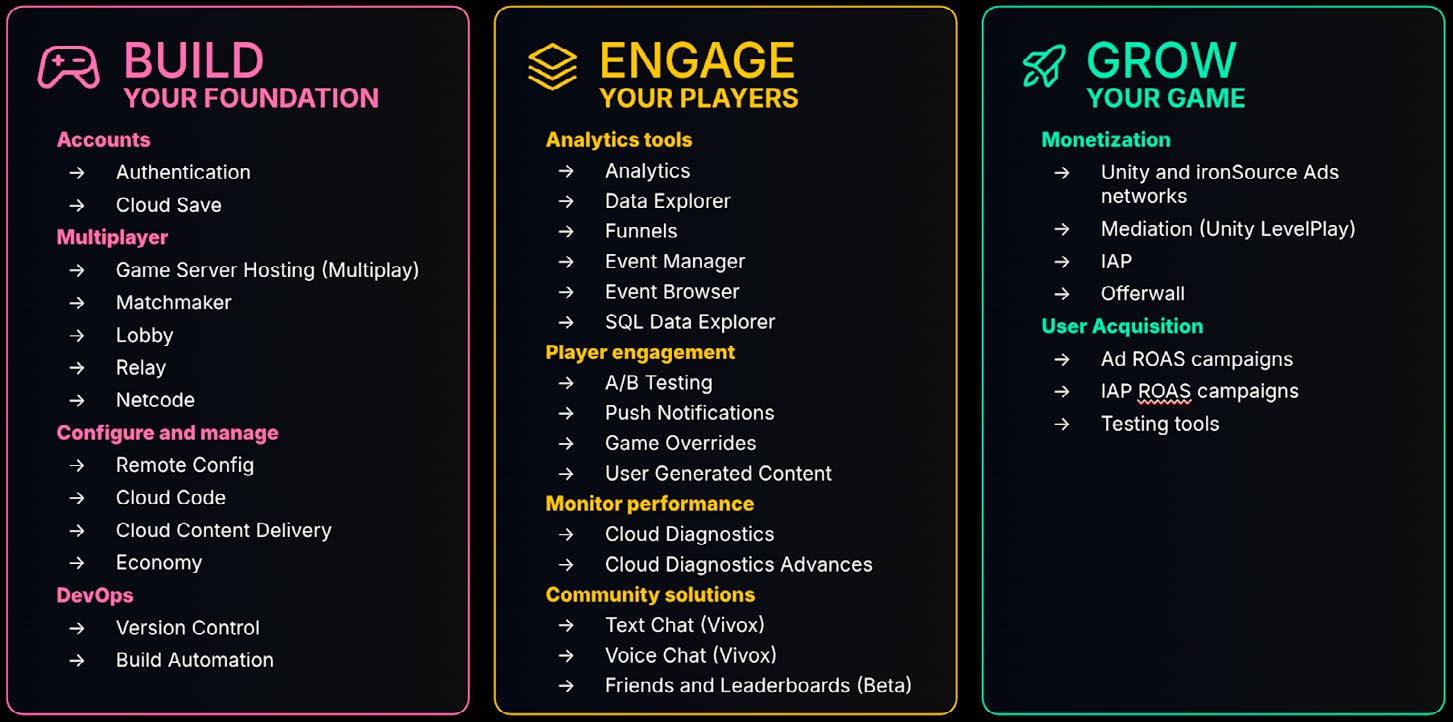
СОЗДАЙТЕ ОСНОВУ
ВОВЛЕКАЙТЕ ИГРОКОВ
УЧЁТНЫЕ ЗАПИСИ
ИНСТРУМЕНТЫ АНАЛИТИКИ
→ Authentication → Cloud Save
→ Analytics → Data Explorer → Funnels → Event Manager → Event Browser → SQL Data Explorer
МНОГОПОЛЬЗОВАТЕЛЬСКИЕ ИГРЫ → Game Server Hosting (Multiplay) → Matchmaker → Lobby → Relay → Netcode
НАСТРОЙКА И УПРАВЛЕНИЕ → Remote Config → Cloud Code → Cloud Content Delivery → Economy
DEVOPS → Version Control → Build Automation
ВОВЛЕЧЕНИЕ ИГРОКОВ → A/B Testing → Push Notifications → Game Overrides → User Generated Content
РАЗВИВАЙТЕ СВОЮ ИГРУ МОНЕТИЗАЦИЯ → Рекламные сети Unity и ironSource → Mediation (Unity LevelPlay) → IAP → Offerwall
ПРИВЛЕЧЕНИЕ ПОЛЬЗОВАТЕЛЕЙ → Ad ROAS campaigns → IAP ROAS campaigns → Инструменты тестирования
МОНИТОРИНГ ПРОИЗВОДИТЕЛЬНОСТИ → Cloud Diagnostics → Cloud Diagnostics Advanced
РЕШЕНИЯ ДЛЯ СООБЩЕСТВА → Text Chat (Vivox) → Voice Chat (Vivox) → Friends and Leaderboards (бета)
Unity предоставляет ряд сервисов, упрощающих разработку сетевых многопользовательских игр. Начните с документации по пакету Multiplayer Services: он упрощает управление зависимостями между многопользовательскими сервисами. С его помощью можно:
- Быстро добавлять в игру многопользовательские возможности на базе Unity Gaming Services: Lobby, Relay, Distributed Authority, Matchmaker и Multiplay Hosting. - Использовать новую систему сеансов как единый облачный уровень для многопользовательского игрового цикла: объединять игроков и управлять общим состоянием сеанса и участников.
- Создавать и администрировать сетевые сеансы P2P, Dedicated Game Server и Distributed Authority. Игроки могут подключаться через Matchmaker, по коду присоединения или из списка активных сеансов. Кратко рассмотрим каждый сервис.
Matchmaker Подбор игроков соединяет участников друг с другом или с игровыми сеансами по заданным критериям, например уровню навыка или региону, чтобы матчи были сбалансированными и увлекательными. Интеграция сервиса Unity Matchmaker включает несколько этапов:
- Задайте критерии подбора: уровень навыка, географическую близость, задержку, предпочтения игроков и другие параметры.
- Ведите профили и рейтинги игроков с нужными для подбора параметрами. Рейтинговая система, например Elo, помогает оценивать уровень навыка и формировать сбалансированные матчи. - Обрабатывайте запросы на подбор: сервис ищет подходящих соперников или союзников в пуле доступных игроков по заданным критериям и выбирает наилучшее сочетание. - Назначайте найденных игроков в игровой сеанс и проверяйте, что все подключены и готовы к началу игры. - Динамически ослабляйте критерии, если точное соответствие найти не удается, чтобы сформировать матч вовремя и не слишком снизить его качество.
Учитывайте эти факторы, чтобы Unity Matchmaker формировал честные и конкурентные матчи.
Lobby Лобби - это предыгровая область, где игроки собираются, настраивают параметры и готовятся к началу матча. Сервис Lobby помогает участникам находить друг друга и подключаться в различных многопользовательских сценариях. Например:
- Просматривать доступные игровые сеансы, выбирать нужный и присоединяться - Передавать другу код присоединения, чтобы он мог подключиться к вашему сеансу
- Использовать Quick Join, чтобы найти любой доступный матч и сразу войти в него - Создавать общедоступное или закрытое лобби и приглашать друзей из внутриигрового списка
- Размещать лобби на игровом сервере, управляя доступом к серверному сеансу - Искать лобби по заданным требованиям, например режиму игры или типу карты
Пример Game Lobby показывает, как с помощью пакетов Lobby и Relay реализовать типичный игровой зал ожидания, включая голосовой чат Vivox. Игрок может создать лобби, а другие - найти его в общедоступном списке или подключиться по коду. Затем участники соединяются через Relay и используют Unity Transport для базовой связи в реальном времени.
Relay Unity Relay упрощает подключение нескольких игроков с помощью кодов присоединения. Создав сеанс, хост получает уникальный код и передает его друзьям или товарищам по команде. Участники используют код для подключения. При этом конфиденциальные данные, например IP-адреса, остаются скрытыми.
В многопользовательских P2P-играх подключение клиентов осложняют NAT (Network Address Translation) и межсетевые экраны. Прямое соединение часто требует сложной настройки сети и раскрывает IP-адреса игроков, создавая риски для безопасности и конфиденциальности.
Relay решает эти проблемы, выступая промежуточным сервером и обеспечивая безопасное простое соединение клиентов. Выделенный сервер не нужен, а объем разработки сокращается. Достаточно создать код присоединения, и игроки смогут сразу подключиться.
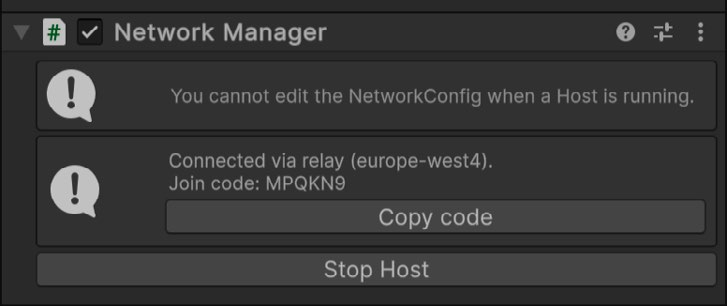
После создания подключения Relay выдает код присоединения.
Подробнее см. в руководстве по началу работы с Unity Relay.
Multiplay Hosting Multiplay Hosting берет на себя сложности масштабного запуска и эксплуатации инфраструктуры, позволяя команде сосредоточиться на игровом опыте. Сервис также позволяет:
- Отслеживать состояние серверов и другие аналитические данные . - Обновлять серверы без простоя
- Размещать игроков на серверах с наилучшим качеством обслуживания по данным QoS - Контейнеризировать сборки с помощью Docker и реестра контейнеров Multiplay Hosting
Vivox Vivox улучшает совместную и соревновательную игру благодаря внутриигровому голосовому и текстовому чату. Это управляемое облачное решение упрощает интеграцию общения и предоставляет средства доступности и соблюдения нормативных требований: преобразование речи в текст, фильтрацию чата и другие возможности. Vivox обеспечивает общение игроков на разных платформах независимо от того, создана игра в Unreal, Unity или на собственном движке. Подключите Vivox к игре и настройте проект в Unity Dashboard. Сервис поддерживает неограниченное число пользователей в 2D- и 3D-каналах, регулировку громкости, отключение звука и управление каналами. В этой сессии GDC показано, как несколько многопользовательских сервисов были интегрированы в демоверсию Megacity Metro.
Multiplayer Services
Unity provides a number of services that can simplify your networked multiplayer development. Start learning about each service by looking at the documentation for the Multiplayer Services package, which simplifies the work it takes to manage dependencies across multiplayer services. For example, you can: —
Quickly add multiplayer elements that integrate Unity Gaming Services into your game. Set up Lobby, Relay, Distributed Authority, Matchmaker and Multiplay Hosting.
A new session system provides a simple shared cloud-side backing for a multiplayer game loop that groups players together and manages a shared session/player state.
Create and manage peer-to-peer (P2P), Dedicated Game Server, and Distributed Authority hosted online sessions. Players can join sessions through matchmaking, a Join Code, or by browsing a list of active sessions.
Let’s take a brief look at each of the services:
Matchmaker Matchmaking is the process of connecting players with other players or game sessions based on specified criteria, such as skill level or geographic location, to ensure a balanced and enjoyable game experience. Implementing Unity’s Matchmaker service involves several steps: —
Define matchmaking criteria: Determine the parameters that will be used to match players. This can include skill level, geographic proximity, latency, and player preferences.
Player profiles and ratings: Maintain profiles for each player that include their matchmaking criteria. Use rating systems (e.g., Elo rating) to assess player skill levels and ensure balanced matches.
Matchmaking requests: When a player requests a match, the matchmaking service searches for suitable opponents or teammates based on the defined criteria. This involves querying a pool of available players and finding the best possible match.
Match assignment: Once a suitable match is found, players are assigned to a game session. The service ensures that all players are connected and ready to start the game.
Dynamic adjustments: If specific criteria cannot be met, the matchmaking service can adjust its parameters dynamically to ensure that matches are made promptly without compromising too much on quality.
Use Unity’s Matchmaking to create fair and competitive matches by considering these factors.
Lobby Lobbies are pre-game areas where players can gather, configure game settings, and prepare to start the game. The Lobby service provides a way for players to discover and connect to each other for various multiplayer gaming scenarios. Some common examples include: —
Browsing a list of available game sessions to select and join one
Sharing a join code with your friend to allow them to connect to your game session
Using Quick Join to find any available match and jump in
Creating a public or private lobby and sending invites to your in-game friends list
Hosting a lobby from a game server to manage and restrict access to the server session
Query for lobbies that match specific requirements (e.g. game mode, map type)
The Game lobby sample demonstrates how to use the Lobby and Relay packages to create a typical game lobby experience, including Vivox Voice chat. Players can host lobbies that other players can join using a public lobby list or lobby code. They can then connect via Relay to use Unity Transport for basic real-time communication.
Relay Unity Relay simplified connecting multiple players through a join code system. When a host sets up a game session, they generate a unique join code to share with friends or teammates, who use it to connect to the session. This system streamlines the connection process while ensuring privacy by keeping sensitive information like IP addresses hidden. In peer-to-peer multiplayer games, connecting clients can be difficult due to network issues like NAT (Network Address Translation) and firewalls. Direct connections often require complex network configurations and expose players’ IP addresses, raising security and privacy concerns. Relay solves these problems by acting as an intermediary server, providing secure and simplified connectivity between clients. It eliminates the need for dedicated servers and reduces development overhead. With Relay, just generate a join code and your players can connect right away.
After connection, Relay provides a join code.
See this Getting starting guide to Unity Relay for more information.
Multiplay Hosting Multiplay Hosting removes the complexity of running and operating infrastructure at scale, so your development team can focus on creating engaging player experiences. It also provides ways for you to: —
Track server health and other analytic data.
Update servers with zero downtime patching.
Place players in servers that offers the best experience based on quality of service (QoS) data.
Containerize your builds using Docker and the Multiplay Hosting container registry.
Vivox Vivox enables better cooperative and competitive multiplayer experiences by letting your players talk through in-game voice or text chat. Vivox allows you to integrate text and voice chat into your service with a managed hosted solution. While also providing accessibility and regulatory features such as speech-to-text, chat filtering, and more. Vivox allows player communication across multiple platforms, whether your game is built in Unreal, Unity, or a custom engine. Plug into your game and configure your project settings to add communications to your project from the Unity Dashboard. Connect an unlimited number of users in 2D and 3D channels. Allow users to control voice volume, perform mute actions, and manage their channels. See this GDC session that explains how a number of multiplayer services were integrated into the Megacity Metro demo.