EditorGUI.Vector4Field
Declaration
public static Vector4 Vector4Field(Rect position, string label, Vector4 value);Параметры
| Параметр | Описание |
|---|---|
| должность | Прямоугольник на экране, который будет использоваться для поля. |
| метка | Метка, отображаемая над полем. |
| значение | Значение для редактирования. |
Возвращаемое значение
Vector4 Значение введено пользователем.
Описание
Создает поля X, Y, Z и W для ввода Vector4.
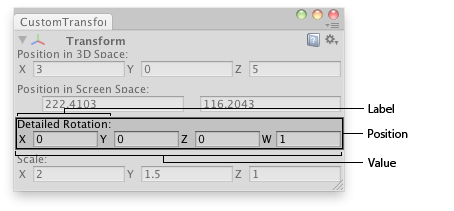
Vector4 поле в окне редактора.
using System.Collections;
using System.Collections.Generic;
using UnityEngine;
using UnityEditor;

// Editor window that shows the detailed rotation (X,Y,Z and W components),
// the position in 3D space and position in Screen space of the selected
// transform.

class CustomTransformInspector : EditorWindow
{
    bool showing = true;
    Vector4 rotationComp;

    [MenuItem("Examples/GameObject detailed inspector")]
    static void Init()
    {
        CustomTransformInspector window = (CustomTransformInspector)EditorWindow.GetWindow(typeof(CustomTransformInspector));
        window.Show();
    }

    void OnInspectorUpdate()
    {
        Repaint();
    }

    void OnGUI()
    {
        var currObj = Selection.activeTransform;

        showing = EditorGUI.InspectorTitlebar(new Rect(0, 0, position.width, 20), showing, currObj, showing);
        if (showing)
        {
            if (currObj)
            {
                currObj.position = EditorGUI.Vector3Field(new Rect(3, 15, position.width - 6, 20),
                    "Position in 3D Space:",
                    currObj.position);

                EditorGUI.Vector2Field(new Rect(3, 50, position.width - 6, 20),
                    "Position in Screen Space:",
                    Camera.main.WorldToScreenPoint(currObj.position));

                rotationComp = EditorGUI.Vector4Field(new Rect(3, 85, position.width - 6, 20),
                    "Detailed Rotation:",
                    QuaternionToVector4(currObj.localRotation));
                currObj.localRotation = ConvertToQuaternion(rotationComp);

                currObj.localScale = EditorGUI.Vector3Field(new Rect(3, 120, position.width - 6, 20),
                    "Scale:",
                    currObj.localScale);
            }
            else
            {
                EditorGUI.DropShadowLabel(
                    new Rect(3, 15, position.width, 20),
                    "Select an Object to inspect");
            }
        }
    }

    Quaternion ConvertToQuaternion(Vector4 v4)
    {
        return new Quaternion(v4.x, v4.y, v4.z, v4.w);
    }

    Vector4 QuaternionToVector4(Quaternion q)
    {
        return new Vector4(q.x, q.y, q.z, q.w);
    }
}