EditorGUI.TextField
Declaration
public static string TextField(Rect position, string text, GUIStyle style = EditorStyles.textField);public static string TextField(Rect position, string label, string text, GUIStyle style = EditorStyles.textField);public static string TextField(Rect position, GUIContent label, string text, GUIStyle style = EditorStyles.textField);Параметры
| Параметр | Описание |
|---|---|
| должность | Прямоугольник на экране, который будет использоваться для текстового поля. |
| метка | Необязательное обозначение, отображаемое перед текстовым полем. |
| текст | Текст для редактирования. |
| стиль | Факультативно GUIStyle. |
Возвращаемое значение
строка Текст, введенный пользователем.
Описание
Создает текстовое поле.
Это работает точно так же, как GUI.TextField, но правильно реагирует на выделение всех, копирование, вставление и т.д. в редакторе, и может иметь дополнительную метку перед ним.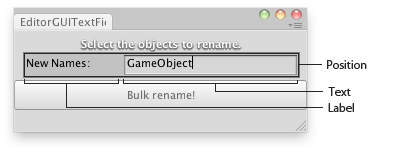
Текстовое поле в окне редактора.
using UnityEngine;
using UnityEditor;

// Changes the name of the selected Objects to the one typed in the text field

class EditorGUITextField : EditorWindow
{
    string objNames = "";

    [MenuItem("Examples/Bulk Name change")]
    static void Init()
    {
        var window = GetWindow<EditorGUITextField>();
        window.Show();
    }

    void OnGUI()
    {
        EditorGUI.DropShadowLabel(new Rect(0, 0, position.width, 20),
            "Select the objects to rename.");

        objNames = EditorGUI.TextField(new Rect(10, 25, position.width - 20, 20),
            "New Names:",
            objNames);

        if (Selection.activeTransform)
        {
            if (GUI.Button(new Rect(0, 50, position.width, 30), "Bulk rename!"))
            {
                foreach (Transform t in Selection.transforms)
                {
                    t.name = objNames;
                }
            }
        }
    }

    void OnInspectorUpdate()
    {
        Repaint();
    }
}