EditorGUI.BoundsField
Declaration
public static Bounds BoundsField(Rect position, Bounds value);public static Bounds BoundsField(Rect position, GUIContent label, Bounds value);Параметры
| Параметр | Описание |
|---|---|
| должность | Прямоугольник на экране, который будет использоваться для поля. |
| метка | Необязательная метка, отображаемая над полем. |
| значение | Значение для редактирования. |
Возвращаемое значение
Границы Значение, введенное пользователем.
Описание
Создает поля Центр и Область для ввода Bounds.
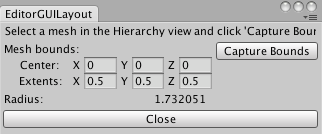
Поле Bounds в окне редактора.
См. также Расширение редактора.
using UnityEngine;
using UnityEditor;


// Simple script that shows radius of bounds of selected MeshFilter

class EditorGUILayoutBoundsField : EditorWindow
{
    float radius = 0;
    Bounds bounds;

    [MenuItem("Examples/Show Radius of mesh bounds")]
    static void Init()
    {
        var window = GetWindow<EditorGUILayoutBoundsField>();
        window.Show();
    }

    void OnGUI()
    {
        GUILayout.Label("Select a mesh in the Hierarchy view and click 'Capture Bounds'");
        EditorGUILayout.BeginHorizontal();
        bounds = EditorGUILayout.BoundsField("Mesh bounds:", bounds);

        if (GUILayout.Button("Capture Bounds") && Selection.activeTransform)
        {
            MeshFilter meshFilter = Selection.activeTransform.GetComponentInChildren<MeshFilter>();
            if (meshFilter)
            {
                bounds = meshFilter.sharedMesh.bounds;
            }
        }
        EditorGUILayout.EndHorizontal();

        EditorGUILayout.LabelField("Radius:", bounds.size.magnitude.ToString());
        if (GUILayout.Button("Close"))
        {
            this.Close();
        }
    }
}