EditorGUIUtility.systemCopyBuffer
Declaration
public static string systemCopyBuffer;Описание
Системный буфер копирования.
Используйте эту команду, чтобы сделать копирование и вставление работающим для вашего приложения. systemCopyBuffer захватывает любой текст, который выбран на машине. Это не обязательно должен быть текст, выбранный в Unity. Чтение и запись systemCopyBuffer возможны. 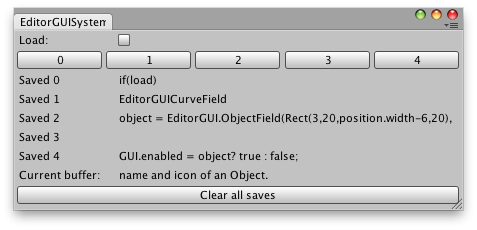
Имейте более одной сохраненной команды "copy".
// Example that shows up to 5 strings.  These strings are captured from Copy
// commands on the machine.  The Current buffer at the bottom of the window shows whatever string
// is copied.  The string can be copied to one of the five Save rows when the Load toggle is
// five Save rows when the Load toggle is off and one of the horizontal buttons is pressed.

using UnityEngine;
using UnityEditor;

public class SystemCopyBufferExample : EditorWindow
{
    string[] savedCopies = new string[5];
    bool load = false;

    [MenuItem("Examples/Example showing systemCopyBuffer")]
    static void systemCopyBufferExample()
    {
        SystemCopyBufferExample window =
            EditorWindow.GetWindow<SystemCopyBufferExample>();
        window.Show();
    }

    void OnGUI()
    {
        load = EditorGUILayout.Toggle("Load:", load);

        EditorGUILayout.BeginHorizontal();
        for (int i = 0; i < savedCopies.Length; i++)
            if (GUILayout.Button(i.ToString()))
                if (load)
                    EditorGUIUtility.systemCopyBuffer = savedCopies[i];
                else
                    savedCopies[i] = EditorGUIUtility.systemCopyBuffer;
        EditorGUILayout.EndHorizontal();

        for (int j = 0; j < savedCopies.Length; j++)
            EditorGUILayout.LabelField("Saved " + j, savedCopies[j]);

        EditorGUILayout.LabelField("Current buffer:", EditorGUIUtility.systemCopyBuffer);
        if (GUILayout.Button("Clear all saves"))
            for (int s = 0; s < savedCopies.Length; s++)
                savedCopies[s] = "";
    }

    void OnInspectorUpdate()
    {
        this.Repaint();
    }
}
Примечание: iOS и Android не поддерживают эту функцию.