EditorGUILayout.IntField
Declaration
public static int IntField(int value, params GUILayoutOption[] options);public static int IntField(int value, GUIStyle style, params GUILayoutOption[] options);public static int IntField(string label, int value, params GUILayoutOption[] options);public static int IntField(string label, int value, GUIStyle style, params GUILayoutOption[] options);public static int IntField(GUIContent label, int value, params GUILayoutOption[] options);public static int IntField(GUIContent label, int value, GUIStyle style, params GUILayoutOption[] options);Параметры
| Параметр | Описание |
|---|---|
| метка | Необязательная метка для отображения перед полем int. |
| значение | Значение для редактирования. |
| стиль | Факультативно GUIStyle. |
| варианты | Необязательный список параметров компоновки, задающих дополнительные свойства раскладки. Любые переданные здесь значения переопределяют настройки, заданные style.Дополнительные ресурсы: GUILayout.Width, GUILayout.Height, GUILayout.MinWidth, GUILayout.MaxWidth, GUILayout.MinHeight, GUILayout.MaxHeight, GUILayout.ExpandWidth, GUILayout.ExpandHeight. |
Возвращаемое значение
инт Значение, введенное пользователем.
Описание
Создать текстовое поле для ввода целых чисел.
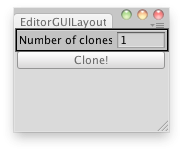
Клонирование выбранного объекта несколько раз.
// Editor Script that clones the selected GameObject a number of times.

using UnityEditor;
using UnityEngine;

public class IntFieldExample : EditorWindow
{
    static int clones = 1;

    [MenuItem("Examples/Clone Object")]
    static void Init()
    {
        EditorWindow window = GetWindow(typeof(IntFieldExample));
        window.Show();
    }

    void OnGUI()
    {
        clones = EditorGUILayout.IntField("Number of clones:", clones);

        if (GUILayout.Button("Clone!"))
        {
            if (!Selection.activeGameObject)
            {
                Debug.Log("Select a GameObject first");
                return;
            }

            for (var i = 0; i < clones; i++)
                Instantiate(Selection.activeGameObject, Vector3.zero, Quaternion.identity);
        }
    }
}