Комментарии
Comments
Code is like humor. If you have to explain it, it’s bad. – Cory House, software architect and author
Well-placed comments enhance the readability of your code. Excessive or frivolous comments can have the opposite effect. Like all things, strike a balance when using them. Most of your code won’t need comments if you follow KISS principles and break your code into easy-to-digest logical parts. Well-named variables and functions will explain themselves. Rather than answering “what,” useful comments fill in the gaps and tell you “why.” Did you make specific decisions that are not immediately obvious? Is there a tricky bit of logic that needs clarification? Useful comments reveal information not gleaned from the code itself. Here are some dos and don’ts for comments: —
Don’t add comments to replace bad code: If you need to add a comment to explain a convoluted tangle of logic, restructure your code to be more obvious. Then you won’t need the comment.
A properly named class, variable, or method serves in place of a comment: Is the code self-explanatory? Then reduce noise and skip the comment.
// AVOID: noisy, redundant comments // the target to shoot Transform targetToShoot;

—
Place the comment on a separate line when possible, not at the end of a line of code: In most cases, keep each one on its own line for clarity.
Use the double slash (//) comment tag in most situations: Keep the comment near the code that it explains rather than using a large multi-line at the beginning. Keeping it close helps the reader connect the explanation with the logic.
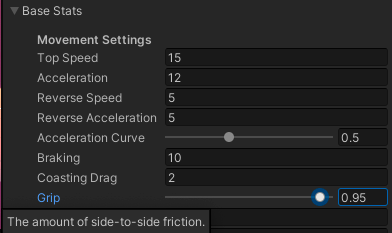
Use a tooltip instead of a comment for serialized fields: If your fields in the Inspector need explanation, add a tooltip attribute and skip the separate comment. The tooltip will do double duty.
// EXAMPLE: Tooltip replaces comment

[Tooltip(“The amount of side-to-side friction.”)] public float Grip;
Tooltip in the Inspector
You can also use a summary XML tag in front of public methods or functions: Visual Studio can provide IntelliSense for many common XML-style comments.
// EXAMPLES: // This is a common comment. // Use them to show intent, logical flow, and approach. // You can also use a summary XML tag. // /// <summary> /// Controls the weapon system including firing, reloading, and dealing damage /// </summary>

public void Fire() { ... }
—
Insert one space between the comment delimiter (//) and the comment text.
Add legal disclaimers: A comment is appropriate for the license or copyright information. However, avoid inserting an entire legal brief into your code. Link instead to an external page with the full legal information.
Style your comments: Maintain a uniform appearance for your comments, e.g., begin each comment with an uppercase letter and end with a period. Whatever your team decides, make it part of the style guide and follow it.
Don’t create formatted blocks of asterisks or special characters around comments: This reduces readability and contributes to the general malaise of code clutter.
Remove commented out code: Though commenting out statements may be normal during testing and development, don’t leave commented code lying around. Rely on your source control for previous versions of the code. Then have the courage to delete those two lines of code.
Keep your TODO comments up-to-date: As you complete tasks, make sure you scrub the TODO comments you’ve left as a reminder. Outdated comments are distractions. You can add a name and date to a TODO for more accountability and context. Also, be realistic. That TODO you left in the code five years ago? You’re never going to get to it. Remember YAGNI. Delete the TODO comment until you need to implement it.
Avoid journals: The comments are not a place for your dev diary. There’s no need to log everything you’re doing in a comment when you start a new class. Proper use of source control makes this redundant.
Avoid attributions: You don’t need to add bylines, e.g., // added by devA or devB. Let the source control system take care of that.