Паттерн Runtime Set
Паттерн Runtime Set
Во время выполнения часто требуется отслеживать список объектов GameObject или компонентов в сцене. Например, может понадобиться список противников или NPC. Экземпляр ScriptableObject существует на уровне проекта, поэтому может хранить данные, доступные любому объекту из любой сцены. Это обеспечивает почти такой же удобный глобальный доступ, как синглтон, но без известных недостатков этого паттерна. Чтение данных напрямую из ScriptableObject также эффективнее, чем поиск в иерархии сцены через Object.FindObjectOfType или GameObject.FindWithTag. В зависимости от задачи и размера иерархии эти методы сравнительно затратны и не подходят для вызова в каждом кадре.
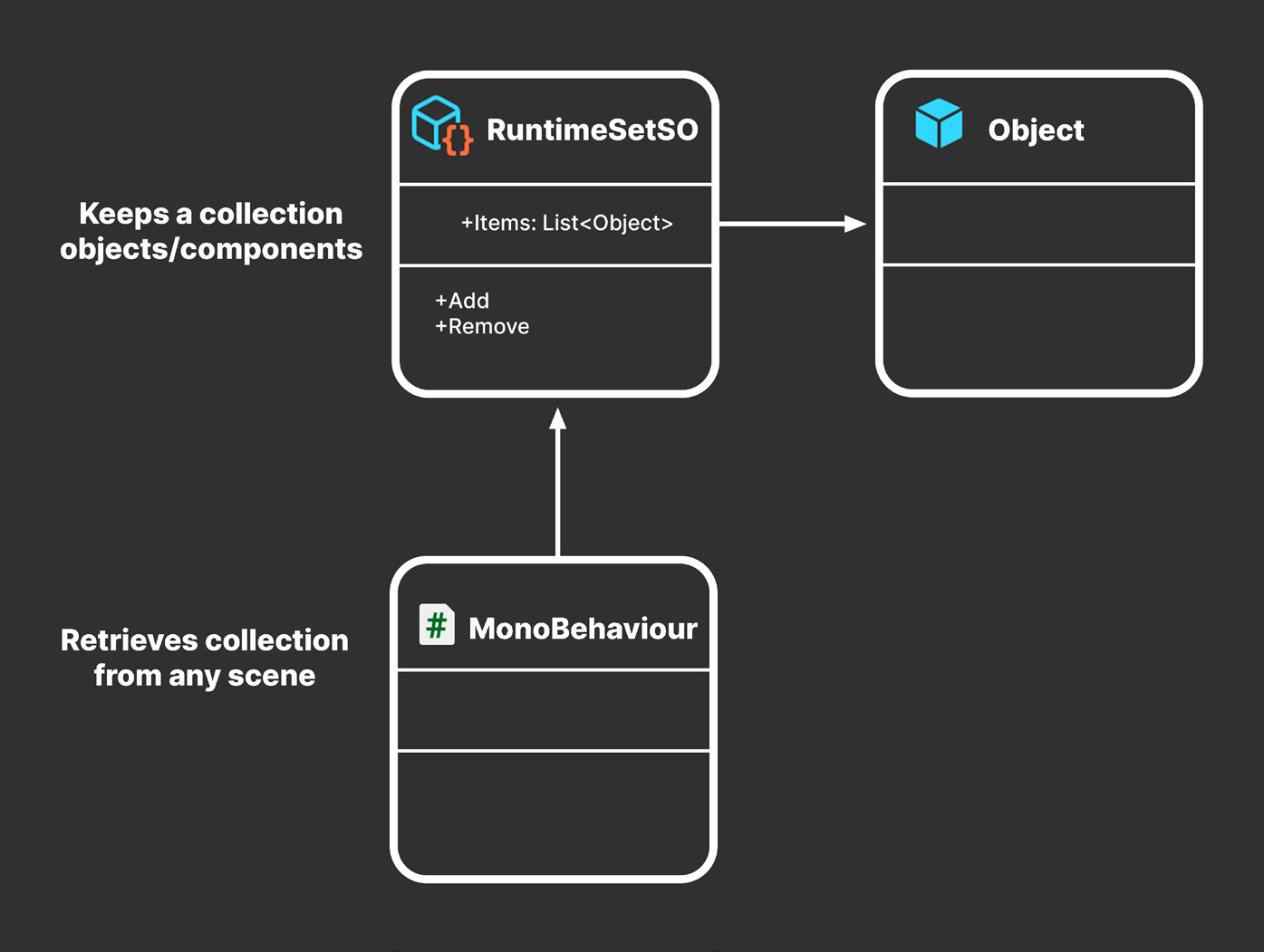
Базовый Runtime Set Вместо этого можно хранить данные в ScriptableObject как Runtime Set. Это специализированный контейнер данных с общедоступной коллекцией элементов и базовыми методами добавления в коллекцию и удаления из нее.
Хранит коллекцию объектов или компонентов
Предоставляет коллекцию любой сцене
Runtime Set предоставляет глобальный доступ к коллекции данных.
Ниже приведен базовый Runtime Set, который отслеживает список объектов GameObject:
using System.Collections.Generic;
using UnityEngine;[CreateAssetMenu(menuName = "GameObject Runtime Set", fileName = "GORuntimeSet")] public class GameObjectRuntimeSetSO : ScriptableObject {
private List<GameObject> items = new List<GameObject>();
public List<GameObject> Items => items;
public void Add(GameObject thingToAdd) {
if (!items.Contains(thingToAdd)) items.Add(thingToAdd);
}public void Remove(GameObject thingToRemove) {
if (items.Contains(thingToRemove)) items.Remove(thingToRemove);
}
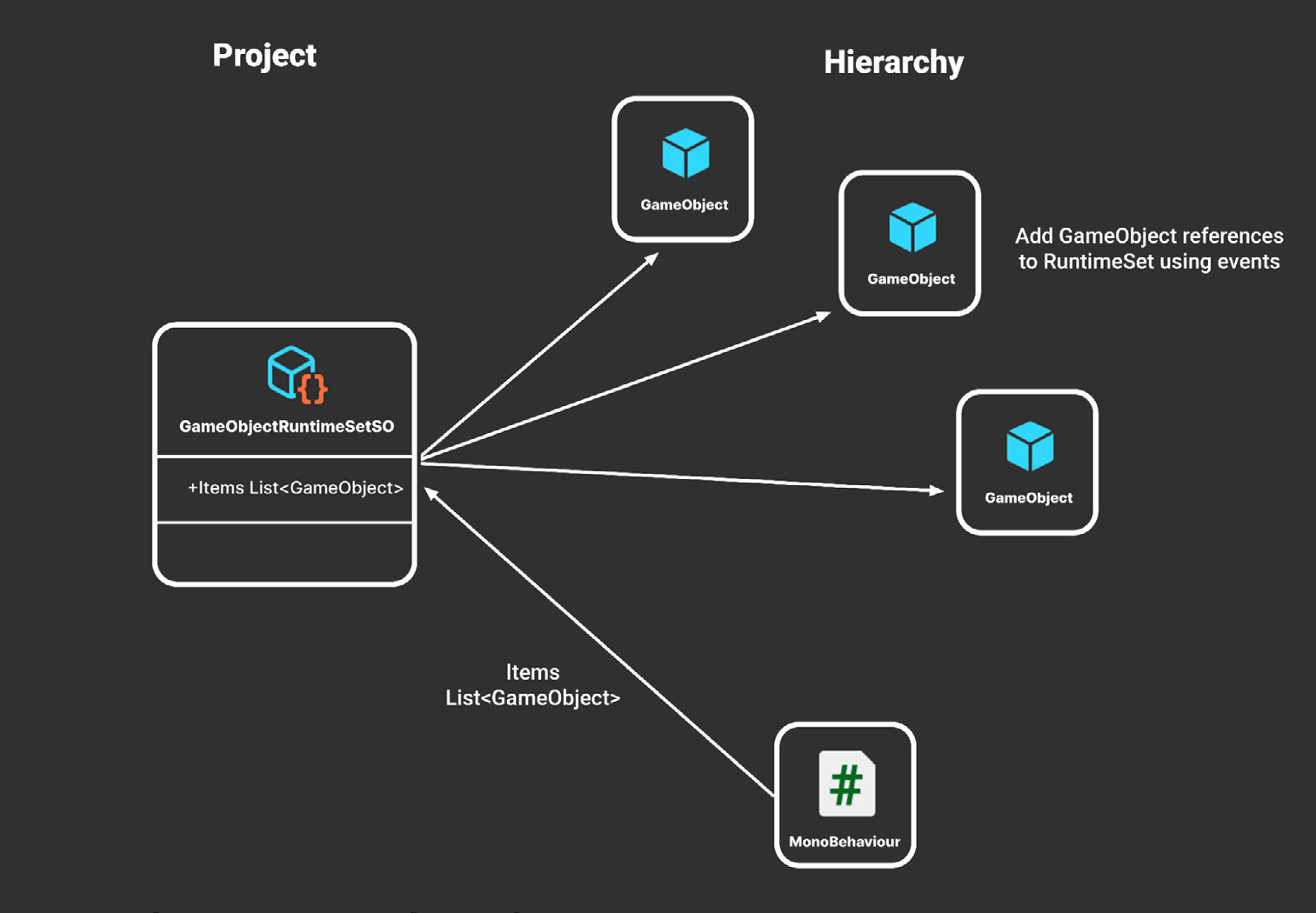
}Во время выполнения любой MonoBehaviour может обратиться к общедоступному свойству Items и получить полный список. За добавление объектов GameObject в этот список и удаление из него должен отвечать другой скрипт или компонент.
Проект
Иерархия
Ссылки GameObject добавляются в Runtime Set через события
Runtime Set для GameObject
Добавьте ссылку на Runtime Set в MonoBehaviour. Затем в функциях событий OnEnable и OnDisable добавляйте объект в список Items этого Runtime Set и удаляйте его оттуда. В качестве альтернативы используйте канал событий, передающий GameObject в качестве полезной нагрузки, например GameObjectEventChannel.
Обобщенная версия Иногда Runtime Set требуется для конкретного типа MonoBehaviour. Например, так можно хранить доступный всем объектам сцены список противников или подбираемых предметов. В этом случае для каждого типа можно создать отдельный Runtime Set, например EnemyRuntimeSet или PickupRuntimeSet.
Упростить создание дополнительных Runtime Set можно с помощью обобщенного абстрактного класса: public abstract class RuntimeSetSO<T> : ScriptableObject { [HideInInspector]
public List<T> Items = new List<T>();public void Add(T thing) {
if (!Items.Contains(thing)) Items.Add(thing);
}public void Remove(T thing) {
if (Items.Contains(thing)) Items.Remove(thing);
}
}Он работает аналогично исходному GameObjectRuntimeSet, но дает больше гибкости. Чтобы создать Runtime Set для пользовательского компонента Foo, определите конкретный FooRuntimeSetSO следующим образом:
[CreateAssetMenu(menuName = "Foo Runtime Set", fileName = "FooRuntimeSet")] public class FooRuntimeSetSO : RuntimeSetSO<Foo> { }Создайте столько конкретных классов, сколько требуется игровой логике. Противники, NPC, предметы инвентаря, задания и другие сущности могут иметь собственные Runtime Set. Для этого достаточно объявить новый пустой класс с нужным типом. Вместо событий каждый компонент Foo может самостоятельно добавлять и удалять себя в методах OnEnable и OnDisable. Если назначить ссылку в поле FooRuntimeSet окна Inspector, компонент Foo будет автоматически появляться в Runtime Set. Это особенно удобно при использовании компонента Foo с префабами.
public class Foo : MonoBehaviour {
public FooRuntimeSetSO RuntimeSet;
private void OnEnable() { RuntimeSet.Add(this); }
private void OnDisable() { RuntimeSet.Remove(this); }
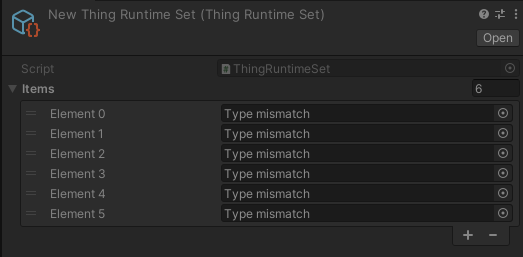
}Примечание. У этого приема есть ограничение: если просматривать ScriptableObject во время выполнения, содержимое списка Runtime Set не будет видно в окне Inspector. Если сделать список общедоступным и вывести его в окно Inspector, результат будет таким:
Runtime Set не отображает объекты и компоненты сцены в окне Inspector.
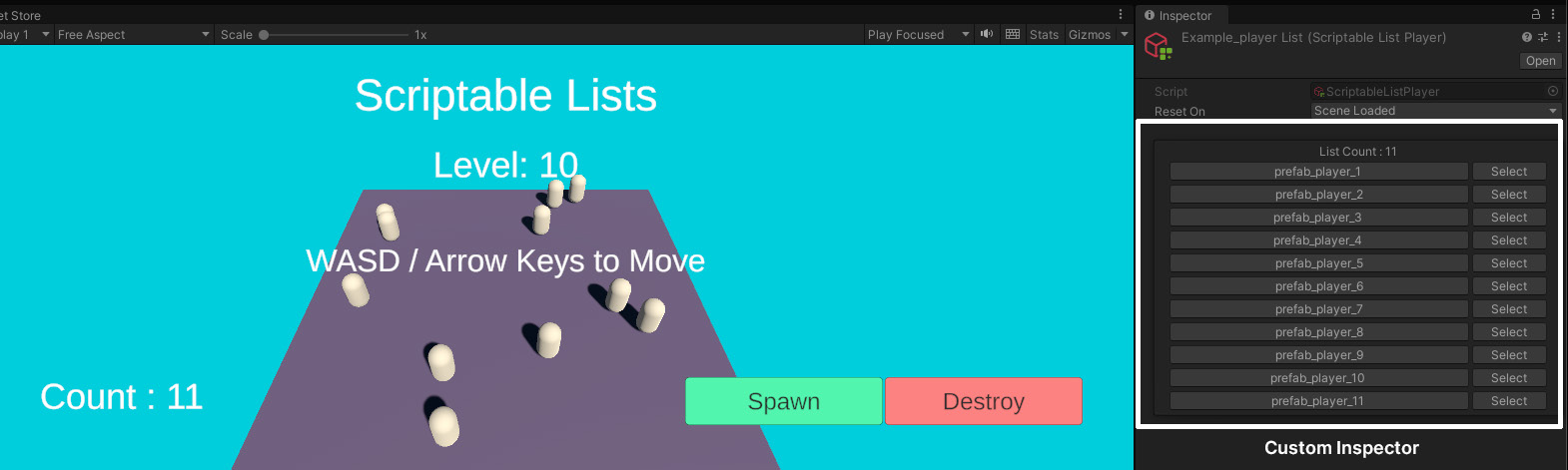
По умолчанию в поле каждого элемента отображается Type mismatch («Несоответствие типов»), поскольку ассет ScriptableObject не может сериализовать ссылку на объект сцены. Список при этом работает нормально, но его содержимое отображается некорректно. Чтобы не вводить пользователя в заблуждение и скрыть список из окна Inspector, предоставьте к нему доступ через общедоступное свойство или примените атрибут HideInInspector. Проблему отображения также можно решить с помощью скрипта пользовательского Editor, который настраивает отображение в окне Inspector. Хороший пример приведен в SOAP (ScriptableObject Architectural Pattern) в Asset Store.
Пользовательский Editor в SOAP отображает содержимое Runtime Set.
Интересные факты о foo и bar В программировании foo и bar часто используют как условные имена. Вероятно, их выбрали потому, что они короткие, легко запоминаются и необычно звучат. Точное происхождение этих терминов неизвестно. По одной из версий, их начали использовать операторы радиолокационных станций во время Второй мировой войны. Бессмысленное слово foo также стало крылатой фразой в комиксе 1930-х годов. В программировании распространение foo и bar обычно связывают с клубом железнодорожного моделизма Tech Model Railroad Club при MIT примерно в 1960-х годах. В помещении клуба у двери находились две универсальные кнопки с надписями foo и bar. Хакеры MIT часто заимствовали эти названия для своих идей, и со временем foo и bar стали общими именами переменных. Сегодня их использование в качестве условных имен широко распространено среди программистов.
The Runtime Set pattern
At runtime, you’ll often need to track a list of GameObjects or components in your scene. For example, you may need to maintain a list of enemies or NPCs. Because a ScriptableObject instance appears at the project level, it can store data that’s available to any object from any scene. Again, this replicates much of the easy global access of a singleton without that pattern’s known drawbacks. Reading data directly from a ScriptableObject is also more optimal than searching the Scene Hierarchy with a find operation such as Object.FindObjectOfType or GameObject. FindWithTag. Depending on your use case and the size of your hierarchy, these are relatively expensive methods that can be inefficient for per-frame updates.
Basic Runtime Set Instead, consider storing data on a ScriptableObject as a “Runtime Set.” This is a specialized data container that maintains a public collection of elements but also provides basic methods to add and remove to the collection.
A Runtime Set provides global access to a collection of data.
Here’s a basic Runtime Set that tracks a list of GameObjects:
using System.Collections.Generic;
using UnityEngine;
[CreateAssetMenu(menuName = "GameObject Runtime Set", fileName = “GORuntimeSet”)] public class GameObjectRuntimeSetSO : ScriptableObject {
private List<GameObject> items = new List<GameObject>();
public List<GameObject> Items => items;
public void Add(GameObject thingToAdd) {
if (!items.Contains(thingToAdd)) items.Add(thingToAdd);
}public void Remove(GameObject thingToRemove) {
if (items.Contains(thingToRemove)) items.Remove(thingToRemove);
}
}
At runtime, any MonoBehaviour can reference the public Items property to obtain the full list. Another script or component must be responsible for managing how the GameObjects are added or removed from this list.A GameObject Runtime Set
Reference the Runtime Set in a MonoBehaviour. Then, in the OnEnable and OnDisable event functions, add or remove the object from the Runtime Set’s Items list. Alternatively, use an event channel to send a GameObject as its payload (e.g., GameObjectEventChannel).
Generic version You may want to use a Runtime Set with a specific type of MonoBehaviour. For instance, this could allow you to maintain a list of enemy or pickup items accessible to anything in your scene. In that case, you could create specific Runtime Sets for each type (e.g., EnemyRuntimeSet, PickupRuntimeSet, etc.). One way to streamline the creation of additional Runtime Sets is to use a generic abstract class: public abstract class RuntimeSetSO<T> : ScriptableObject { [HideInInspector] public List<T> Items = new List<T>();
public void Add(T thing) {
    if (!Items.Contains(thing)) Items.Add(thing);
}public void Remove(T thing) {
if (Items.Contains(thing)) Items.Remove(thing);
}
}This works similarly to the original GameObjectRuntimeSet but with added flexibility. If you wanted to create a Runtime Set for a custom Foo component, you would create a concrete FooRuntimeSetSO like so:
[CreateAssetMenu(menuName = "Foo Runtime Set", fileName = "FooRuntimeSet")] public class FooRuntimeSetSO : RuntimeSet<Foo> { }Build as many concrete classes as needed for gameplay (e.g., enemies, NPCs, inventory items, quests, and more can all have their own Runtime Sets). You just need to declare a new empty class with the right type. As an alternative to using events, each Foo component can add or remove itself using its OnEnable or OnDisable methods. Then, if you set the FooRuntimeSet field in the Inspector, the Foo component will appear in the Runtime Set automatically. This is especially handy if you’re using the Foo component with prefabs.
public class Foo : MonoBehaviour {
    public FooRuntimeSetSO RuntimeSet;
    private void OnEnable() { RuntimeSet.Add(this); }
    private void OnDisable() { RuntimeSet.Remove(this); }
}
Note: One limitation of this technique is that if you inspect the ScriptableObject at runtime, you won’t be able to see the contents of the Runtime Set list in the Inspector. If you try to publicly expose the list in the Inspector, you’ll see this:Runtime Sets won’t show scene objects or components in the Inspector.
By default, a “Type mismatch” appears in each element field since a ScriptableObject won’t be able to serialize a scene object. The list works normally, but the data does not display correctly. Use a public property or the HideInInspector attribute if you want to avoid confusion and prevent the list from showing in the Inspector. You can also fix this issue with a custom Editor script and Inspector. For a good example of this, see SOAP (ScriptableObject Architectural Pattern) on the Asset Store.
A custom Editor in SOAP shows the contents of a Runtime Set.
Fun facts about foo and bar The terms foo and bar are common placeholder names in programming. These terms were likely chosen because they are short, easy to remember, and sound distinctive. While their exact origins are unclear, some people believe that the terms originated from radar operators in World War II. The nonsense word “foo” also appeared as a catchphrase in a 1930’s comic strip. In a programming context, their use is generally credited to the Tech Model Railroad Club at MIT circa the 1960s. The MIT train room had two general-purpose buttons by the door labeled “foo” and “bar.” MIT hackers often repurposed these names for their ideas, hence the adoption of foo and bar as general variable names.Today, the use of foo and bar as dummy variable names is a widespread convention in the programming community.