EditorGUILayout.TagField
Declaration
public static string TagField(string tag, params GUILayoutOption[] options);public static string TagField(string tag, GUIStyle style, params GUILayoutOption[] options);public static string TagField(string label, string tag, params GUILayoutOption[] options);public static string TagField(string label, string tag, GUIStyle style, params GUILayoutOption[] options);public static string TagField(GUIContent label, string tag, params GUILayoutOption[] options);public static string TagField(GUIContent label, string tag, GUIStyle style, params GUILayoutOption[] options);Параметры
| Параметр | Описание |
|---|---|
| метка | Факультативный знак перед полем. |
| метка | Тег, который показывает поле. |
| стиль | Факультативно GUIStyle. |
| варианты | Необязательный список параметров компоновки, задающих дополнительные свойства раскладки. Любые переданные здесь значения переопределяют настройки, заданные style.Дополнительные ресурсы: GUILayout.Width, GUILayout.Height, GUILayout.MinWidth, GUILayout.MaxWidth, GUILayout.MinHeight, GUILayout.MaxHeight, GUILayout.ExpandWidth, GUILayout.ExpandHeight. |
Возвращаемое значение
строка Тег, выбранный пользователем.
Описание
Сделайте поле выбора тегов.
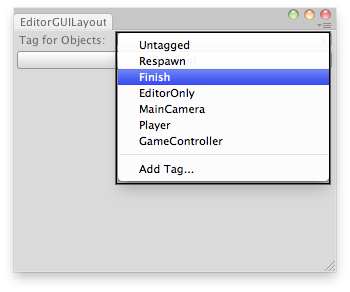
Назначить метки на выбранные GameObjects.
// Simple editor script that lets you set a tag for the selected GameObjects.
using UnityEditor;
using UnityEngine;

public class EditorGUILayoutTagField : EditorWindow
{
    static string tagStr = "";

    [MenuItem("Examples/Set Tags For Selection")]
    static void Init()
    {
        EditorWindow window = GetWindow(typeof(EditorGUILayoutTagField));
        window.Show();
    }

    void OnGUI()
    {
        tagStr = EditorGUILayout.TagField("Tag for Objects:", tagStr);
        if (GUILayout.Button("Set Tag!"))
        {
            SetTags();
        }
    }

    static void SetTags()
    {
        foreach (GameObject go in Selection.gameObjects)
        {
            go.tag = tagStr;
        }
    }
}