EditorGUILayout.Popup
Declaration
public static int Popup(int selectedIndex, string[] displayedOptions, params GUILayoutOption[] options);public static int Popup(int selectedIndex, string[] displayedOptions, GUIStyle style, params GUILayoutOption[] options);public static int Popup(int selectedIndex, GUIContent[] displayedOptions, params GUILayoutOption[] options);public static int Popup(int selectedIndex, GUIContent[] displayedOptions, GUIStyle style, params GUILayoutOption[] options);public static int Popup(string label, int selectedIndex, string[] displayedOptions, params GUILayoutOption[] options);public static int Popup(string label, int selectedIndex, string[] displayedOptions, GUIStyle style, params GUILayoutOption[] options);public static int Popup(GUIContent label, int selectedIndex, GUIContent[] displayedOptions, params GUILayoutOption[] options);public static int Popup(GUIContent label, int selectedIndex, GUIContent[] displayedOptions, GUIStyle style, params GUILayoutOption[] options);Параметры
| Параметр | Описание |
|---|---|
| метка | Факультативный знак перед полем. |
| selectedIndex | Индекс параметра, который показывает поле. |
| displayedOptions | Массив с параметрами, отображаемыми в всплывающем окне. Используйте косую черту для разделения подпунктов (например, Menu/SubMenu). Используйте нуль или пустую строку для добавления разделителя." |
| стиль | Факультативно GUIStyle. |
| варианты | Необязательный список параметров компоновки, задающих дополнительные свойства раскладки. Любые переданные здесь значения переопределяют настройки, заданные style.Дополнительные ресурсы: GUILayout.Width, GUILayout.Height, GUILayout.MinWidth, GUILayout.MaxWidth, GUILayout.MinHeight, GUILayout.MaxHeight, GUILayout.ExpandWidth, GUILayout.ExpandHeight. |
Возвращаемое значение
инт Индекс параметра, который был выбран пользователем.
Описание
Создать общее поле выбора всплывающего окна.
Принимает текущий выбранный индекс в качестве параметра и возвращает индекс, выбранный пользователем.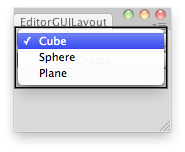
Создать примитив в зависимости от выбранного параметра.
using UnityEditor;
using UnityEngine;
using System.Collections;

// Creates an instance of a primitive depending on the option selected by the user.
public class EditorGUILayoutPopup : EditorWindow
{
    public string[] options = new string[] {"Cube", "Sphere", "Plane"};
    public int index = 0;
    [MenuItem("Examples/Editor GUILayout Popup usage")]
    static void Init()
    {
        EditorWindow window = GetWindow(typeof(EditorGUILayoutPopup));
        window.Show();
    }

    void OnGUI()
    {
        index = EditorGUILayout.Popup(index, options);
        if (GUILayout.Button("Create"))
            InstantiatePrimitive();
    }

    void InstantiatePrimitive()
    {
        switch (index)
        {
            case 0:
                GameObject cube = GameObject.CreatePrimitive(PrimitiveType.Cube);
                cube.transform.position = Vector3.zero;
                break;
            case 1:
                GameObject sphere = GameObject.CreatePrimitive(PrimitiveType.Sphere);
                sphere.transform.position = Vector3.zero;
                break;
            case 2:
                GameObject plane = GameObject.CreatePrimitive(PrimitiveType.Plane);
                plane.transform.position = Vector3.zero;
                break;
            default:
                Debug.LogError("Unrecognized Option");
                break;
        }
    }
}