EditorGUI.ProgressBar
Declaration
public static void ProgressBar(Rect position, float value, string text);Параметры
| Параметр | Описание |
|---|---|
| totalPosition | Прямоугольник на экране, чтобы использовать в общей сложности для обоих контроля. |
| значение | Отображаемое значение. |
Описание
Создает строку прогресса.
Значение варьируется от 0 до 1, где 0 означает 0% заполнения столбца, а 1 означает, что столбец полностью заполнен на 100%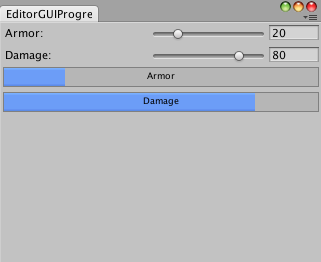
Сигнал прогресса в окне редактора.
using UnityEngine;
using System.Collections;
using UnityEditor;

// Draw the armor and damage with bars in an Editor Window

public class EditorGUIProgressBar : EditorWindow
{
    float armor = 20;
    float damage  = 80;

    [MenuItem("Examples/Display Info")]

    static void Init()
    {
        EditorWindow window = GetWindow(typeof(EditorGUIProgressBar), false, "DisplayInfo");
        window.Show();
    }

    void OnGUI()
    {
        armor = EditorGUI.IntSlider(new Rect(3, 3, position.width - 6, 15), "Armor", Mathf.RoundToInt(armor), 0, 100);
        damage = EditorGUI.IntSlider(new Rect(3, 25, position.width - 6, 15), "Damage", Mathf.RoundToInt(damage), 0, 100);

        EditorGUI.ProgressBar(new Rect(3, 45, position.width - 6, 20), armor / 100, "Armor");
        EditorGUI.ProgressBar(new Rect(3, 70, position.width - 6, 20), damage / 100, "Damage");
    }
}