EditorGUI.Popup
Declaration
public static int Popup(Rect position, int selectedIndex, string[] displayedOptions, GUIStyle style = EditorStyles.popup);public static int Popup(Rect position, int selectedIndex, GUIContent[] displayedOptions, GUIStyle style = EditorStyles.popup);public static int Popup(Rect position, string label, int selectedIndex, string[] displayedOptions, GUIStyle style = EditorStyles.popup);public static int Popup(Rect position, GUIContent label, int selectedIndex, GUIContent[] displayedOptions, GUIStyle style = EditorStyles.popup);Параметры
| Параметр | Описание |
|---|---|
| должность | Прямоугольник на экране, который будет использоваться для поля. |
| метка | Факультативный знак перед полем. |
| selectedIndex | Индекс параметра, который показывает поле. |
| displayedOptions | Массив с параметрами, отображаемыми в всплывающем окне. |
| стиль | Факультативно GUIStyle. |
Возвращаемое значение
инт Индекс параметра, который был выбран пользователем.
Описание
Создает общее поле выбора всплывающего окна.
Принимает текущий выбранный индекс в качестве параметра и возвращает индекс, выбранный пользователем.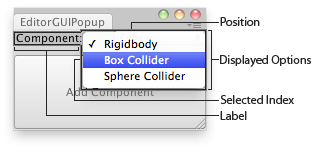
Всплывающее окно и окно редактора.
using UnityEngine;
using UnityEditor;


// Adds a component to the selected GameObjects

class EditorGUIPopup : EditorWindow
{
    string[] options = { "Rigidbody", "Box Collider", "Sphere Collider" };
    int index = 0;

    [MenuItem("Examples/Editor GUI Popup usage")]
    static void Init()
    {
        var window = GetWindow<EditorGUIPopup>();
        window.position = new Rect(0, 0, 180, 80);
        window.Show();
    }

    void OnGUI()
    {
        index = EditorGUI.Popup(
            new Rect(0, 0, position.width, 20),
            "Component:",
            index,
            options);

        if (GUI.Button(new Rect(0, 25, position.width, position.height - 26), "Add Component"))
            AddComponentToObjects();
    }

    void AddComponentToObjects()
    {
        if (!Selection.activeGameObject)
        {
            Debug.LogError("Please select at least one GameObject first");
            return;
        }

        foreach (GameObject obj in Selection.gameObjects)
        {
            switch (index)
            {
                case 0:
                    obj.AddComponent<Rigidbody>();
                    break;

                case 1:
                    obj.AddComponent<BoxCollider>();
                    break;

                case 2:
                    obj.AddComponent<SphereCollider>();
                    break;
            }
        }
    }
}
Примечание: объект displayedOptions содержит массив вариантов. Если эти элементы содержат символы "/" (косая черта), они используются для подменю. Текст слева от косых черт определяет структуру.