GUI.tooltip
Declaration
public static string tooltip;Описание
tooltip контроля, над которым в данный момент находится мышь, или на котором находится фокус клавиатуры. (Только чтение).
При создании GUI элементов управления, вы можете передать для них tooltip. Это делается путем изменения параметра content, чтобы взять пользовательский объект GUIContent, а не просто передать строку для отображения.
Когда мышка находится над элементом управления с tooltip, он устанавливает глобальное значение GUI.tooltip на значение tooltip, которое вы передали. Если мышка не находится над каким-либо элементом управления, значение устанавливается на элемент управления, на котором находится фокус клавиатуры. В конце кода OnGUI вы можете сделать метку, показывающую значение GUI.tooltip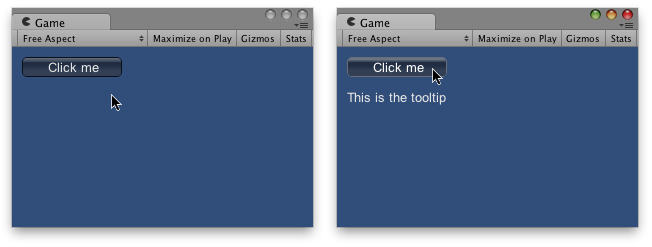
GUI Подсказка в представлении Game появляется, когда мышка находится над кнопкой.
using UnityEngine;
using System.Collections;

public class ExampleClass : MonoBehaviour
{
    void OnGUI()
    {
        // Make a button using a custom GUIContent parameter to pass in the tooltip.
        GUI.Button(new Rect(10, 10, 100, 20), new GUIContent("Click me", "This is the tooltip"));

        // Display the tooltip from the element that has mouseover or keyboard focus
        GUI.Label(new Rect(10, 40, 100, 40), GUI.tooltip);
    }
}
Вы можете использовать порядок элементов для создания "иерархических" подсказок:
using UnityEngine;
using System.Collections;

public class ExampleClass : MonoBehaviour
{
    void OnGUI()
    {
        // This box is larger than many elements following it, and it has a tooltip.
        GUI.Box(new Rect(5, 35, 110, 75), new GUIContent("Box", "this box has a tooltip"));

        // This button is inside the box, but has no tooltip so it does not
        // override the box's tooltip.
        GUI.Button(new Rect(10, 55, 100, 20), "No tooltip here");

        // This button is inside the box, and HAS a tooltip so it overrides
        // the tooltip from the box.
        GUI.Button(new Rect(10, 80, 100, 20), new GUIContent("I have a tooltip", "The button overrides the box"));

        // finally, display the tooltip from the element that has
        // mouseover or keyboard focus
        GUI.Label(new Rect(10, 40, 100, 40), GUI.tooltip);
    }
}
Подсказки также могут быть использованы для реализации системы сообщений OnMouseOver / OnMouseOut:
using UnityEngine;
using System.Collections;

public class ExampleClass : MonoBehaviour
{
    public string lastTooltip = " ";

    void OnGUI()
    {
        GUILayout.Button(new GUIContent("Play Game", "Button1"));
        GUILayout.Button(new GUIContent("Quit", "Button2"));

        if (Event.current.type == EventType.Repaint && GUI.tooltip != lastTooltip)
        {
            if (lastTooltip != "")
            {
                SendMessage(lastTooltip + "OnMouseOut", SendMessageOptions.DontRequireReceiver);
            }

            if (GUI.tooltip != "")
            {
                SendMessage(GUI.tooltip + "OnMouseOver", SendMessageOptions.DontRequireReceiver);
            }

            lastTooltip = GUI.tooltip;
        }
    }

    void Button1OnMouseOver()
    {
        Debug.Log("Play game got focus");
    }

    void Button2OnMouseOut()
    {
        Debug.Log("Quit lost focus");
    }
}