GUI.depth
Declaration
public static int depth;Описание
Глубина сортировки текущего выполнения поведения GUI.
Настройте это, чтобы определить порядок, когда у вас одновременно работают разные скрипты. GUI элементы, рисуемые с меньшими значениями глубины, будут появляться над элементами с более высокими значениями (то есть, вы можете представить глубину как "расстояние" от камеры).
Примечание:Чтобы этот пример заработал, вам понадобится создать 2 скрипта. Не забудьте назвать их так же, как называются классы, иначе работать не будет.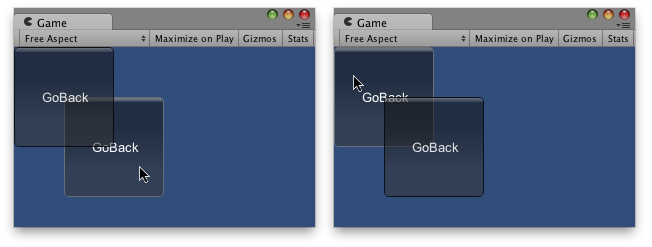
Одна кнопка за другой.
using UnityEngine;
using System.Collections;

// Makes this button go back in depth

public class Example1 : MonoBehaviour
{
    public int guiDepth = 0;
    public Example2 example2;

    private float buttonX, buttonY;

    void Start()
    {
        buttonX = (Screen.width / 2) - 100;
        buttonY = (Screen.height / 2) - 100;
    }

    void OnGUI()
    {
        GUI.depth = guiDepth;
        GUI.color = Color.yellow;

        GUIStyle size = new GUIStyle("button");
        size.fontSize = 16;

        if (GUI.RepeatButton(new Rect(buttonX, buttonY, 200, 100), "Go Backwards", size))
        {
            guiDepth = 1;
            example2.guiDepth = 0;
        }
    }
}
И скопируйте этот другой пример в другой скрипт:
using UnityEngine;
using System.Collections;

// Makes this button go back in depth

public class Example2 : MonoBehaviour
{
    public int guiDepth = 1;
    public Example1 example1;

    private float buttonX, buttonY;

    void Start()
    {
        buttonX = (Screen.width / 2)  - 50;
        buttonY = (Screen.height / 2) - 50;
    }

    void OnGUI()
    {
        GUI.depth = guiDepth;
        GUI.color = Color.green;

        GUIStyle size = new GUIStyle("button");
        size.fontSize = 16;

        if (GUI.RepeatButton(new Rect(buttonX, buttonY, 200, 100), "Go Backwards", size))
        {
            guiDepth = 1;
            example1.guiDepth = 0;
        }
    }
}