EditorGUILayout.MaskField
Declaration
public static int MaskField(GUIContent label, int mask, string[] displayedOptions, GUIStyle style, params GUILayoutOption[] options);public static int MaskField(string label, int mask, string[] displayedOptions, GUIStyle style, params GUILayoutOption[] options);public static int MaskField(GUIContent label, int mask, string[] displayedOptions, params GUILayoutOption[] options);public static int MaskField(string label, int mask, string[] displayedOptions, params GUILayoutOption[] options);public static int MaskField(int mask, string[] displayedOptions, GUIStyle style, params GUILayoutOption[] options);public static int MaskField(int mask, string[] displayedOptions, params GUILayoutOption[] options);Параметры
| Параметр | Описание |
|---|---|
| метка | Префиксная метка поля. |
| маска | Текущая маска для отображения. |
| displayedOption | Строковый массив, содержащий метки для каждого флага. |
| варианты | Необязательный список параметров компоновки, задающих дополнительные свойства раскладки. Любые переданные здесь значения переопределяют настройки, заданные style.Дополнительные ресурсы: GUILayout.Width, GUILayout.Height, GUILayout.MinWidth, GUILayout.MaxWidth, GUILayout.MinHeight, GUILayout.MaxHeight, GUILayout.ExpandWidth, GUILayout.ExpandHeight. |
Возвращаемое значение
инт Значение, изменённое пользователем.
Описание
Сделайте поле для масок.
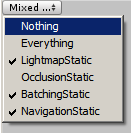
Простое окно, показывающее поле маскировки.
using UnityEngine;
using UnityEditor;

public class MaskFieldExample : EditorWindow
{
    static int flags = 0;
    static string[] options = new string[] {"CanJump", "CanShoot", "CanSwim"};

    [MenuItem("Examples/Mask Field usage")]
    static void Init()
    {
        MaskFieldExample window = (MaskFieldExample)GetWindow(typeof(MaskFieldExample));
        window.Show();
    }

    void OnGUI()
    {
        flags = EditorGUILayout.MaskField("Player Flags", flags, options);

        // Display the flags in disabled toggles
        GUI.enabled = false;
        for (var i = 0; i < options.Length; i++)
        {
            var value = (flags & (1 << i)) != 0;
            EditorGUILayout.Toggle(options[i], value);
        }
        GUI.enabled = true;
    }
}