EditorWindow.position
Declaration
public Rect position;Описание
Желаемое положение окна в пространстве экрана.
Установка этого значения разблокирует окно, если оно пришвартовано.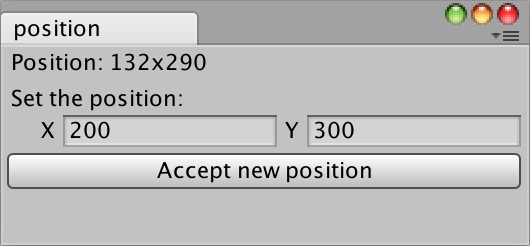
Создать разблокированное окно редактора с позицией.
// The position of the window is displayed when it is
// external from Unity.

using UnityEngine;
using UnityEditor;
using UnityEngine.UIElements;

public class PositionExample : EditorWindow
{
    Vector2Int p1;
    bool showButton = true;

    [MenuItem("Examples/Window Position")]
    static void Init()
    {
        GetWindow<PositionExample>("position");
    }

    void CreateGUI()
    {
        Rect r = position;
        var label = new Label("Position: " + r.x + "x" + r.y);
        rootVisualElement.Add(label);

        var field = new Vector2IntField("Set the position:");
        rootVisualElement.Add(field);
        if (showButton)
        {
            var button = new Button(() => {
                r.x = field.value.x;
                r.y = field.value.y;

                position = r;
            });
            button.text = "Accept new position";
            rootVisualElement.Add(button);
        }
    }
}