Animator.SetFloat
Declaration
public void SetFloat(string name, float value);public void SetFloat(string name, float value, float dampTime, float deltaTime);public void SetFloat(int id, float value);public void SetFloat(int id, float value, float dampTime, float deltaTime);Параметры
| Параметр | Описание |
|---|---|
| имя | Имя параметра. |
| Идентификатор | Параметр ID. |
| значение | Новое значение параметра. |
| dampTime | Общее время работы дампера. |
| deltaTime | дельта-время, которое должно предоставляться клапана. |
Описание
Посылать значения с плавающей запятой в Animator для влияния на переходы.
Используйте SetFloat в сценарии для отправки значений float в Animator для активации переходов. В Animator определите, какие значения влияют на переход определенных анимаций. Это полезно в различных ситуациях, особенно в циклах анимации, таких как анимации движения, где вы можете потребовать, чтобы персонаж ходил или бежал в зависимости от нажатия кнопки.
//The code below shows how to send the horizontal value of the controller or keys to the Animator.
//You must assign the same parameter name in the Animator as you set in SetFloat, in this case “horizontalSpeed”. You must also handle the transition conditions in the Animator, to tell which values should cause each transition.
//For example, the walking animation triggers when the horizontal value is above 0, and the running animation triggers when the horizontal value reaches past 0.5. Assigning animations to states are also done in the Animator.

using UnityEngine;

public class Example : MonoBehaviour
{
    Animator m_Animator;
    float m_HorizontalMovement;

    void Start()
    {
        //Get the animator, which you attach to the GameObject you are intending to animate.
        m_Animator = gameObject.GetComponent<Animator>();
    }

    void Update()
    {
        //Translate the left and right button presses or the horizontal joystick movements to a float
        m_HorizontalMovement = Input.GetAxis("Horizontal");
        //Sends the value from the horizontal axis input to the animator. Change the settings in the
        //Animator to define when the character is walking or running
        m_Animator.SetFloat("horizontalSpeed", m_HorizontalMovement);
    }
}
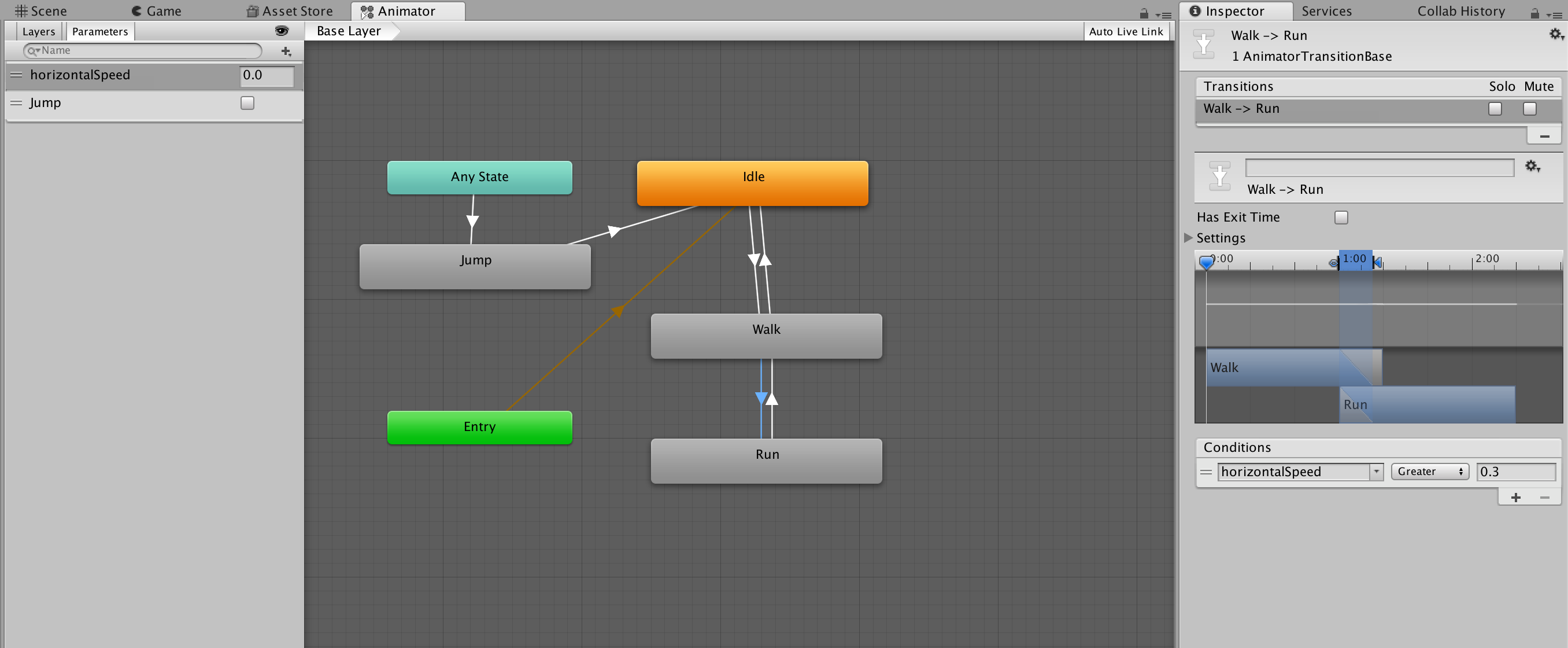
Выше приведен пример настройки Animator для принятия float.